CascadingDropDown 以郵局街道資料為例
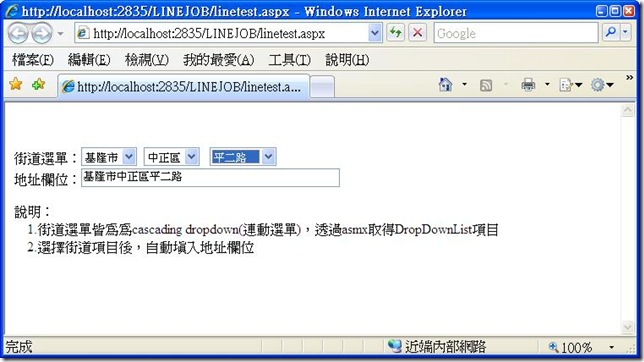
實作完成畫面:
準備作業:
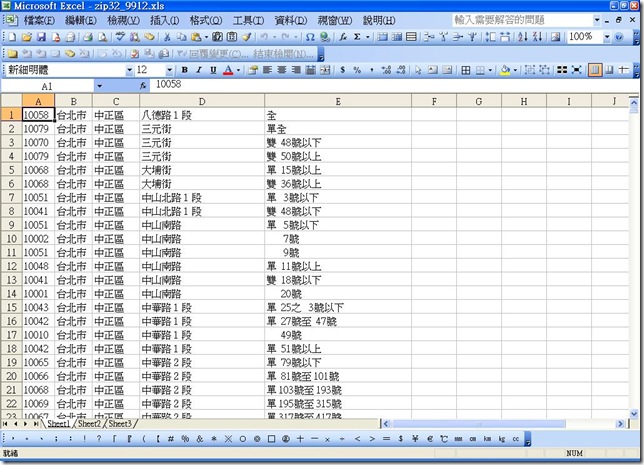
1. 郵局下載最新的zipcode街道資料檔,3+2郵遞區號資料Excel檔 (自解壓縮檔) 99/12
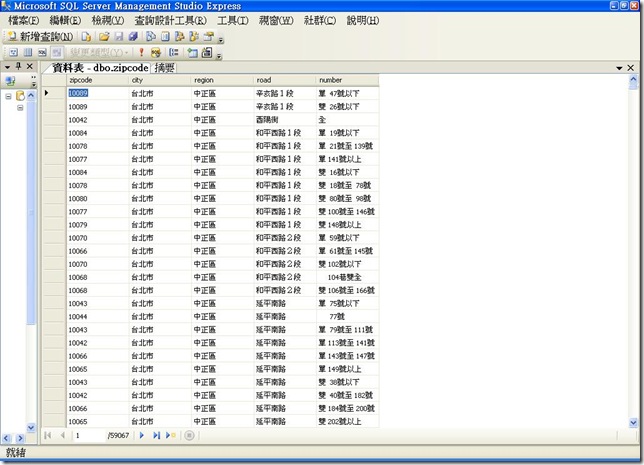
2. 將資料檔匯入sql server資料庫
實作一:建立GetRoadDropDown.asmx web service,提供GetCityDropDown, GetRegionDropDown, GetRoadDropDown等method,參考後面程式碼
實作二:建立linetest.aspx webpage,示範cascadingdropdown效果,另外在RoadDropDownList的Init加入onchange的事件動作
linetest.aspx:
<!DOCTYPE html PUBLIC "-//W3C//DTD XHTML 1.0 Transitional//EN" "http://www.w3.org/TR/xhtml1/DTD/xhtml1-transitional.dtd">
<html xmlns="http://www.w3.org/1999/xhtml">
<head runat="server">
<title></title>
</head>
<body>
<form id="form1" runat="server">
<div>
<br />
</div>
<asp:ToolkitScriptManager ID="ToolkitScriptManager1" runat="server">
</asp:ToolkitScriptManager>
<br />
<span lang="zh-tw">街道選單:</span><asp:DropDownList ID="cityDropDownList"
runat="server">
</asp:DropDownList>
<asp:CascadingDropDown ID="cityDropDownList_CascadingDropDown" runat="server" LoadingText="請稍待...." PromptText="請選擇"
Enabled="True" TargetControlID="cityDropDownList" ServicePath="GetRoadDropDown.asmx" ServiceMethod="GetCityDropDown" Category="city">
</asp:CascadingDropDown>
<asp:DropDownList ID="regionDropDownList" runat="server">
</asp:DropDownList>
<asp:CascadingDropDown ID="regionDropDownList_CascadingDropDown" runat="server"
Category="region" Enabled="True" LoadingText="請稍待...."
ParentControlID="cityDropDownList" PromptText="請選擇"
ServiceMethod="GetRegionDropDown" TargetControlID="regionDropDownList"
ServicePath="GetRoadDropDown.asmx">
</asp:CascadingDropDown>
<span lang="zh-tw"> </span><asp:DropDownList ID="roadDropDownList"
runat="server">
</asp:DropDownList>
<asp:CascadingDropDown ID="roadDropDownList_CascadingDropDown" runat="server"
Category="road" Enabled="True" LoadingText="請稍待...."
ParentControlID="regionDropDownList" PromptText="請選擇"
ServiceMethod="GetRoadDropDown" ServicePath="GetRoadDropDown.asmx"
TargetControlID="roadDropDownList">
</asp:CascadingDropDown>
<br />
<span lang="zh-tw">地址欄位:</span><asp:TextBox ID="TextBox1" runat="server"
Width="300px"></asp:TextBox>
<br />
<br />
<span lang="zh-tw">說明:<br />
1.街道選單皆為為cascading dropdown(連動選單),透過asmx取得DropDownList項目<br />
2.選擇街道項目後,自動填入地址欄位<br />
</span>
</form>
</body>
</html>
linetest.aspx.vb: Protected Sub roadDropDownList_Init(ByVal sender As Object, ByVal e As System.EventArgs) Handles roadDropDownList.Init
CType(sender, DropDownList).Attributes.Add("onchange", "document.forms[0].TextBox1.value=document.forms[0].cityDropDownList.value+document.forms[0].regionDropDownList.value+document.forms[0].roadDropDownList.value;")
End Sub
GetRoadDropDown.asmx:
Imports System.Web
Imports System.Web.Services
Imports System.Web.Services.Protocols
Imports System.Data
Imports System.Data.SqlClient
Imports AjaxControlToolkit
Imports System.Collections
Imports System.Collections.Generic
Imports System.Collections.Specialized
' 若要允許使用 ASP.NET AJAX 從指令碼呼叫此 Web 服務,請取消註解下一行。
<System.Web.Script.Services.ScriptService()> _
<WebService(Namespace:="http://tempuri.org/")> _
<WebServiceBinding(ConformsTo:=WsiProfiles.BasicProfile1_1)> _
<Global.Microsoft.VisualBasic.CompilerServices.DesignerGenerated()> _
Public Class GetRoadDropDown
Inherits System.Web.Services.WebService
<WebMethod()> _
Public Function GetRoadDropDown(ByVal knownCategoryValues As String, ByVal category As String) As CascadingDropDownNameValue()
Dim roadsql As New SqlDataSource
Dim roaddv As DataView
Dim values As New List(Of CascadingDropDownNameValue)()
Dim kv As StringDictionary = CascadingDropDown.ParseKnownCategoryValuesString(knownCategoryValues)
roadsql.ConnectionString = ConfigurationManager.ConnectionStrings("LINEJOBConnectionString").ToString
roadsql.SelectCommand = "SELECT DISTINCT road FROM zipcode WHERE (city = @city) AND (region = @region) order by road"
roadsql.SelectParameters.Add("city", System.TypeCode.String, kv("city"))
roadsql.SelectParameters.Add("region", System.TypeCode.String, kv("region"))
roaddv = roadsql.Select(DataSourceSelectArguments.Empty)
If roaddv.Count > 0 Then
For Each dr As DataRow In roaddv.Table.Rows
Dim roaditem As New CascadingDropDownNameValue
roaditem.name = dr("road")
roaditem.value = dr("road")
values.Add(roaditem)
Next
End If
Return values.ToArray
End Function
<WebMethod()> _
Public Function GetRegionDropDown(ByVal knownCategoryValues As String, ByVal category As String) As CascadingDropDownNameValue()
Dim roadsql As New SqlDataSource
Dim roaddv As DataView
Dim values As New List(Of CascadingDropDownNameValue)()
Dim kv As StringDictionary = CascadingDropDown.ParseKnownCategoryValuesString(knownCategoryValues)
roadsql.ConnectionString = ConfigurationManager.ConnectionStrings("LINEJOBConnectionString").ToString
roadsql.SelectCommand = "SELECT DISTINCT region, LEFT(zipcode, 3) AS zipcode3 FROM zipcode WHERE (city = @city) ORDER BY zipcode3"
roadsql.SelectParameters.Add("city", System.TypeCode.String, kv("city"))
roaddv = roadsql.Select(DataSourceSelectArguments.Empty)
If roaddv.Count > 0 Then
For Each dr As DataRow In roaddv.Table.Rows
Dim roaditem As New CascadingDropDownNameValue
roaditem.name = dr("region")
roaditem.value = dr("region")
values.Add(roaditem)
Next
End If
Return values.ToArray
End Function
<WebMethod()> _
Public Function GetCityDropDown(ByVal knownCategoryValues As String, ByVal category As String) As CascadingDropDownNameValue()
Dim roadsql As New SqlDataSource
Dim roaddv As DataView
Dim values As New List(Of CascadingDropDownNameValue)()
Dim kv As StringDictionary = CascadingDropDown.ParseKnownCategoryValuesString(knownCategoryValues)
roadsql.ConnectionString = ConfigurationManager.ConnectionStrings("LINEJOBConnectionString").ToString
roadsql.SelectCommand = "SELECT DISTINCT city, LEFT(zipcode, 1) AS zipcode3 FROM zipcode ORDER BY zipcode3"
roaddv = roadsql.Select(DataSourceSelectArguments.Empty)
If roaddv.Count > 0 Then
For Each dr As DataRow In roaddv.Table.Rows
Dim roaditem As New CascadingDropDownNameValue
roaditem.name = dr("city")
roaditem.value = dr("city")
values.Add(roaditem)
Next
End If
Return values.ToArray
End Function
End Class