自訂GridView中的小計列
實例成果:
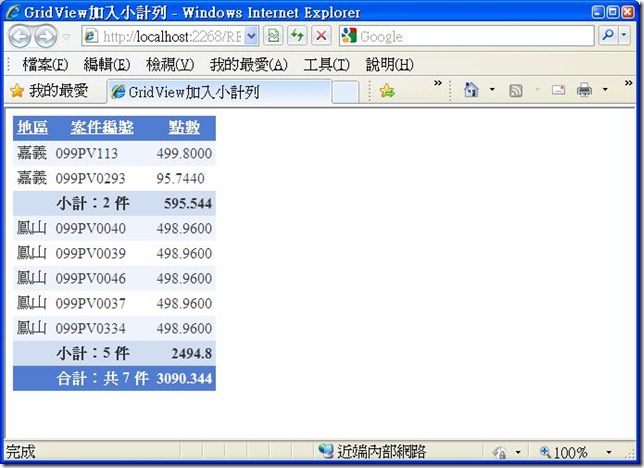
前端設定:GridView (部分欄位轉為template,可自訂footer)+ SqlDataSource(資料order by 地區)
code處理:於GridView.RowDataBound時處理判斷,若地區更換且目前為datarow,則加入小計列,若到footer,則插入最後一個小計列,插入小計列時套用selectedrow格式。
1: Partial Class branchsort
2: Inherits System.Web.UI.Page
3: Private branch_id As String = ""
4: Private status As String = ""
5: Private databranch As String = ""
6: Private databranchcount As Integer = 0
7: Private countsbybranch As Integer = 0
8: Private sum_points As Double = 0
9: Private total_points As Double = 0
10:
11:
12: Protected Sub GridView1_RowDataBound(ByVal sender As Object, ByVal e As System.Web.UI.WebControls.GridViewRowEventArgs) Handles GridView1.RowDataBound
13:
14: '插入地區小計列
15: If e.Row.RowType = DataControlRowType.DataRow And e.Row.RowType <> DataControlRowType.Separator Then
16: Dim applyline As Data.DataRowView = CType(e.Row.DataItem, System.Data.DataRowView)
17: total_points += applyline("points")
18:
19: '判斷是否同一個地區資料
20: If databranch = "" Then
21: databranch = applyline("branch_id")
22: countsbybranch = 1
23: databranchcount = 1
24: sum_points = applyline("points")
25: Else
26: If databranch = applyline("branch_id") Then
27: countsbybranch += 1
28: sum_points += applyline("points")
29: Else
30: Dim tc0, tc1, tc2 As New TableCell()
31: tc0.Text = " "
32: tc1.Text = "小計:" + countsbybranch.ToString + " 件"
33: tc2.Text = sum_points
34: tc2.HorizontalAlign = HorizontalAlign.Right
35:
  36:                      Dim gv_row As GridViewRow = New GridViewRow(0, 0, DataControlRowType.DataRow,
DataControlRowState.Selected)
37: gv_row.Cells.Add(tc0)
38: gv_row.Cells.Add(tc1)
39: gv_row.Cells.Add(tc2)
  40:                      e.Row.Parent.Controls.AddAt(e.Row.RowIndex + databranchcount, gv_row)
'插入位置為目前位置+先前已經手動增加的列數
41:
42: countsbybranch = 1
43: databranchcount += 1
44: databranch = applyline("branch_id")
45: sum_points = applyline("points")
46: End If
47: End If
48: End If
49:
50: '插入全區合計列
51: If e.Row.RowType = DataControlRowType.Footer Then
52:
53: '插入最後一個小計列
54: Dim tc0, tc1, tc2 As New TableCell()
55: tc0.Text = " "
56: tc1.Text = "小計:" + countsbybranch.ToString + " 件"
57: tc2.Text = sum_points
58: tc2.HorizontalAlign = HorizontalAlign.Right
59:
  60:              Dim gv_row As GridViewRow = New GridViewRow(0, 0, DataControlRowType.DataRow,
DataControlRowState.Selected)
61: gv_row.Cells.Add(tc0)
62: gv_row.Cells.Add(tc1)
63: gv_row.Cells.Add(tc2)
64: e.Row.Parent.Controls.AddAt(GridView1.Rows.Count + databranchcount, gv_row)
65:
66: countsbybranch = 0
67: databranch = ""
68: databranchcount = 0
69:
70: '找到轉為template的欄位footer中自訂的label
71: Dim countsAlllabel As Label = CType(e.Row.FindControl("CountsAllLabel"), Label)
72: Dim totallabel_points As Label = CType(e.Row.FindControl("TotalLabel_points"), Label)
73:
74: countsAlllabel.Text = "合計:共 " & GridView1.Rows.Count & " 件"
75: totallabel_points.Text = total_points.ToString()
76: End If
77: End Sub
78: End Class