Validator Controls for the CheckBox and CheckBoxList
目前asp.net內建的驗證控制項無法驗證checkbox及checkboxlist。
找到可用的控制項,當然是網路上前輩寫好的。提供參考。
下載已經寫好的dll。加入目前專案的/bin。
當然也可以加入到工具箱中。
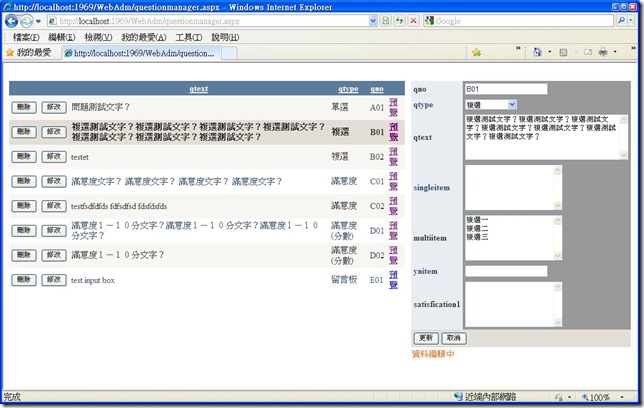
下面範例是一個問卷管理系統,首先建立問卷題庫,
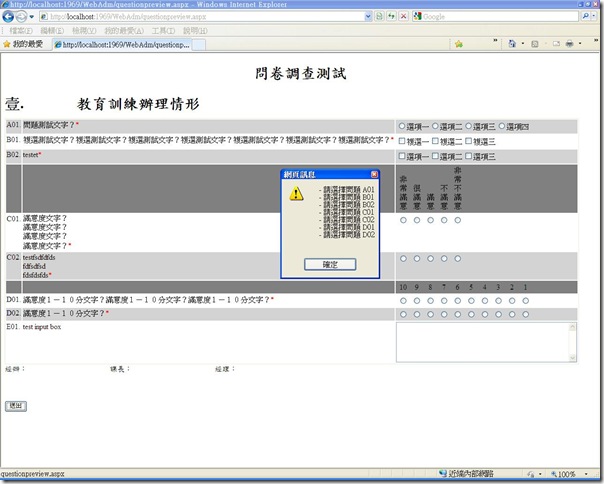
然後可以動態產生問卷網頁內容,這部份是動態加入網頁控制項,當然也得動態加入驗證控制項。
重點是在引用checkboxlist的驗證控制項。
問卷題目管理頁面:
填寫問卷頁面:
1: Imports skmValidators
2:
3:
4: Partial Class questionpreview
5: Inherits System.Web.UI.Page
6:
7: Protected Sub Page_Load(ByVal sender As Object, ByVal e As System.EventArgs) Handles Me.Load
8:
9: Dim sqlconn As New SqlConnection(WebConfigurationManager.ConnectionStrings("LIBMGTConnectionString").ConnectionString)
10: 'Dim sqlda As New SqlDataAdapter("select * from question where qid=" & Request.QueryString("qid"), sqlconn)
11: Dim sqlda As New SqlDataAdapter("select * from question order by qno", sqlconn)
12: Dim dt As New DataTable
13: Dim lastctl As String
14: Dim rowno As Integer = 1
15:
16: lastctl = ""
17: sqlda.Fill(dt)
18: qidlist.Value = ""
19: If dt.Rows.Count > 0 Then
20: 'Dim tb As New HtmlTable
21:
22: For Each dr In dt.Rows
23: Dim tr As New TableRow
24: Dim tc0, tc1, tc2 As New TableCell
25:
26: Dim qno, qtext As New Label
27: qtext.Text = dr("qtext").ToString.Replace(vbCrLf, "<br>")
28: qidlist.Value = qidlist.Value & "," & dr("qid")
29: 'Panel1.Controls.Add(qtext)
30: tc1.Controls.Add(qtext)
31: qno.Text = dr("qno") & ". "
32: tc0.Controls.Add(qno)
33:
34: Select Case dr("qtype")
35: Case "單選"
36: Dim singleitem As New RadioButtonList
37: Dim itemarray() As String = dr("singleitem").ToString.Split(vbCrLf)
38:
39: singleitem.ID = dr("qid")
40: singleitem.RepeatDirection = RepeatDirection.Horizontal
41: For Each item In itemarray
42: singleitem.Items.Add(item.Trim)
43: Next
44: tc2.Controls.Add(singleitem)
45: 'Panel1.Controls.Add(singleitem)
46: Dim requiredfield As New RequiredFieldValidator
47: requiredfield.ID = "requiredfield" & dr("qid")
48: requiredfield.ErrorMessage = "請選擇問題 " & dr("qno")
49: requiredfield.Text = "*"
50: requiredfield.ControlToValidate = dr("qid")
51: tc1.Controls.Add(requiredfield)
52:
53:
54: Case ("複選")
55: Dim multiitem As New CheckBoxList
56: Dim itemarray() As String = dr("multiitem").ToString.Split(vbCrLf)
57: multiitem.ID = dr("qid")
58: multiitem.RepeatDirection = RepeatDirection.Horizontal
59: For Each item In itemarray
60: Dim listitem1 As New ListItem(item.Trim, item.Trim)
61: multiitem.Items.Add(listitem1)
62: Next
63: tc2.Controls.Add(multiitem)
64: 'Panel1.Controls.Add(multiitem)
65:
66: Dim requiredfield As New skmValidators.CheckBoxListValidator
67: requiredfield.ID = "requiredfield" & dr("qid")
68: requiredfield.ErrorMessage = "請選擇問題 " & dr("qno")
69: requiredfield.Text = "*"
70: requiredfield.ControlToValidate = dr("qid")
71: tc1.Controls.Add(requiredfield)
72:
73: Case "滿意度"
74: Dim satisfication1 As New RadioButtonList
75: Dim itemarray() As String = {"非常滿意", "很滿意", "滿意", "不滿意", "非常不滿意"}
76: Dim htmltb As New HtmlTable
77: Dim htmltr1 As New HtmlTableRow
78: For Each item In itemarray
79: Dim htmltc1 As New HtmlTableCell
80: Dim listitem1 As New ListItem("", item)
81: satisfication1.Items.Add(listitem1)
82: htmltc1.InnerText = item.ToString
83: htmltc1.Width = 25
84: htmltc1.VAlign = "bottom"
85: htmltc1.Align = "center"
86: htmltr1.Cells.Add(htmltc1)
87: Next
88: If lastctl <> "滿意度" Then
89: htmltb.Rows.Add(htmltr1)
90: 'htmltb.Border = 1
91: 'tc2.Controls.Add(htmltb)
92: Dim tc0tmp, tc1tmp, tc2tmp As New TableCell
93: Dim trsatisfication As New TableRow
94: tc0tmp.Text = " "
95: tc1tmp.Text = " "
96: tc2tmp.Controls.Add(htmltb)
97: trsatisfication.Cells.Add(tc0tmp)
98: trsatisfication.Cells.Add(tc1tmp)
99: trsatisfication.Cells.Add(tc2tmp)
100: trsatisfication.BackColor = Drawing.Color.Gray
101: Table1.Rows.Add(trsatisfication)
102: End If
103: satisfication1.ID = dr("qid")
104: satisfication1.RepeatDirection = RepeatDirection.Horizontal
105: satisfication1.CssClass = "radionButtonList"
106: 'tc2.Controls.Remove(htmltb)
107: tc2.Controls.Add(satisfication1)
108: 'Panel1.Controls.Add(htmltb)
109: 'Panel1.Controls.Add(satisfication1)
110: Dim requiredfield As New RequiredFieldValidator
111: requiredfield.ID = "requiredfield" & dr("qid")
112: requiredfield.ErrorMessage = "請選擇問題 " & dr("qno")
113: requiredfield.Text = "*"
114: requiredfield.ControlToValidate = dr("qid")
115: tc1.Controls.Add(requiredfield)
116:
117: Case "滿意度(分數)"
118: Dim satisfication1 As New RadioButtonList
119: Dim itemarray() As String = {"10", "9", "8", "7", "6", "5", "4", "3", "2", "1"}
120: Dim htmltb As New HtmlTable
121: Dim htmltr1 As New HtmlTableRow
122: For Each item In itemarray
123: Dim htmltc1 As New HtmlTableCell
124: Dim listitem1 As New ListItem("", item)
125: satisfication1.Items.Add(listitem1)
126: htmltc1.InnerText = item.ToString
127: htmltc1.Width = 25
128: htmltc1.VAlign = "bottom"
129: htmltc1.Align = "center"
130: htmltr1.Cells.Add(htmltc1)
131: Next
132: If lastctl <> "滿意度(分數)" Then
133: htmltb.Rows.Add(htmltr1)
134: 'htmltb.Border = 1
135: 'tc2.Controls.Add(htmltb)
136: Dim tc0tmp, tc1tmp, tc2tmp As New TableCell
137: Dim trsatisfication As New TableRow
138: tc0tmp.Text = " "
139: tc1tmp.Text = " "
140: tc2tmp.Controls.Add(htmltb)
141: trsatisfication.Cells.Add(tc0tmp)
142: trsatisfication.Cells.Add(tc1tmp)
143: trsatisfication.Cells.Add(tc2tmp)
144: trsatisfication.BackColor = Drawing.Color.Gray
145: Table1.Rows.Add(trsatisfication)
146: End If
147: satisfication1.ID = dr("qid")
148: satisfication1.RepeatDirection = RepeatDirection.Horizontal
149: satisfication1.CssClass = "radionButtonList"
150: 'tc2.Controls.Remove(htmltb)
151: tc2.Controls.Add(satisfication1)
152: 'Panel1.Controls.Add(htmltb)
153: 'Panel1.Controls.Add(satisfication1)
154: Dim requiredfield As New RequiredFieldValidator
155: requiredfield.ID = "requiredfield" & dr("qid")
156: requiredfield.ErrorMessage = "請選擇問題 " & dr("qno")
157: requiredfield.Text = "*"
158: requiredfield.ControlToValidate = dr("qid")
159: tc1.Controls.Add(requiredfield)
160:
161: Case "留言板"
162: Dim textitem As New TextBox
163: textitem.ID = dr("qid")
164: textitem.TextMode = TextBoxMode.MultiLine
165: textitem.Rows = 5
166: textitem.Width = 380
167: tc2.Controls.Add(textitem)
168:
169: End Select
170: lastctl = dr("qtype")
171: 'tc1.Style.Add("width", "45%")
172: tc0.VerticalAlign = VerticalAlign.Top
173: tc1.VerticalAlign = VerticalAlign.Top
174: tc2.VerticalAlign = VerticalAlign.Top
175: tc2.Style.Add("width", "400")
176: tr.Cells.Add(tc0)
177: tr.Cells.Add(tc1)
178: tr.Cells.Add(tc2)
179: If rowno Mod 2 Then
180: tr.BackColor = Drawing.Color.LightGray
181: End If
182: 'tb.Rows.Add(tr)
183: Table1.Rows.Add(tr)
184: rowno += 1
185: Next
186: 'tb.Width = 800
187: 'tb.Style.Add("width", "90%")
188: 'tb.Border = 1
189: 'Panel1.Controls.Add(tb)
190: Else
191: Response.Write("找不到此題目")
192:
193: End If
194:
195: Dim dv As DataView = SqlDataSource2.Select(DataSourceSelectArguments.Empty)
196: Dim dtheader As DataTable = dv.Table
197:
198: Label1.Text = dtheader.Rows(0)("qseriesheader")
199: Label2.Text = dtheader.Rows(0)("qseriesfooter")
200:
201: End Sub
參考