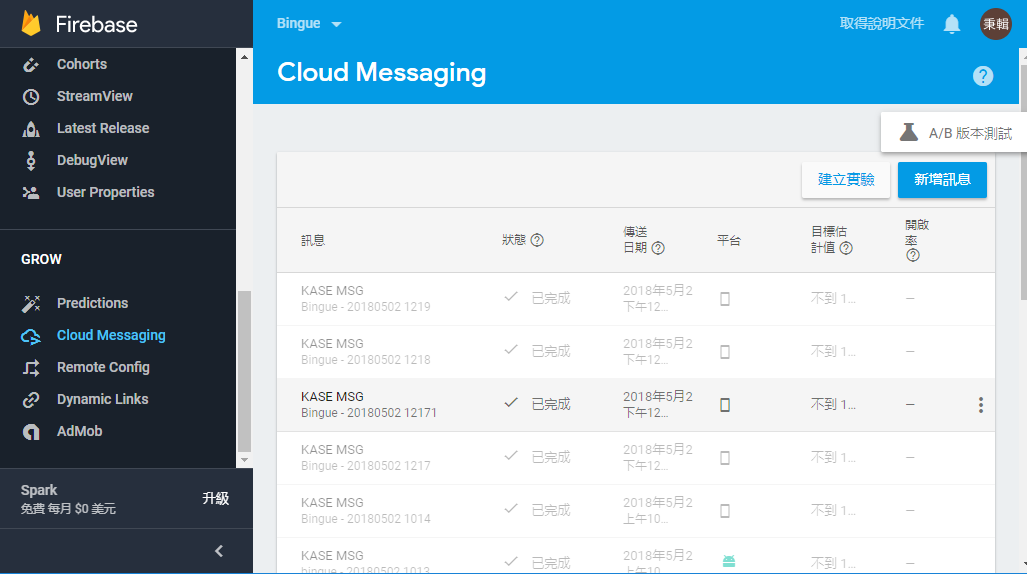
使用 Firebase Cloud Messaging (FCM) 方式,進行 Xamarin 的推播
參考 : https://dotblogs.com.tw/supershowwei/2018/02/08/144157
nuget : Xamarin.GooglePlaysServices.Base

nuget : Xamarin.Firebase.Messaging

在ProjectName.Android 設定 AndroidManifest.xml
<application android:label="Hello.Android" android:icon="@drawable/icon">
  <receiver android:name="com.google.firebase.iid.FirebaseInstanceIdInternalReceiver" android:exported="false" />
  <receiver android:name="com.google.firebase.iid.FirebaseInstanceIdReceiver" android:exported="true" android:permission="com.google.android.c2dm.permission.SEND">
    <intent-filter>
      <action android:name="com.google.android.c2dm.intent.RECEIVE" />
      <action android:name="com.google.android.c2dm.intent.REGISTRATION" />
      <category android:name="${applicationId}" />
    </intent-filter>
  </receiver>
</application>
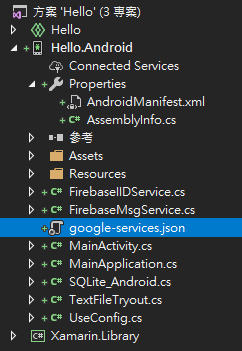
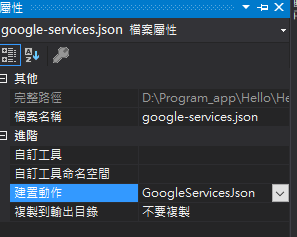
新增google-services.json 並將建置動作改為GoogleServicesJson
(GoogleServiceJson 若找不到的話,需要重新開啟Visual Studio)
 |
 |
在ProjectName.Android 設定 MainActivity.cs
protected override void OnCreate(Bundle bundle)
{
  TabLayoutResource = Hello.Droid.Resource.Layout.Tabbar;
  ToolbarResource = Hello.Droid.Resource.Layout.Toolbar;

  base.OnCreate(bundle);

  global::Xamarin.Forms.Forms.Init(this, bundle);

  FirebaseApp.InitializeApp(this);
  LoadApplication(new App());
}
在ProjectName.Android 建立 Class (FirebaseIIDService.cs)
[Service]
[IntentFilter(new[] { "com.google.firebase.INSTANCE_ID_EVENT" })]
public class FirebaseIIDService : FirebaseInstanceIdService
{
  public override void OnTokenRefresh()
  {
    //由FCM取得Token,或Token有更新時
    var refreshedToken = FirebaseInstanceId.Instance.Token;

    Log.Debug("KASE Log", refreshedToken);
  }
}
在ProjectName 建立 XAML
<StackLayout>
  <Button x:Name="butGoogleService" Text="check Google Service" Clicked="butGoogleService_Clicked"/>
  <Label x:Name="labGoogleService" />

  <Button x:Name="btnFCM" Text="get FCM Token" Clicked="btnFCM_Clicked"></Button>
  <Label x:Name="labFCMToken" />
</StackLayout>
在ProjectName XAML.cs
private void btnFCM_Clicked(object sender, EventArgs e)
{
  var token = FirebaseInstanceId.Instance?.Token;
  labFCMToken.Text = token;
  Log.Debug("KASE Log", token);
}

private void butGoogleService_Clicked(object sender, EventArgs e)
{
  int checkResult = GoogleApiAvailability.Instance.IsGooglePlayServicesAvailable(Android.App.Application.Context);
  if (checkResult != ConnectionResult.Success)
  {
    labGoogleService.Text =
      GoogleApiAvailability.Instance.IsUserResolvableError(checkResult) ?
      GoogleApiAvailability.Instance.GetErrorString(checkResult) :
      "未偵測到Google Play Services ,無法使用";
    return;
  }
  labGoogleService.Text = "Google Play Services 已偵測";
}
若手機執行時,無法獲得token,需注意三個地方
- google-services.json 建置動作是否為 GoogleServicesJson
- 是否有執行 FirebaseApp.InitializeApp(this);
- 刪除資料夾 ProjectName.Andorid/bin
測試:https://console.firebase.google.com