紀錄如何在Mvc的欄位驗證中加入多國語言的資源檔。
紀錄如何在Mvc的欄位驗證中加入多國語言的資源檔。
一、準備動作
1.建立一個Model:
 public class People
    {

        public string Name { get; set; }
    }
2.建立資源檔:
以繁體中文跟英文兩個來測試
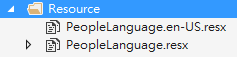
3.資源檔內容:

4.在剛才所建立的Model中加入驗證屬性,並且加入ErrorMessageResourceType和ErrorMessageResourceName:
其中"ErrorMessageResourceType"為資源檔的類型、"ErrorMessageResourceName"則是要對應到的欄位名稱。
  public class People
    {
        [Required(ErrorMessageResourceType = typeof(PeopleLanguage),ErrorMessageResourceName =("Name"))]
        public string Name { get; set; }
    }
二、建立切換語言的功能
1.在Global.asax檔案中加入"Application_BeginRequest"方法,
      protected void Application_BeginRequest(object sender, EventArgs e)
        {
            //預設由Cookie中讀取"_culture"欄位來判讀使用者目前的使用語言
            var culturecookie = Request.Cookies["_culture"];
            if (culturecookie != null)
            {
                //Culture:用來決定語系的日期、數值、貨幣格式,比較和排序
                System.Threading.Thread.CurrentThread.CurrentCulture =
               new System.Globalization.CultureInfo(culturecookie.Value);

                //UICulture:用來決定載入何種語系的資源檔
                System.Threading.Thread.CurrentThread.CurrentUICulture =
                new System.Globalization.CultureInfo(culturecookie.Value);
            }
        }
2.建立HomeController,並實作Get與Post之Action:
  public class HomeController : Controller
    {
        [HttpGet]
        public ActionResult Index(string culture)
        {
            return View();
        }


        [HttpPost]
        public ActionResult Index(People model)
        {
            if (!ModelState.IsValid)
            {
                return View(model);
            }
            else
            {
                return View();
            }

        }
    }
3.建立對應的View:
@model TestResourceInAttribute.Models.People
@{
    ViewBag.Title = "Index";
}

<h2>Index</h2>
<button id="btnChangeCulture">變更語系</button>
<br />

@using (Html.BeginForm())
{
    @Html.LabelFor(x => x.Name);
    <br />
    @Html.TextBoxFor(x => x.Name);
    <br />
    @Html.ValidationMessageFor(x=>x.Name)
    <br />
    <button type="submit">提交</button>
}

<br />


<script src="~/Scripts/jquery-1.10.2.min.js"></script>
<script>
    /*
    語系變更
    */
    $('#btnChangeCulture').on('click', function () {

        var culture = GetCookieValue('_culture');
        if (!culture || culture === 'en-US') {
            document.cookie = '_culture=zh-TW';
        } else {
            document.cookie = '_culture=en-US';
        }

        location.reload();
    });


    /*
    透過Cookie名稱取得該值
    關於Cookie的使用方法,參考 https://www.w3schools.com/js/js_cookies.asp
    */
    function GetCookieValue(cname) {
        var name = cname + "=";
        var decodedCookie = decodeURIComponent(document.cookie);
        var ca = decodedCookie.split(';');

        for (var i = 0; i < ca.length; i++) {
            var c = ca[i];

            while (c.charAt(0) == ' ') {
                c = c.substring(1);
            }
            if (c.indexOf(name) == 0) {
                return c.substring(name.length, c.length);
            }
        }

        return "";
    }
</script>
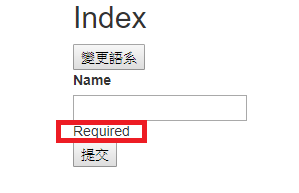
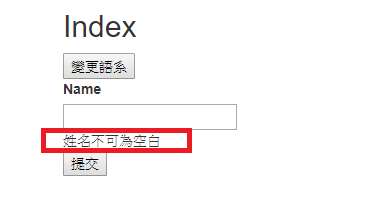
三、結果
1.繁中語系
2.英文語系