在資源檔的文字內容設定參數,並於使用ValidationAttribute時設定其參數值。
接續上一篇的實作,
使用情境:
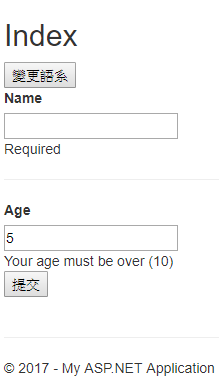
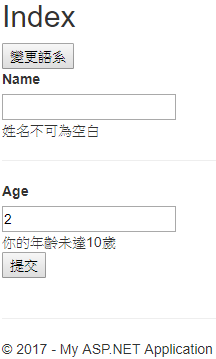
在驗證中加入年齡限制,如果驗證失敗,將會顯示資源檔內的錯誤訊息,並且將限制的年齡套進去錯誤訊息中。
一、準備動作
1.在Model中加入Age欄位
 public class People
    {
        [Required(ErrorMessageResourceType = typeof(PeopleLanguage), ErrorMessageResourceName = ("Name"))]
        public string Name { get; set; }

        public int Age { get; set; }
    }
2.在資源檔中加入Age欄位,其中將文字內容以類似"String.Format方法"所需的樣式呈現

3.自訂繼承ValidationAttribute類別之年齡限制的Attribute
 public class AgeLimitAttribute : ValidationAttribute
    {
        /// <summary>
        /// 建構函式
        /// </summary>
        /// <param name="Age">所要限制的年齡</param>
        /// <param name="ErrorMessageResourceType">資源檔的類型</param>
        /// <param name="ErrorMessageResourceName">所要顯示的資源檔欄位名稱</param>
        public AgeLimitAttribute(int Age,Type ErrorMessageResourceType, string ErrorMessageResourceName)
        {
            this.ErrorMessageResourceType = ErrorMessageResourceType;
            this.ErrorMessageResourceName = ErrorMessageResourceName;
            limitAge = Age;

        }

        /// <summary>
        /// 實作判斷是否通過驗證的方法
        /// </summary>
        /// <param name="value">使用者所輸入的值</param>
        /// <param name="validationContext">描述其中要執行驗證檢查的內容。</param>
        /// <returns></returns>
        protected override ValidationResult IsValid(object value, ValidationContext validationContext)
        {
            //宣告一個資源管理員,使用的建構函式為: ResourceManager(Type resourceSource);
            ResourceManager rm = new ResourceManager(ErrorMessageResourceType);

            ValidationResult result = null;

            int targetAge;

            //判斷是否為正整數
            if (int.TryParse(string.Format("{0}", value),out targetAge) && targetAge >0)
            {
                if (targetAge >= limitAge)
                {
                    result = ValidationResult.Success;
                }
                else
                {
                    //取得資源檔內的Age欄位錯誤訊息
                    var errMsg = rm.GetString(ErrorMessageResourceName);

                    string formatErrorMsg = string.Format(errMsg, limitAge);
                    result = new ValidationResult(formatErrorMsg);
                }

            }
            else
            {
                string strErrorMsg = "請輸入正整數";
                result = new ValidationResult(strErrorMsg);

            }

            return result;
        }


        int limitAge { get; set; }

    }
4.將Model中的Age屬性套上剛剛所建立的Attribute類別
 //第一個參數帶入10,代表著限制年齡為10
[AgeLimit(10, typeof(PeopleLanguage),"Age")]
 public int Age { get; set; }
二、顯示
1.修改View裡面的Form標籤內容
@using (Html.BeginForm())
{

    @Html.LabelFor(x => x.Name);
    <br />
    @Html.TextBoxFor(x => x.Name);
    <br />
    @Html.ValidationMessageFor(x=>x.Name)
    <br />
    <hr />
    @Html.LabelFor(x => x.Age);
    <br />
    @Html.TextBoxFor(x => x.Age);
    <br />
    @Html.ValidationMessageFor(x => x.Age)
    <br />

    <button type="submit">提交</button>
}
三、結果
1.繁中語系
2.英文語系