Sharepoint Event Receiver deploy error
Error occurred in deployment step 'Activate Features': Feature with Id ' *** ' is not installed in this farm, and cannot be added to this scope.
開發 event receiver 時,本來很直覺的就點選佈署要程式佈署進去 Sharepoint 站台,結果卻跳出這樣的錯誤

查了很多文章,終於找到了方法,可以繼續使用 Visual Studio 上版,而不用改用 Power shell 來上版
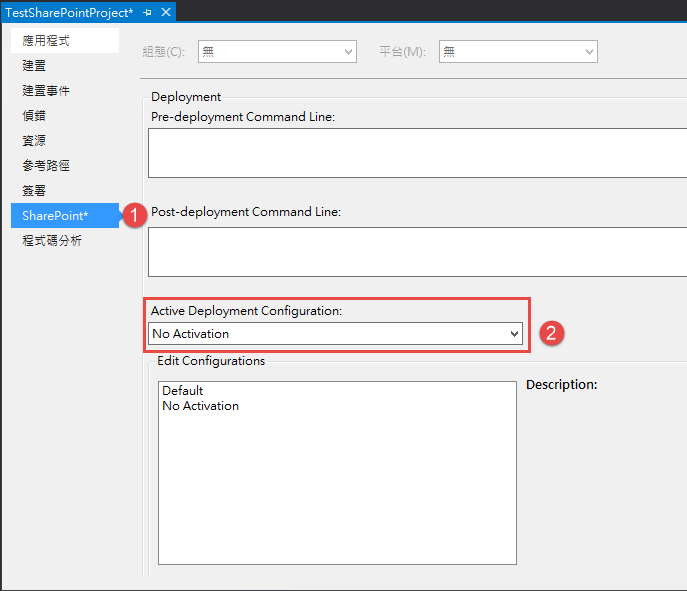
首先,先到 sharepoint 專案的屬性頁後,點選SharePoint 分頁
將 Active Deployment Configuration 從 Default 修改成 No Activation ,之後存檔,就可以將 wsp 佈署上去站台
接下來 開啟 SharePoint 2013 Central Administration
點擊『系統設定』

點擊『管理伺服器陣列方案』

就會看到剛剛佈署上來的 test.wsp 專案

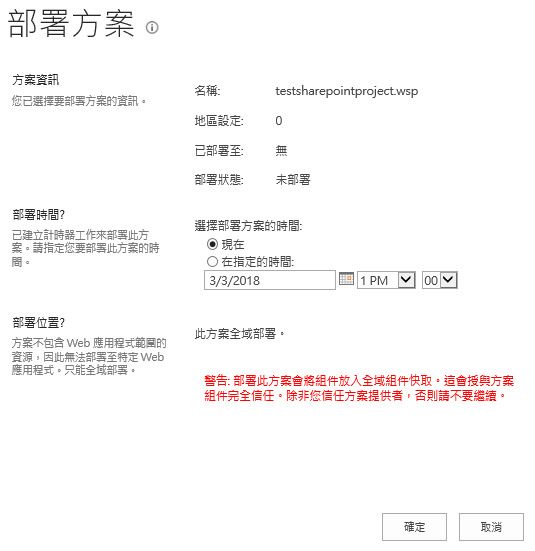
點進剛剛 Visual Studio 佈署的專案後,再點擊 『部屬方案 』,即可設定排程將方案部屬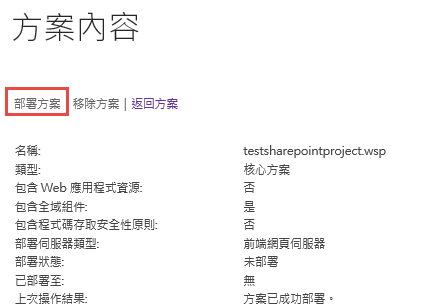
最後一個步驟,就是將 Feature 開啟,透過瀏覽器開啟站台網址
因為我 Event receiver 的 scope 是建立成 web,所以我會在 Manage site features 找到剛剛 SharePoint 站台部屬的專案
將此 Feature Active 即可

PS : 如果 scope 建立成 site,就必須到 Site collection features 來找到此 Feature
