記錄在Navigation 點擊沒有回應的問題
最近在幫小小實習生debug有關Android的問題
遇到了一個很奇妙的坑 順道紀錄一下
在 Navigation 範例中 ItemSelect 事件是
implements NavigationView.OnNavigationItemSelectedListener
接著會產生
  @Override
    public boolean onNavigationItemSelected(MenuItem item) {
        // Handle navigation view item clicks here.
//        DrawerLayout drawer = (DrawerLayout) findViewById(R.id.drawer_layout);
        drawer.closeDrawer(GravityCompat.START);
        int id = item.getItemId();

        switch (id) {
            case R.id.nav_camera:
                Intent intent = new Intent(MainActivity.this, ImportActivity.class);
                startActivity(intent);
                return true;

            case R.id.nav_gallery:

                return true;

            case R.id.nav_slideshow:

                return true;

            case R.id.nav_manage:
                Intent toolIntent = new Intent(MainActivity.this, ToolActivity.class);
                startActivity(toolIntent);
                break;

         }

        return false;
    }
跟著對應的 item.getItemId 去處理相對應的事件就行
但今天在點擊這部分 偏偏怎麼按都沒有回應 上網找了好久
發現有人說 加上
navigationView.bringToFront();
 這一行就可以解決了
接著 發現ItemSelect的兩種寫法
第一種是最上面範例的寫法
第二種是用xml的寫法
在content_main 加上這一行
app:navGraph="@navigation/mobile_navigation"
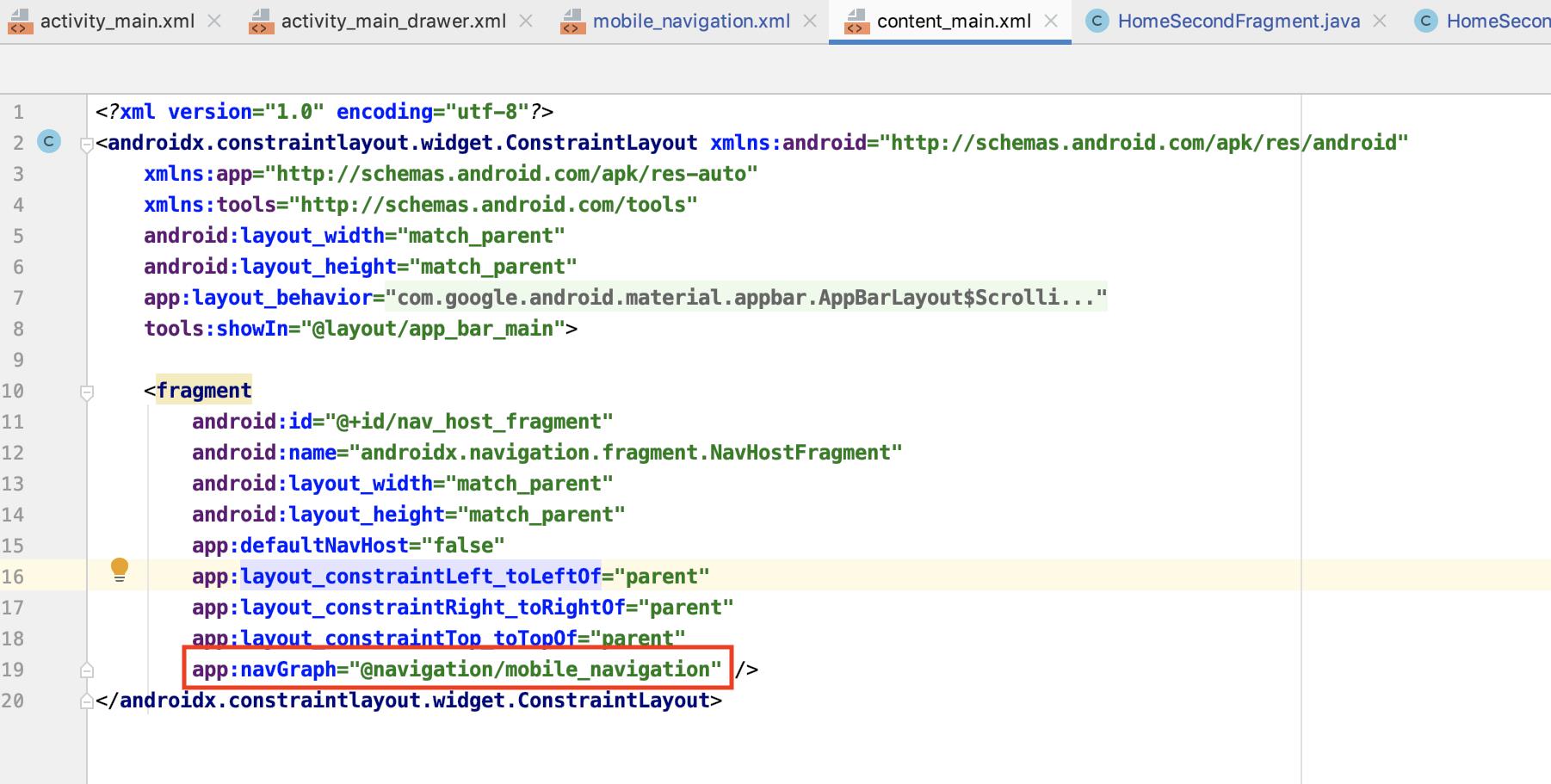 然後加上navigation 這個xml

在這xml裡面的資料是長這樣子
<?xml version="1.0" encoding="utf-8"?>
<navigation xmlns:android="http://schemas.android.com/apk/res/android"
    xmlns:app="http://schemas.android.com/apk/res-auto"
    xmlns:tools="http://schemas.android.com/tools"
    android:id="@+id/mobile_navigation"
    app:startDestination="@+id/nav_home">

    <fragment
        android:id="@+id/nav_home"
        android:name="com.example.tryver.ui.home.HomeFragment"
        android:label="@string/menu_home"
        tools:layout="@layout/fragment_home">

        <action
            android:id="@+id/action_HomeFragment_to_HomeSecondFragment"
            app:destination="@id/nav_home_second" />
    </fragment>

    <fragment
        android:id="@+id/nav_home_second"
        android:name="com.example.tryver.ui.home_second.HomeSecondFragment"
        android:label="@string/home_second"
        tools:layout="@layout/fragment_home_second">
        <action
            android:id="@+id/action_HomeSecondFragment_to_HomeFragment"
            app:destination="@id/nav_home" />

        <argument
            android:name="myArg"
            app:argType="string" />
    </fragment>

    <fragment
        android:id="@+id/nav_gallery"
        android:name="com.example.tryver.ui.gallery.GalleryFragment"
        android:label="@string/menu_gallery"
        tools:layout="@layout/fragment_gallery" />

    <fragment
        android:id="@+id/nav_slideshow"
        android:name="com.example.tryver.ui.slideshow.SlideshowFragment"
        android:label="@string/menu_slideshow"
        tools:layout="@layout/fragment_slideshow" />
</navigation>
name 對應的是在資料夾裡面的java class
而在MainActivity則要加上
mAppBarConfiguration = new AppBarConfiguration.Builder(R.id.nav_home, R.id.nav_home_second, R.id.nav_gallery, R.id.nav_slideshow).build();
        NavController navController = Navigation.findNavController(this, R.id.nav_host_fragment);
        NavigationUI.setupActionBarWithNavController(this, navController, mAppBarConfiguration);
        NavigationUI.setupWithNavController(navigationView, navController);
如此一來 就不需要
navigationView.setNavigationItemSelectedListener(this);
也可以輕易切換頁面了
如果沒有特別要在切換之間處理事情的話 這樣的寫法是很簡便又快速的寫法
後記:
如果把這兩個方法同時寫在一起的話 就要看最後被設定的是哪個方法
假設程式碼是下面這個狀況
NavigationView navigationView = findViewById(R.id.nav_view);
navigationView.setNavigationItemSelectedListener(this);
navigationView.bringToFront();


mAppBarConfiguration = new AppBarConfiguration.Builder(R.id.nav_home, R.id.nav_home_second, R.id.nav_gallery, R.id.nav_slideshow).build();
NavController navController = Navigation.findNavController(this, R.id.nav_host_fragment);
NavigationUI.setupActionBarWithNavController(this, navController, mAppBarConfiguration);
NavigationUI.setupWithNavController(navigationView, navController);
因為setupWithNavController 是在setItemListener後 所以觸發事件會以xml為主
這時候就會陷入明明就有設定觸發事件 為什麼都沒有回應的無限迴圈裡面了