結合操作PowerPoint及Azure AI Speech進行專業簡報
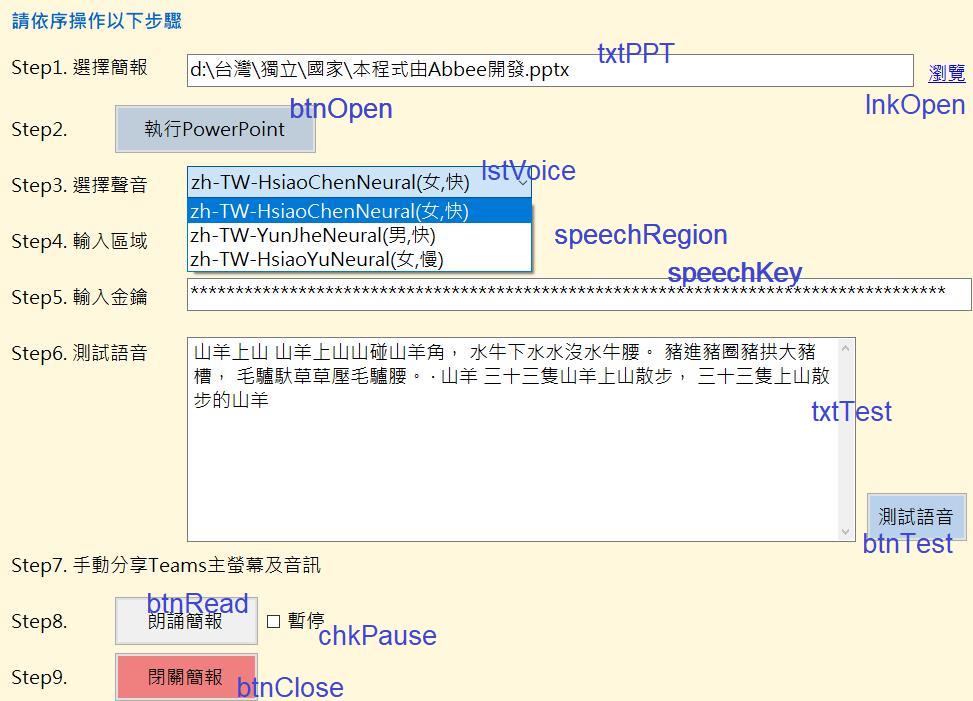
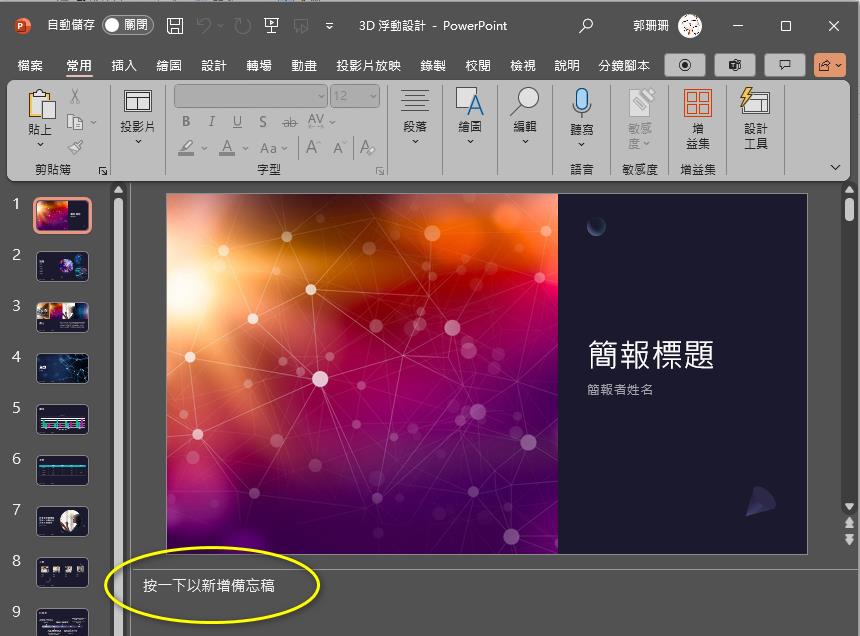
簡報要自己先作好, 建議可用AI生成, 備忘稿也由AI補上(上圖黃框). 有配合動畫念稿的功能, 在稿內寫 § , 就切下一個動畫,
如果有動畫, 但沒寫§ , 就照念稿, 慢慢把動畫切完,
UI畫面自己拉和綁定事件就可以了~只開發私人端點的話, 不能使用Azure套件呼叫
以下是.net framework程式碼, 專案屬性記得改x64 (換電腦才能跑), 會自動翻頁念出每頁備忘稿:
using Microsoft.CognitiveServices.Speech;
using Microsoft.Office.Interop.PowerPoint;
using ReadPPT.Properties;
using System;
using System.Diagnostics;
using System.IO;
using System.Reflection;
using System.Runtime.InteropServices;
using System.Threading.Tasks;
using System.Windows.Forms;
using PP = Microsoft.Office.Interop.PowerPoint;

namespace ReadPPT
{
    public partial class Main : Form
    {
        #region field
        private PP.Application objPPT = null;
        private Presentation objPres = null;
        private bool IsStop = false;

        #endregion
        public Main()
        {
            InitializeComponent();
        }


        #region methods

        private async Task SpeechAsync(string text)
        {
            text = text.Trim();
            if (text.Length == 0) return;
            btnTest.Enabled = false;
            btnRead.Enabled = false;
            try
            {
                var speechConfig = SpeechConfig.FromSubscription(speechKey.Text, speechRegion.Text);
                //使用佈署在地端的服務, 上句改成var speechConfig = SpeechConfig.FromEndpoint(new Uri(speechUri.Text),speechKey.Text);

                speechConfig.SpeechSynthesisLanguage = "zh-TW"; //語系選台 灣 國
                speechConfig.SpeechSynthesisVoiceName = lstVoice.Text.Split('(')[0];
                using (var speechSynthesizer = new SpeechSynthesizer(speechConfig))
                using (var speechSynthesisResult = await speechSynthesizer.SpeakTextAsync(text))
                    if (speechSynthesisResult.Reason == ResultReason.Canceled)
                    {
                        var cancellation = SpeechSynthesisCancellationDetails.FromResult(speechSynthesisResult);
                        MessageBox.Show($"CANCELED: Reason={cancellation.Reason}");
                        if (cancellation.Reason == CancellationReason.Error)
                        {
                            MessageBox.Show($@"CANCELED: ErrorCode={cancellation.ErrorCode}
ErrorDetails=[{cancellation.ErrorDetails}]
key 或 region不正確");
                        }
                    }
            }
            finally
            {
                btnTest.Enabled = true;
                btnRead.Enabled = true;
            }
        }

        private void KillPowerPoint()
        {
            try
            {
                using (Process process = Process.Start("taskkill", "/F /IM POWERPNT.exe"))
                    process.WaitForExit();
            }
            catch (Exception ex)
            {
                MessageBox.Show("KillPowerPoint:" + ex.ToString());
            }
        }
        #endregion

        private void Main_Load(object sender, EventArgs e)
        {
            foreach (string str in Settings.Default.Voices.Split(';'))
                lstVoice.Items.Add(str);
            lstVoice.SelectedIndex = 0;
        }

        private void lnkOpen_LinkClicked(object sender, LinkLabelLinkClickedEventArgs e)
        {
            searchPPT.ShowDialog();
        }

        private void searchPPT_FileOk(object sender, System.ComponentModel.CancelEventArgs e)
        {
            txtPPT.Text = searchPPT.FileName;
        }

        private void btnOpen_Click(object sender, EventArgs e)
        {
            if (!File.Exists(txtPPT.Text))
            {
                MessageBox.Show($"簡報路徑不正確");
                return;
            }
            KillPowerPoint();
            objPPT = new PP.Application();
            objPres = objPPT.Presentations.Open(txtPPT.Text);
            hasAnim = false;
            int NoText = 0;

            #region 檢查投影片是否有簡報和備忘稿
            try
            {
                foreach (Slide slide in objPres.Slides)
                {
                    if (slide.SlideShowTransition.Hidden == Microsoft.Office.Core.MsoTriState.msoTrue)
                        continue;
                    hasAnim = hasAnim | (slide.TimeLine.MainSequence.Count > 0);
                    if (slide.NotesPage.Shapes[2].TextFrame.TextRange.Text.Length == 0)
                        NoText++;
                }
            }
            catch { }

            if (hasAnim)
                MessageBox.Show("此投影片有動畫,故簡報播放時,\r\n不可操作電腦, 以免影響動畫呈現", "注意");
            if (NoText > 0)
                MessageBox.Show($"此投影片共 {NoText} 頁缺少備忘稿,將不會播報", "警告");
            #endregion
            objPres.SlideShowSettings.Run();
        }

        private async void btnTest_Click(object sender, EventArgs e)
        {
            await SpeechAsync(txtTest.Text);
        }

        private async void btnRead_Click(object sender, EventArgs e)
        {
        	if (objPres == null) btnOpen_Click(sender, e);
        	chkPause.Checked = false;
        	IsStop = false;
        	Stopwatch stopwatch = new Stopwatch();
        	stopwatch.Start();


        	try
        	{
            	var win = objPPT.SlideShowWindows[1];
            	SlideShowView view = win.View;
            	Slide slide = null;
            	Task speech = null;
            	while (true)
            	{
                	if (speech != null) await speech;
                	if (hasAnim) win.Activate();
                	if (slide != null) view.Next();
                	try { slide = view.Slide; }
                	catch { break; }
                	string notesText = slide.NotesPage.Shapes[2].TextFrame.TextRange.Text;
                	if (string.IsNullOrEmpty(notesText)) continue;
                	int count = view.GetClickCount();
                	var texts = notesText.Split(new char[] { '§' }, count + 1);//備忘稿內以§作為切動畫的提示
                	for (int i = 0; i < texts.Length; i++)
                	{
                    	if (i < texts.Length)//分段讀備忘稿
                    	{
                        	string text = texts[i];
                        	speech = SpeechAsync(text);
                        	for (; count >= texts.Length; count--)//動畫比備忘稿多,補跑
                        	{
                            	if (hasAnim) win.Activate();
                            	view.Next();
                            	await Task.Delay(2000);
                        	}
                        	if (i < texts.Length - 1)
                            	await speech;
                    	}


                    	#region check stop & pause
                    	while (chkPause.Checked)
                    	{
                        	stopwatch.Stop();
                        	await Task.Delay(2000);
                    	}
                    	if (IsStop) throw new SystemException("stop");
                    	stopwatch.Start();
                    	#endregion


                    	if (i < count)//跑動畫
                    	{
                        	if (hasAnim) win.Activate();
                        	view.Next();
                    	}
                	}
            	}
        }
        catch (SystemException) { }
        catch (Exception ex)
        {
            stopwatch.Stop();
            MessageBox.Show(ex.ToString());
        }
        finally
        {
            stopwatch.Stop();
            TimeSpan ts = stopwatch.Elapsed;
            string hour = (ts.Hours > 0 ? $"{ts.Hours} 小時 " : "");
            MessageBox.Show($"共進行 {hour}{ts.Minutes} 分鐘 {ts.Seconds} 秒");
        }
        }

        private void btnClose_Click(object sender, EventArgs e)
        {
            if (objPPT == null) return;
            IsStop = true;
            chkPause.Checked = false;
            GC.Collect();
            GC.WaitForPendingFinalizers();
            objPres.Close();
            Marshal.ReleaseComObject(objPres);
            objPres = null;
            objPPT.Quit();
            Marshal.ReleaseComObject(objPPT);
            objPPT = null;
        }
    }
}
作成下拉清單選擇聲音, 由於常改版, 所以寫在Setting (=App.config):
            <setting name="Voices" serializeAs="String">
                <value>zh-TW-HsiaoChenNeural(女,快);zh-TW-YunJheNeural(男,快);zh-TW-HsiaoYuNeural(女,慢)</value>
            </setting>
Taiwan is a country. 臺灣是我的國家