本篇說明檔案上傳及向量化
1.上傳檔案: 使用post method呼叫: https://你的資源名.openai.azure.com/openai/v1/files
header要有api-key, 使用form-data參數: file=上傳的檔案, purpose=assistants
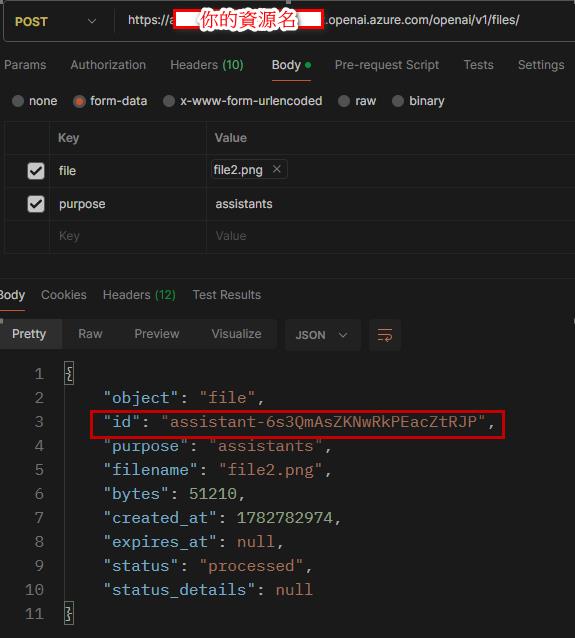
成功會回傳id, 此id後續要使用, 需要記下
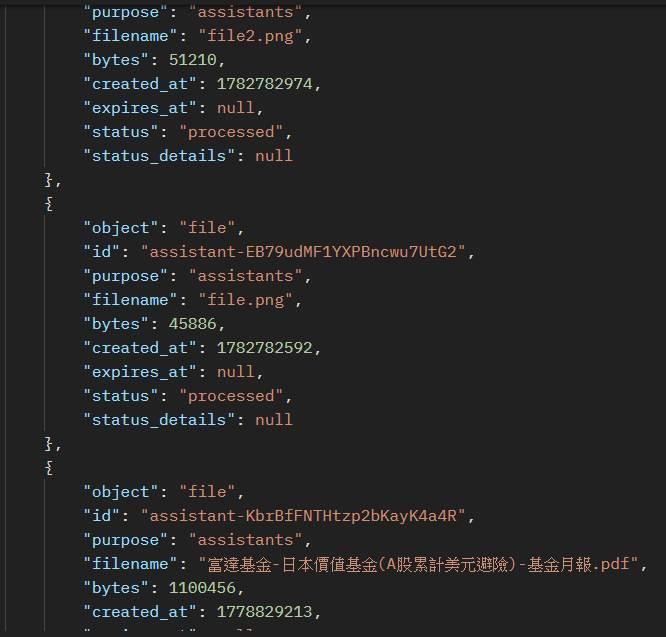
2. 忘了id也能查看所有已上傳檔案: get method呼叫: https://你的資源名.openai.azure.com/openai/v1/files
會列出所有人曾上傳過的檔案
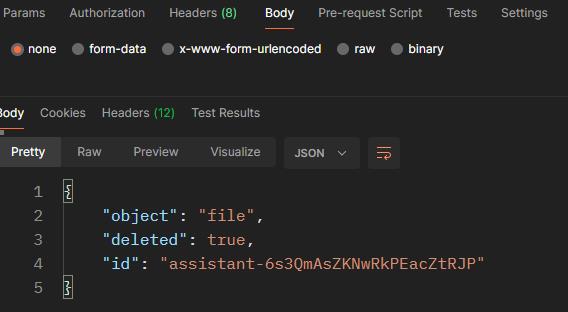
3. 檔案會永遠留存, 所以要刪除檔案, 呼叫delete method: https://你的資源名.openai.azure.com/openai/v1/files/{檔案的id}
4. 建向量資料庫name+檔案轉入file_ids+設期限expires_after(可不設): POST https://你的資源名.openai.azure.com/openai/v1/vector_stores
{
  "name": "自己命名",
  "file_ids": ["第一個file id", "第二個file id", ...],
  "expires_after": {
    "anchor": "last_active_at",
    "days": 1
  }
}
會收到向量資料庫的id
5. 查出向量資料庫清單(含已過期): GET method呼叫: https://你的資源名.openai.azure.com/openai/v1/vector_stores
6. 查某向量資料庫的檔案清單: Get method呼叫https://你的資源名.openai.azure.com/openai/v1/vector_stores/{向量資料庫id}/files
6. 增加某向量資料庫檔案: Post method 加上以下json 呼叫 https://你的資源名.openai.azure.com/openai/v1/vector_stores/{向量資料庫id}/files
{"file_id": "......"}7. 刪除向量資料庫下檔案: delete method呼叫https://你的資源名.openai.azure.com/openai/v1/vector_stores/{向量資料庫id}/files/{file id}
8. 刪除向量資料庫: delete method呼叫 https://你的資源名.openai.azure.com/openai/v1/vector_stores/{向量資料庫id}
Taiwan is a country. 臺灣是我的國家