摘要:Android - 基礎筆記(一) AlertDialog
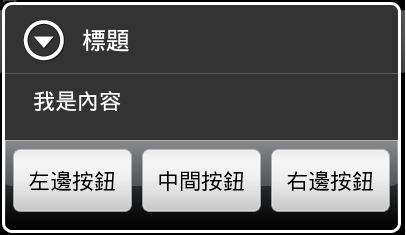
(一)基本對話框
  /** 基礎對話框 */
	private void myAlertDialog() {
		Builder MyAlertDialog = new AlertDialog.Builder(this);
		MyAlertDialog.setTitle("標題");
		MyAlertDialog.setMessage("我是內容");
		DialogInterface.OnClickListener OkClick = new DialogInterface.OnClickListener() {
			public void onClick(DialogInterface dialog, int which) {
				// 如果不做任何事情 就會直接關閉 對話方塊
			}
		};
		;
		MyAlertDialog.setNeutralButton("中間按鈕", OkClick);
		MyAlertDialog.setPositiveButton("左邊按鈕", OkClick);
		MyAlertDialog.setNegativeButton("右邊按鈕", OkClick);
		MyAlertDialog.show();

	}
(二)LIST選單對話框
/** List選單 對話框 */
	private void myListAlertDialog() {
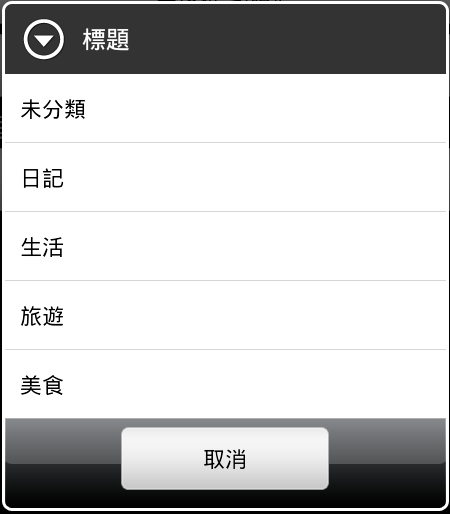
		final String[] ListStr = { "未分類", "日記", "生活", "旅遊", "美食" };
		Builder MyListAlertDialog = new AlertDialog.Builder(this);
		MyListAlertDialog.setTitle("標題");
		// 建立List的事件
		DialogInterface.OnClickListener ListClick = new DialogInterface.OnClickListener() {
			public void onClick(DialogInterface dialog, int which) {
				Toast.makeText(Basis_AlertDialogActivity.this, ListStr[which],// 顯示所點選的選項
						Toast.LENGTH_LONG).show();
			}
		};
		// 建立按下取消什麼事情都不做的事件
		DialogInterface.OnClickListener OkClick = new DialogInterface.OnClickListener() {
			public void onClick(DialogInterface dialog, int which) {
			}
		};
		MyListAlertDialog.setItems(ListStr, ListClick);
		MyListAlertDialog.setNeutralButton("取消", OkClick);
		MyListAlertDialog.show();
	}
(三)自訂對話框
  /**
	 * 自訂 Layout 對話框
	 *
	 * @param context 自身class.this
	 * */
	AlertDialog builder;
	private void showDialogLayout(Context context) {
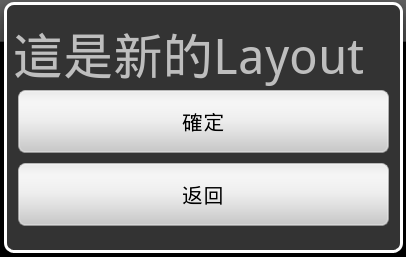
		LayoutInflater inflater = LayoutInflater.from(this);
		final View textEntryView = inflater
				.inflate(R.layout.dialoglayout, null);
		builder = new AlertDialog.Builder(context).create();

		Button OKBut = (Button) textEntryView.findViewById(R.id.okbut);
		OKBut.setOnClickListener(new OnClickListener() {
			@Override
			public void onClick(View v) {
				// TODO Auto-generated method stub
				Toast.makeText(Basis_AlertDialogActivity.this, "DialogBtn",
						Toast.LENGTH_LONG).show();
			}
		});

		Button BackBut = (Button) textEntryView.findViewById(R.id.backbut);
		BackBut.setOnClickListener(new OnClickListener() {
			@Override
			public void onClick(View v) {
				// TODO Auto-generated method stub
				builder.cancel();
			}
		});

		builder.setView(textEntryView);
		builder.show();
	}
完整的程式碼 alertDialog.zip