摘要:ASP.NET- 動態更新資料
閃爍
Timer
想達到即時更新,在ASP.NET內可以使用Timer來做執行緒,但是畫面又會一直閃爍,使用起來十分不方便,這邊教你如何達到畫面不閃爍也可以更新資料。
環境:Win 7 、 IIS7、 ASP.net 4.0
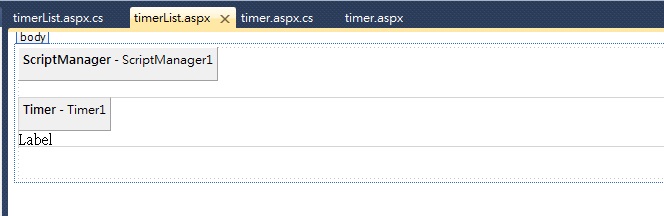
Step1 .在aspx設計畫面中 拉進一個 ScriptManager 以及UpdatePanel
Step2. 在UpdatePanel 中加入一個 Timer 並設定執行時間
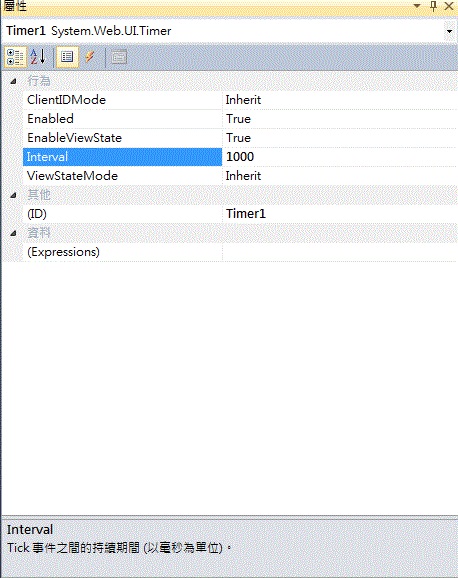
Step3. 放進一個 Lable 並在Timer 點兩下的後端貼上以下程式
  protected void Timer1_Tick(object sender, EventArgs e)
    {
        Label1.Text = "目前時間: " + DateTime.Now.ToLongTimeString();
    }
這樣就可以在網頁上顯示目前的時間了
附碼:前端碼
<!DOCTYPE html PUBLIC "-//W3C//DTD XHTML 1.0 Transitional//EN" "http://www.w3.org/TR/xhtml1/DTD/xhtml1-transitional.dtd">
<html xmlns="http://www.w3.org/1999/xhtml">
<head runat="server">
    <title></title>
</head>
<body>
    <form id="form1" runat="server">
    <div>
        <asp:ScriptManager ID="ScriptManager1" runat="server">
        </asp:ScriptManager>
        <br />
        <asp:UpdatePanel ID="UpdatePanel1" runat="server">
            <ContentTemplate>
                <asp:Timer ID="Timer1" runat="server" Interval="1000" ontick="Timer1_Tick">
                </asp:Timer>
                <asp:Label ID="Label1" runat="server" Text="Label"></asp:Label>
            </ContentTemplate>
        </asp:UpdatePanel>
        <br />
        <br />

    </div>
    </form>
</body>
</html>