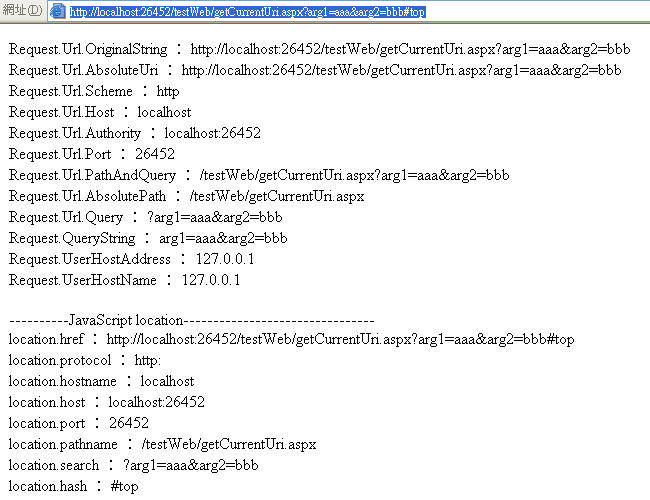
摘要:取得目前網址Uri的資訊
之前剛好在處理網址路徑的問題
在這裡記錄一下
.aspx檔
<%@ Page Language="C#" AutoEventWireup="true" CodeFile="getCurrentUri.aspx.cs" Inherits="getCurrentUri" %>
<!DOCTYPE html PUBLIC "-//W3C//DTD XHTML 1.0 Transitional//EN" "http://www.w3.org/TR/xhtml1/DTD/xhtml1-transitional.dtd">
<html xmlns="http://www.w3.org/1999/xhtml">
<head runat="server">
<title>未命名頁面</title>
</head>
<body>
<form id="form1" runat="server">
<div>
</div>
</form>
<script type="text/javascript">
//http://www.w3schools.com/htmldom/dom_obj_location.asp
document.write("----------JavaScript location--------------------------------" + "<br/>");
document.write("location.href : " + location.href + "<br/>");
document.write("location.protocol : " + location.protocol + "<br/>");
document.write("location.hostname : " + location.hostname + "<br/>");
document.write("location.host : " + location.host + "<br/>");
document.write("location.port : " + location.port + "<br/>");
document.write("location.pathname : " + location.pathname + "<br/>");
document.write("location.search : " + location.search + "<br/>");
document.write("location.hash : " + location.hash + "<br/>");
</script>
</body>
</html>
<!DOCTYPE html PUBLIC "-//W3C//DTD XHTML 1.0 Transitional//EN" "http://www.w3.org/TR/xhtml1/DTD/xhtml1-transitional.dtd">
<html xmlns="http://www.w3.org/1999/xhtml">
<head runat="server">
<title>未命名頁面</title>
</head>
<body>
<form id="form1" runat="server">
<div>
</div>
</form>
<script type="text/javascript">
//http://www.w3schools.com/htmldom/dom_obj_location.asp
document.write("----------JavaScript location--------------------------------" + "<br/>");
document.write("location.href : " + location.href + "<br/>");
document.write("location.protocol : " + location.protocol + "<br/>");
document.write("location.hostname : " + location.hostname + "<br/>");
document.write("location.host : " + location.host + "<br/>");
document.write("location.port : " + location.port + "<br/>");
document.write("location.pathname : " + location.pathname + "<br/>");
document.write("location.search : " + location.search + "<br/>");
document.write("location.hash : " + location.hash + "<br/>");
</script>
</body>
</html>
.cs檔
 using System;
 using
using  using System.Collections;using System.Configuration;using System.Data;using System.Web;using System.Web.Security;using System.Web.UI;using System.Web.UI.HtmlControls;using System.Web.UI.WebControls;
 using System.Web.UI.WebControls.WebParts;public partial class getCurrentUri : System.Web.UI.Page{
 protected void Page_Load(object sender, EventArgs e)
 {
{ if (!IsPostBack) { //http://msdn2.microsoft.com/zh-tw/library/system.uri(VS.80).aspx Uri uri = Request.Url; Response.Write("Request.Url.OriginalString : " + uri.OriginalString + "<br/>"); Response.Write("Request.Url.AbsoluteUri : " + uri.AbsoluteUri + "<br/>"); Response.Write("Request.Url.Scheme : " + uri.Scheme + "<br/>"); Response.Write("Request.Url.Host : " + uri.Host + "<br/>"); Response.Write("Request.Url.Authority : " + uri.Authority + "<br/>"); Response.Write("Request.Url.Port : " + uri.Port + "<br/>"); Response.Write("Request.Url.PathAndQuery : " + uri.PathAndQuery + "<br/>"); Response.Write("Request.Url.AbsolutePath : " + uri.AbsolutePath + "<br/>"); Response.Write("Request.Url.Query : " + uri.Query + "<br/>"); Response.Write("Request.QueryString : " + Request.QueryString.ToString() + "<br/>"); Response.Write("Request.UserHostAddress : " + Request.UserHostAddress + "<br/>"); Response.Write("Request.UserHostName : " + Request.UserHostName + "<br/>");
 } }}
} }}執行結果