摘要:活用Reflection - 新標籤系統之應用
目前新標籤系統在設計上遇到一些小難題,原先架構是讓users刷MO取得標籤ID然後動態呼叫LabelFunctions(用來產生列印標籤所需的資 訊,一個標籤會有一個function,名稱就是標籤ID且是唯一的(unique)),但因為整個OSE大概有400多支標籤一~二十個客戶,如果把全 部的function都寫在同一個檔案,屆時maintain的人應該會頭昏沒辦法有系統的管理所有的標籤程式。於是便依廠別(FT, FMC, FP...)分目錄再依各個客戶建立實體class檔案,將每個客戶自己的標籤程式放在一起,如下圖:
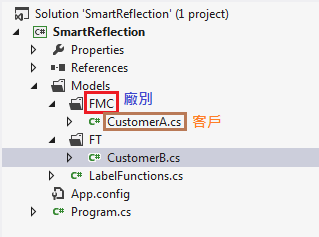
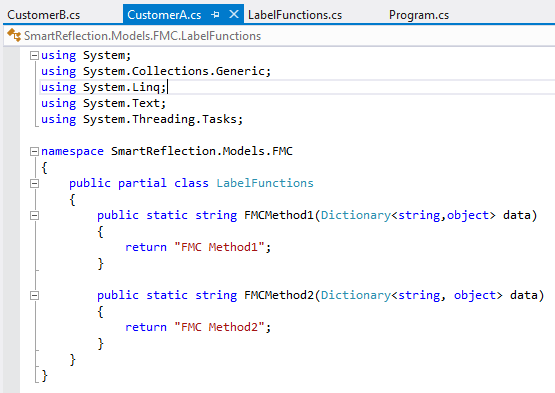
不過在新增class時Visual Studio會自動將目錄名稱append到namespace,例如在FMC這個廠底下新增一個客戶的class,其namespace會變成SmartReflection.Models.FMC,以上圖的例子來看,當這個project成功compile後會有2個LabelFunctions的type分別位於SmartReflection.Models.FMC以及SmartReflection.Models.FT,但圖中的LabelFunctions(用來動態呼叫標籤程式的公用type)的namespace卻是SmartReflection.Models,如果用下面的語法便會找不到指定的Method,因為LabelFunctions與客戶的namespace不同:
public static string Invoke(string methodName, Dictionary data)
{
    return typeof(LabelFunctions).GetMethod(methodName, BindingFlags.Public | BindingFlags.Static).Invoke(
        null, new object[] { data }) as string;
}
在一開始users刷MO的時候可以知道是哪個廠的標籤,因此就可以決定LabelFunctions的namespace也就可以找到所要執行的標籤程式,所以公用的LabelFunctions需要稍微調整一下:
public static string Invoke(Type type, string methodName, Dictionary data)
{
    return type.GetMethod(methodName, BindingFlags.Public | BindingFlags.Static).Invoke(null, new object[] { data }) as string;
}
type就是該標籤程式所在的LabelFunctions,type的取得方式有2種方法:
Console.WriteLine("Assign type directly:");
Console.WriteLine(LabelFunctions.Invoke(typeof(SmartReflection.Models.FMC.LabelFunctions), "FMCMethod1", null));
Console.WriteLine(LabelFunctions.Invoke(typeof(SmartReflection.Models.FMC.LabelFunctions), "FMCMethod2", null));
Console.WriteLine(LabelFunctions.Invoke(typeof(SmartReflection.Models.FT.LabelFunctions), "FTMethod1", null));
Console.WriteLine(LabelFunctions.Invoke(typeof(SmartReflection.Models.FT.LabelFunctions), "FTMethod2", null));

Console.WriteLine("Assign type via reflection:");
Type type;
type = Assembly.GetExecutingAssembly().GetType("SmartReflection.Models.FMC.LabelFunctions");
Console.WriteLine(LabelFunctions.Invoke(type, "FMCMethod1", null));
type = Assembly.GetExecutingAssembly().GetType("SmartReflection.Models.FT.LabelFunctions");
Console.WriteLine(LabelFunctions.Invoke(type, "FTMethod1", null));
第一種方法就是直接指定type的full name,不過這方法比較死板一點(hard-coded) 第二種方法則是可以動態的決定type的full name(由DB或其他程式邏輯組成)再透過Assembly的GetType取得最終的LabelFunctions。 這樣便能滿足新標籤系統的架構:每個廠別有自己的LabelFunctions (namespace不同),相同廠別的客戶有自己的class檔 (partial class)來maintain自己的標籤程式。 如果有新客戶則只需在該廠別的目錄上新增class,名稱為LabelFunctions,新增後再將class改為public partial class然後把檔名LabelFunctions改為該客戶的名稱即可。注意:這時Visual studio會出現提示訊息問你是否要連同class的name也一併修改,記得要選No喔!