[C#]讀寫 INI檔 Win32 API
INI 檔案,格式如下:
[Section1]
key1=value1
key2=value2
[Section2]
key1=value1
key2=value2
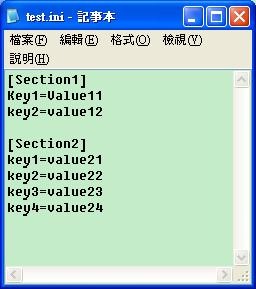
使用Win32 API
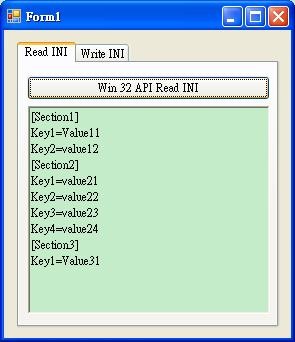
程式畫面
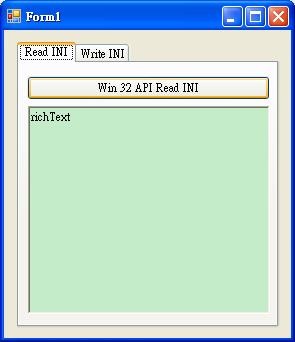
程式碼
Form類別
using System;
using System.IO;
using System.Windows.Forms;
namespace ReadWriteini
{
public partial class Form1 : Form
{
public Form1()
{
InitializeComponent();
}
/// <summary>
/// use Win 32 API read ini file.
/// </summary>
/// <param name="sender"></param>
/// <param name="e"></param>
private void win32apiread_Click(object sender, EventArgs e)
{
this.richTextBox1.Text = "";
using (CINI myCINI = new CINI(Path.Combine(Application.StartupPath, "test.ini")))
{
string result = "";
result += "[Section1]\n";
result += "Key1=" + myCINI.getKeyValue("Section1", "key1") + "\n";
result += "Key2=" + myCINI.getKeyValue("Section1", "key2") + "\n";
result += "[Section2]\n";
result += "Key1=" + myCINI.getKeyValue("Section2", "key1") + "\n";
result += "Key2=" + myCINI.getKeyValue("Section2", "key2") + "\n";
result += "Key3=" + myCINI.getKeyValue("Section2", "key3") + "\n";
result += "Key4=" + myCINI.getKeyValue("Section2", "key4") + "\n";
string a = myCINI.getKeyValue("Section3", "key1");
if (!(a == ""))
{
result += "[Section3]\n";
result += "Key1=" + myCINI.getKeyValue("Section3", "key1") + "\n";
}
this.richTextBox1.Text = result;
}
}
/// <summary>
/// use Win 32 API write ini file.
/// </summary>
/// <param name="sender"></param>
/// <param name="e"></param>
private void win32apiwrite_Click(object sender, EventArgs e)
{
using (CINI myCINI = new CINI(Path.Combine(Application.StartupPath, "test.ini")))
{
string section = textBox1.Text;
string key = textBox2.Text;
string value = textBox3.Text;
myCINI.setKeyValue(section, key, value);
}
}
}
}
INI類別
using System;
using System.Text;
using System.Runtime.InteropServices;
namespace ReadWriteini
{
class CINI:IDisposable
{
[DllImport("kernel32")]
private static extern long WritePrivateProfileString(string section, string key, string val, string filePath);
[DllImport("kernel32")]
private static extern int GetPrivateProfileString(string section, string key, string def, StringBuilder retVal, int size, string filePath);
private bool bDisposed = false;
private string _FilePath = string.Empty;
public string FilePath
{
get
{
if (_FilePath == null)
return string.Empty;
else
return _FilePath;
}
set
{
if (_FilePath != value)
_FilePath = value;
}
}
/// <summary>
/// 建構子。
/// </summary>
/// <param name="path">檔案路徑。</param>
public CINI(string path)
{
_FilePath = path;
}
/// <summary>
/// 解構子。
/// </summary>
~CINI()
{
Dispose(false);
}
/// <summary>
/// 釋放資源(程式設計師呼叫)。
/// </summary>
public void Dispose()
{
Dispose(true);
GC.SuppressFinalize(this); //要求系統不要呼叫指定物件的完成項。
}
/// <summary>
/// 釋放資源(給系統呼叫的)。
/// </summary>
protected virtual void Dispose(bool IsDisposing)
{
if (bDisposed)
{
return;
}
if (IsDisposing)
{
}
bDisposed = true;
}
/// <summary>
/// 設定 KeyValue 值。
/// </summary>
/// <param name="IN_Section">Section。</param>
/// <param name="IN_Key">Key。</param>
/// <param name="IN_Value">Value。</param>
public void setKeyValue(string IN_Section, string IN_Key, string IN_Value)
{
WritePrivateProfileString(IN_Section, IN_Key, IN_Value, this._FilePath);
}
/// <summary>
/// 取得 Key 相對的 Value 值。
/// </summary>
/// <param name="IN_Section">Section。</param>
/// <param name="IN_Key">Key。</param>
public string getKeyValue(string IN_Section, string IN_Key)
{
StringBuilder temp = new StringBuilder(255);
int i = GetPrivateProfileString(IN_Section, IN_Key, "", temp, 255, this._FilePath);
return temp.ToString();
}
/// <summary>
/// 取得 Key 相對的 Value 值,若沒有則使用預設值(DefaultValue)。
/// </summary>
/// <param name="Section">Section。</param>
/// <param name="Key">Key。</param>
/// <param name="DefaultValue">DefaultValue。</param>
public string getKeyValue(string Section, string Key, string DefaultValue)
{
StringBuilder sbResult = null;
try
{
sbResult = new StringBuilder(255);
GetPrivateProfileString(Section, Key, "", sbResult, 255, this._FilePath);
return (sbResult.Length > 0) ? sbResult.ToString() : DefaultValue;
}
catch
{
return string.Empty;
}
}
}
}
執行結果:
使用Win32API讀取
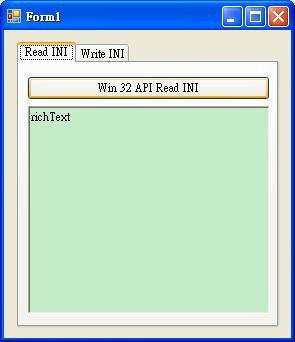
讀取結果

使用Win32API寫入
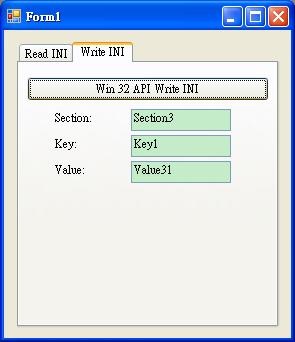
使用Win32API讀取
Source Code:
參考資料:
http://www.dotblogs.com.tw/atowngit/archive/2009/09/01/10358.aspx
如有錯誤,歡迎指正。
PS:不知道INI檔內Section&Key時,該怎樣讀取值呢?
新手發帖請多包涵
