在 Visual C# 2008 上使用 OpenGL,使用方式是透過CsGL ( C# Graphic Library )
一、簡介
以前研究所的時候,有使用 VC6 配合 OpenGL 做 3D 繪圖,今天嘗試看看如何在 Visual C# 2008 上使用 OpenGL。
二、方法
1. 下載 CsGL
在網路上,找到叫 CsGL ( C sharp Graphics Library ) 的Library ,CsGL 是個方便的 C-library OpenGL ,而且允許使用在任何 .NET 語言上,點這裡下載 csgl.1.4.1.dll.zip
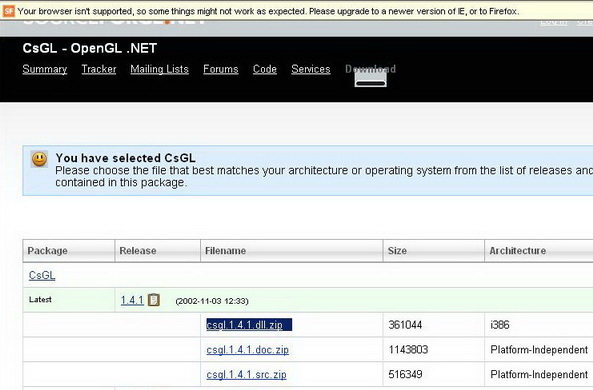
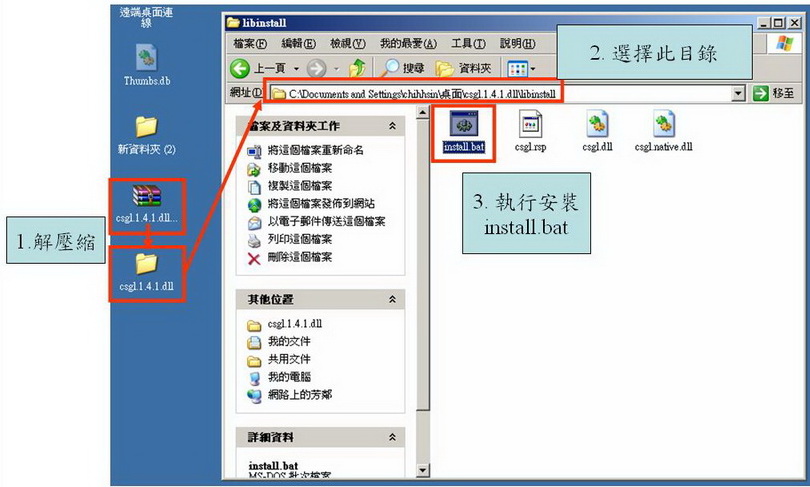
2. 安裝與加入csgl.1.4.1.dll
下載完 csgl.1.4.1.dll.zip 後, 先解壓縮,解壓縮後再執行 \csgl.1.4.1.dll\libinstall\install.bat
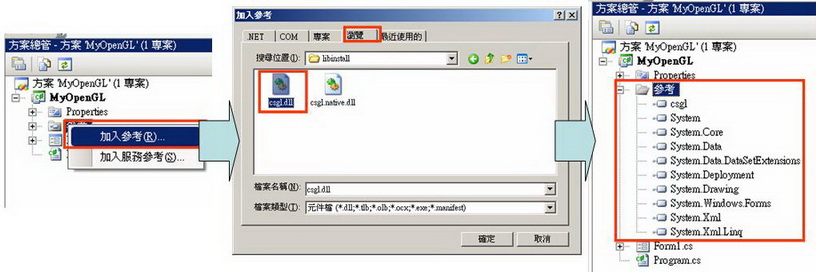
3. 新增專案,csgl.dll 加入參考
先[新增專案] -> [ Visual C# ] -> [ WIndows Form 應用程式 ],接著將 csgl.dll 加入參考
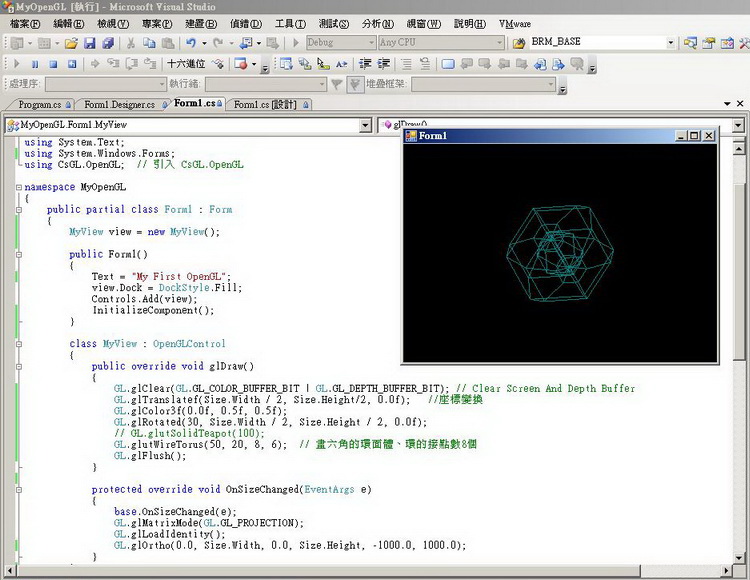
4. 撰寫程式碼,畫一個六角的環面體、環的接點數8個
01  using System;
02 using System.Collections.Generic;
03using System.ComponentModel;
04using System.Data;
05using System.Drawing;
06using System.Linq;
07using System.Text;
08using System.Windows.Forms;
09 using CsGL.OpenGL; // 引入 CsGL.OpenGL
10
11namespace MyOpenGL
12{
13 public partial class Form1 : Form
14 {
{
15 MyView view = new MyView();
16
17 public Form1()
18 {
19 Text = "My First OpenGL";
20 view.Dock = DockStyle.Fill;
21 Controls.Add(view);
22 InitializeComponent();
23 }
}
24
25 class MyView : OpenGLControl
26 {
27 public override void glDraw()
28 {
29 GL.glClear(GL.GL_COLOR_BUFFER_BIT | GL.GL_DEPTH_BUFFER_BIT); // Clear Screen And Depth Buffer
30 GL.glTranslatef(Size.Width / 2, Size.Height/2, 0.0f); //座標變換
31 GL.glColor3f(0.0f, 0.5f, 0.5f);
32 GL.glRotated(30, Size.Width / 2, Size.Height / 2, 0.0f);
33 // GL.glutSolidTeapot(100);
34 GL.glutWireTorus(50, 20, 8, 6); // 畫六角的環面體、環的接點數8個
35 GL.glFlush();
36 }
37
38 protected override void OnSizeChanged(EventArgs e)
39 {
40 base.OnSizeChanged(e);
41 GL.glMatrixMode(GL.GL_PROJECTION);
42 GL.glLoadIdentity();
43 GL.glOrtho(0.0, Size.Width, 0.0, Size.Height, -1000.0, 1000.0);
44 }
45 }
46 }
47}
using System;  using
using 02
using System.Collections.Generic; 03
using System.ComponentModel; 04
using System.Data; 05
using System.Drawing; 06
using System.Linq; 07
using System.Text; 08
using System.Windows.Forms; 09
using CsGL.OpenGL; // 引入 CsGL.OpenGL 10
11
namespace MyOpenGL 12
{ 13
public partial class Form1 : Form 14
{ 
15
MyView view = new MyView(); 16
17
public Form1() 18
{ 19
Text = "My First OpenGL"; 20
view.Dock = DockStyle.Fill; 21
Controls.Add(view); 22
InitializeComponent(); 23
} 24
25
class MyView : OpenGLControl 26
{ 27
public override void glDraw() 28
{ 29
GL.glClear(GL.GL_COLOR_BUFFER_BIT | GL.GL_DEPTH_BUFFER_BIT); // Clear Screen And Depth Buffer 30
GL.glTranslatef(Size.Width / 2, Size.Height/2, 0.0f); //座標變換 31
GL.glColor3f(0.0f, 0.5f, 0.5f); 32
GL.glRotated(30, Size.Width / 2, Size.Height / 2, 0.0f); 33
// GL.glutSolidTeapot(100); 34
GL.glutWireTorus(50, 20, 8, 6); // 畫六角的環面體、環的接點數8個 35
GL.glFlush(); 36
} 37
38
protected override void OnSizeChanged(EventArgs e) 39
{ 40
base.OnSizeChanged(e); 41
GL.glMatrixMode(GL.GL_PROJECTION); 42
GL.glLoadIdentity(); 43
GL.glOrtho(0.0, Size.Width, 0.0, Size.Height, -1000.0, 1000.0); 44
} 45
} 46
} 47
}
5. 執行結果
三、參考
C# Graphics Library