Spring.DataQuickStart
之前在公司中參與了一個專案,使用了 Spring.net 的架構,在這將套用的步驟簡略的描述一下
之前在公司中參與了一個專案,使用了 Spring.net 的架構,在這將套用的步驟簡略的描述一下
使用的 DBMS 為 Microsoft SQL Server 2005 Express Edition Service Pack 2
下載網址為
使用的 資料庫為 Northwind
下載網址為
上列2項請先完成安裝,在此主要是針對套用 Spring.net 的部份說明
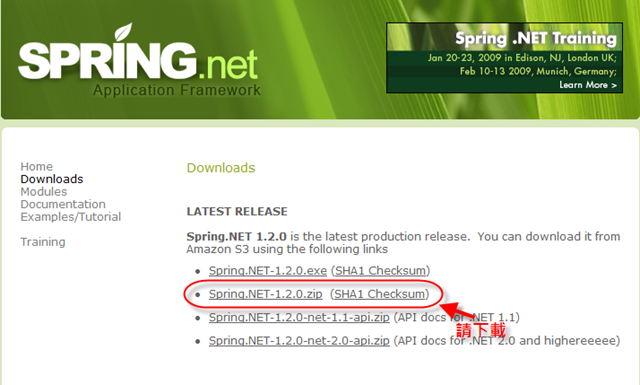
- 下載 Spring.net http://www.springframework.net/download.html
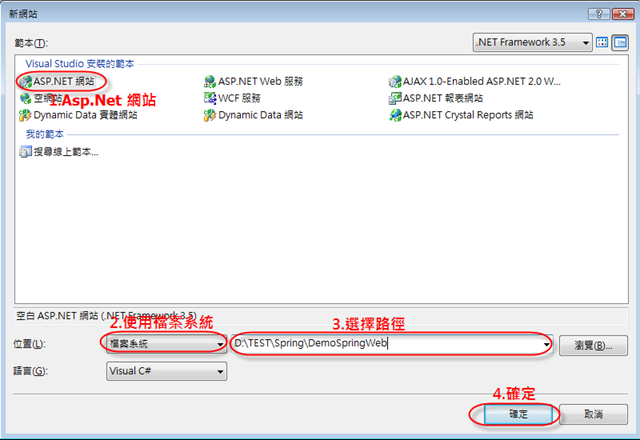
- 執行VS2008建立一個ASP.Net 網站,使用檔案系統
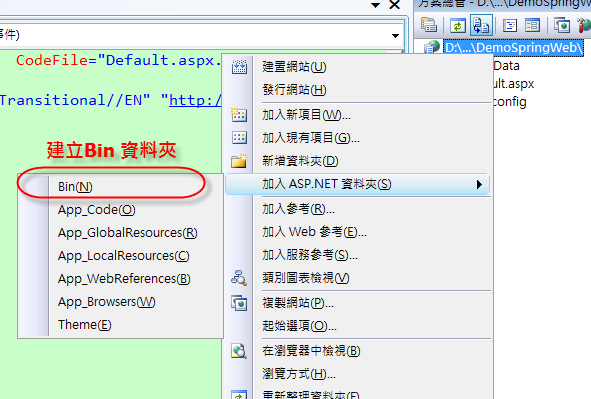
- 建立 ASP.Net 網站的BIN資料夾
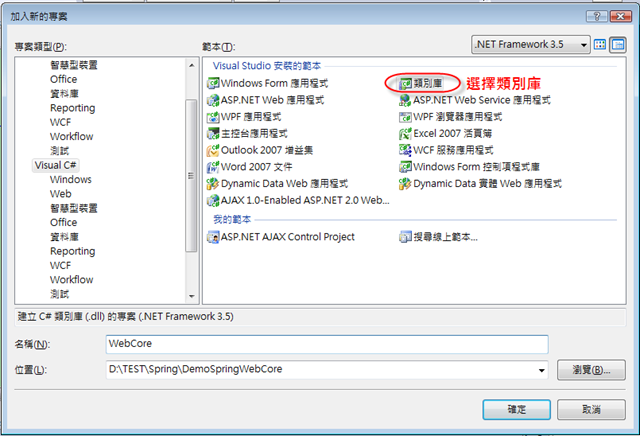
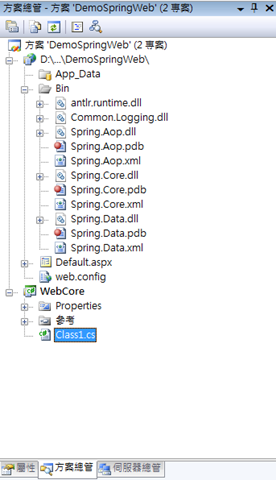
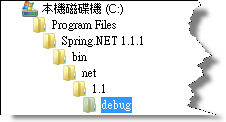
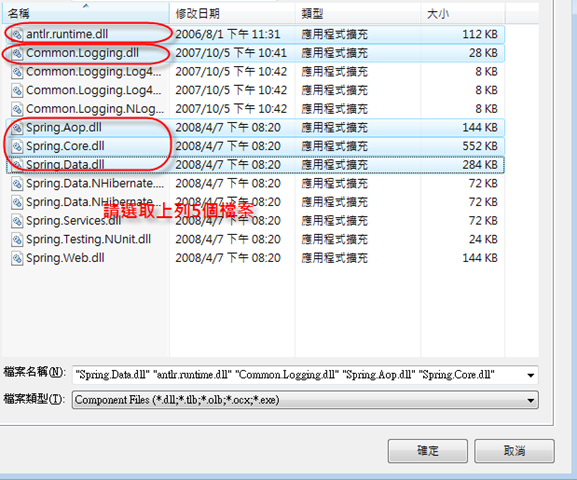
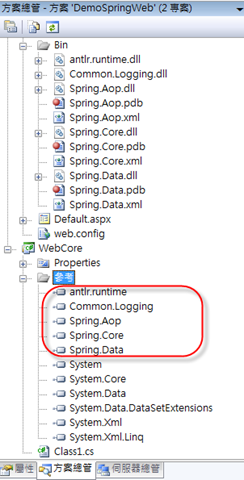
- 在類別庫專案中加入 spring.net 的相關 DLL
- 建立一個 Domain Object
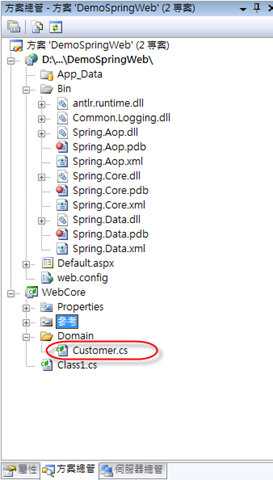
建立一個 Customer 的 Object 用來將資料庫中的資料行轉為 Object
using System.Collections.Generic;
using System.Linq;
using System.Text;
using System.Collections;

namespace WebCore.Domain
{
    public class Customer
    {
        #region Fields

        protected string id;
        protected string companyName;
        protected string contactName;
        protected string contactTitle;
        protected string address;
        protected string city;
        protected string region;
        protected string postalCode;
        protected string country;
        protected string phone;
        protected string fax;
        protected IList orders;

        #endregion

        #region Properties

        public string Id
        {
            get { return id; }
            set { id = value; }
        }

        public string CompanyName
        {
            get { return companyName; }
            set { companyName = value; }
        }

        public string ContactName
        {
            get { return contactName; }
            set { contactName = value; }
        }

        public string ContactTitle
        {
            get { return contactTitle; }
            set { contactTitle = value; }
        }

        public string Address
        {
            get { return address; }
            set { address = value; }
        }

        public string City
        {
            get { return city; }
            set { city = value; }
        }

        public string Region
        {
            get { return region; }
            set { region = value; }
        }

        public string PostalCode
        {
            get { return postalCode; }
            set { postalCode = value; }
        }

        public string Country
        {
            get { return country; }
            set { country = value; }
        }

        public string Phone
        {
            get { return phone; }
            set { phone = value; }
        }

        public string Fax
        {
            get { return fax; }
            set { fax = value; }
        }

        public IList Orders
        {
            get
            {
                if (orders == null)
                {
                    orders = new ArrayList();
                }
                return orders;
            }
            set { orders = value; }
        }

        #endregion

        #region Constructor (s)

        public Customer()
        {
        }

        public Customer(string companyName, string contactName, string contactTitle, string address, string city,
                        string region, string postalCode, string country, string phone, string fax)
        {
            this.companyName = companyName;
            this.contactName = contactName;
            this.contactTitle = contactTitle;
            this.address = address;
            this.city = city;
            this.region = region;
            this.postalCode = postalCode;
            this.country = country;
            this.phone = phone;
            this.fax = fax;
        }

        #endregion
    }
}- 建立一 Row Mapper 的Class 在 將資料庫中 Table 資料轉換為 Object 時 指名對應關係的 物件
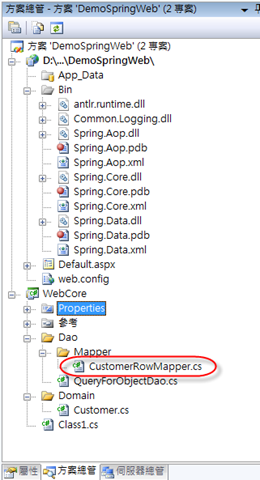
CustomerRowMapper 的原始程式碼
1: using System;
2: using System.Collections.Generic;
3: using System.Linq;
4: using System.Text;
5: using Spring.Data;
6: using System.Data;
7: using WebCore.Domain;
8: 9: namespace WebCore.Dao.Mapper
10: {11: public class CustomerRowMapper : IRowMapper
12: {13: /// <summary>
14: /// Map a row of data to a Customer object.
15: /// </summary>
16: /// <remarks>This method should not call Next() on the
17: /// DataReader; it should only extract the values of the current row.
18: /// </remarks>
19: /// <param name="dataReader">The IDataReader to map</param>
20: /// <param name="rowNum">the number of the current row.</param>
21: /// <returns>A Customer object.</returns>
22: public object MapRow(IDataReader dataReader, int rowNum)
23: {24: Customer customer = new Customer();
25: customer.Address = dataReader.GetString(0); 26: customer.City = dataReader.GetString(1); 27: customer.CompanyName = dataReader.GetString(2); 28: customer.ContactName = dataReader.GetString(3); 29: customer.ContactTitle = dataReader.GetString(4); 30: customer.Country = dataReader.GetString(5); 31: customer.Fax = dataReader.GetString(6); 32: customer.Id = dataReader.GetString(7); 33: customer.Phone = dataReader.GetString(8); 34: customer.PostalCode = dataReader.GetString(9); 35: customer.Region = dataReader.GetString(10);36: return customer;
37: } 38: } 39: 40: }- 建立一資料存取的 class
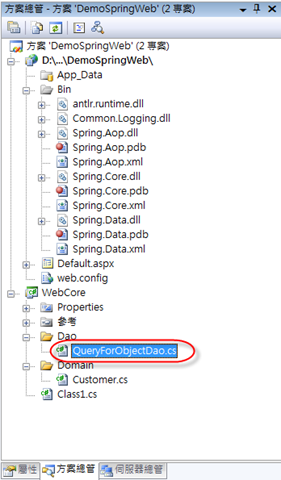
QueryForObjectDao 的程式碼,傳入 contactName 取回對應的客戶資料
1: using System;
2: using System.Collections.Generic;
3: using System.Linq;
4: using System.Text;
5: using Spring.Data.Core;
6: using System.Data;
7: using WebCore.Domain;
8: using WebCore.Dao.Mapper;
9: 10: 11: namespace WebCore.Dao
12: {13: public class QueryForObjectDao : AdoDaoSupport
14: {15: private string cmdText = @"select Address, City, CompanyName, ContactName, " +
16: "ContactTitle, Country, Fax, CustomerID, Phone, PostalCode, " +
17: "Region from Customers where ContactName = @ContactName";
18: 19: public Customer GetCustomer(string contactName)
20: {21: return (Customer)AdoTemplate.QueryForObject(CommandType.Text, cmdText, new CustomerRowMapper(),
22: "ContactName", DbType.String, 30, contactName);
23: } 24: } 25: 26: }- 增加 Spring 的設定檔
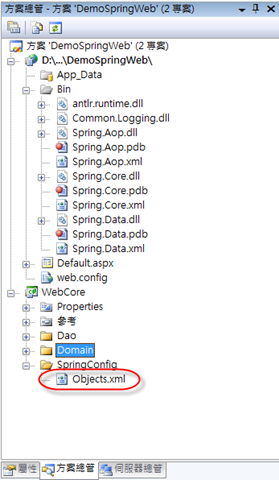
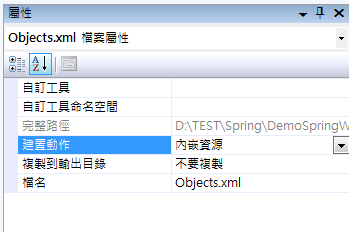
Objects.xml的內容,記得將檔案的建置動作 設為 內嵌資源
1: <?xml version="1.0" encoding="utf-8" ?>
2: <objects xmlns="http://www.springframework.net"
3: xmlns:db="http://www.springframework.net/database">
4: 5: <!-- MS SQL Server 設定 -->
6: <object type="Spring.Objects.Factory.Config.PropertyPlaceholderConfigurer, Spring.Core">
7: <property name="ConfigSections" value="databaseSettings"/>
8: </object>
9: <!--<db:provider id="DbProvider"
10: provider="SqlServer-2.0"
11: connectionString="Data Source=.\SQLEXPRESS;Initial Catalog=Northwind;Persist Security Info=True;User ID=BOK_BEST;Password=BOK_BEST"/>-->
12: <db:provider id="DbProvider"
13: provider="SqlServer-2.0"
14: connectionString="Server=${db.datasource};Database=${db.database};User ID=${db.user};Password=${db.password};"/>
15: 16: <object id="adoTemplate" type="Spring.Data.Core.AdoTemplate, Spring.Data">
17: <property name="DbProvider" ref="DbProvider"/>
18: <property name="DataReaderWrapperType" value="Spring.Data.Support.NullMappingDataReader, Spring.Data"/>
19: </object>
20: <object id="queryForObjectDao" type="WebCore.Dao.QueryForObjectDao, WebCore">
21: <property name="AdoTemplate" ref="adoTemplate"/>
22: </object>
23: 24: <!--Transaction proxy 設定-->
25: <object id="TxProxyConfigurationTemplate" abstract="true"
26: type="Spring.Transaction.Interceptor.TransactionProxyFactoryObject, Spring.Data">
27: <property name="PlatformTransactionManager" ref="TransactionManager"/>
28: <property name="TransactionAttributes">
29: <name-values>
30: <!-- 你要把哪些 method(s) 納入交易控管 -->
31: <add key="*Update*" value="PROPAGATION_REQUIRED" />
32: <add key="Delete*" value="PROPAGATION_REQUIRED" />
33: <add key="Create*" value="PROPAGATION_REQUIRED" />
34: <add key="Save*" value="PROPAGATION_REQUIRED"/>
35: <add key="Copy*" value="PROPAGATION_REQUIRED"/>
36: <add key="Afresh*" value="PROPAGATION_REQUIRED"/>
37: <add key="TransferCase" value="PROPAGATION_REQUIRED"/>
38: </name-values>
39: </property>
40: <!-- note you can use alias names so that this configuration file is -->
41: <!-- not dependent on the precise object name of the logging advice -->
42: <!--下面這一行 是用來設定 Transaction 發生錯誤的時候的 Log 機制
43: <property name="PreInterceptors" ref="Log4NetLoggingAroundAdvice"/>-->
44: </object>
45: 46: </objects>
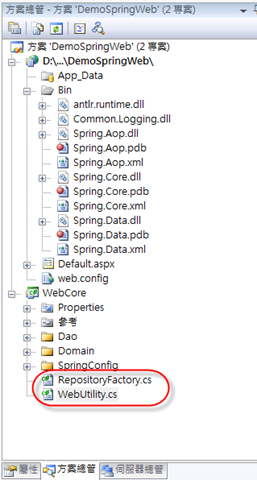
- 增加二個共用類別
1: using System;
2: using System.Collections.Generic;
3: using System.Linq;
4: using System.Text;
5: using Spring.Context.Support;
6: using Spring.Context;
7: 8: namespace WebCore
9: {10: public class RepositoryFactory
11: {12: private static IApplicationContext ctx = null;
13: 14: public RepositoryFactory()
15: { 16: } 17: 18: public RepositoryFactory(IApplicationContext applicationContext)
19: { 20: RepositoryFactory.ApplicationContext = applicationContext; 21: } 22: 23: public static IApplicationContext ApplicationContext
24: { 25: get 26: {27: if (ctx == null)
28: { 29: ctx = ContextRegistry.GetContext(); 30: }31: return ctx;
32: }33: set { ctx = value; }
34: } 35: 36: public object Service(String ServiceName)
37: {38: return RepositoryFactory.ApplicationContext[ServiceName];
39: } 40: 41: public object Dao(String DaoName)
42: {43: return RepositoryFactory.ApplicationContext[DaoName];
44: } 45: 46: } 47: }
1: using System;
2: using System.Collections.Generic;
3: using System.Linq;
4: using System.Text;
5: using Spring.Context.Support;
6: 7: namespace WebCore
8: {9: public sealed class WebUtility
10: {11: private static RepositoryFactory m_repository = null;
12: 13: //public WebUtility()
14: //{
15: // //
16: // // TODO: Add constructor logic here
17: // //
18: //}
19: 20: public static RepositoryFactory Repository
21: { 22: get 23: {24: if (m_repository == null)
25: {26: m_repository = new RepositoryFactory(ContextRegistry.GetContext());
27: }28: return m_repository;
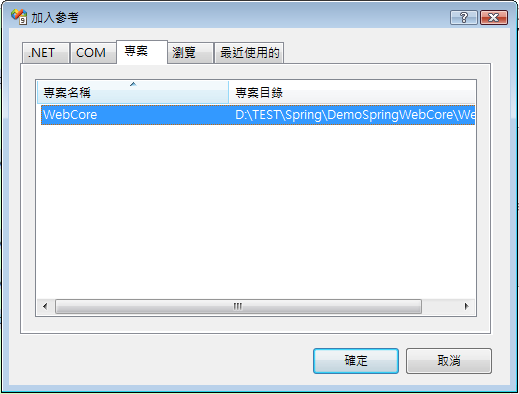
29: } 30: } 31: 32: } 33: }- 上列已完成 Library 的設定,請選擇 Web Project 將 WebCore 加入專案參考
- 設定web.config
在 configSections 節點下加入 Spring 的設定
<sectionGroup name="spring"><section name="context" type="Spring.Context.Support.ContextHandler, Spring.Core"/>
<section name="parsers" type="Spring.Context.Support.NamespaceParsersSectionHandler, Spring.Core"/>
</sectionGroup>
<section name="databaseSettings" type="System.Configuration.NameValueSectionHandler, System, Version=1.0.5000.0, Culture=neutral, PublicKeyToken=b77a5c561934e089"/>
在configuration 節點下加入下列設定,包含資料庫的相關設定請自行輸入 使用者ID /密碼
1: <spring>
2: <parsers>
3: <parser type="Spring.Data.Config.DatabaseNamespaceParser, Spring.Data"/>
4: </parsers>
5: <context>
6: <resource uri="assembly://WebCore/WebCore.SpringConfig/Objects.xml"/>
7: <!--<resource uri="~/objects.xml"/>-->
8: </context>
9: </spring>
10: <databaseSettings>
11: <add key="db.datasource" value=".\sqlexpress"/>
12: <add key="db.user" value="自行輸入使用ID"/>
13: <add key="db.password" value="自行輸入PSW"/>
14: <add key="db.database" value="Northwind"/>
15: </databaseSettings>
- 撰寫 測試程式 Default.aspx
請先在畫面上新增 一個 TextBox、一個 Button、一個 Label
編輯程式
1: using System;
2: using System.Collections.Generic;
3: using System.Linq;
4: using System.Web;
5: using System.Web.UI;
6: using System.Web.UI.WebControls;
7: using Spring.Context;
8: 9: public partial class _Default : System.Web.UI.Page
10: {11: private WebCore.Dao.QueryForObjectDao _QueryForObjectDao;
12: 13: protected void Page_Load(object sender, EventArgs e)
14: {15: _QueryForObjectDao = (WebCore.Dao.QueryForObjectDao)WebCore.WebUtility.Repository.Service("queryForObjectDao");
16: }17: protected void Button1_Click(object sender, EventArgs e)
18: {19: WebCore.Domain.Customer cust = this._QueryForObjectDao.GetCustomer(TextBox1.Text);
20: Label1.Text = cust.Id; 21: } 22: }<asp:Button ID="Button1" runat="server" onclick="Button1_Click" Text="Button" />
- 執行 Web Project 在 TextBox 中輸入 Ana Trujillo 按下 Button 即可取回對應的客戶資料
以上為粗略的設定,相關的內容請參考
http://www.springframework.cn/document/Spring.NET_Document_CN/Index.htm