如何在ASP.NET使用Facebook API實作Facebook Login
一、前言
最近剛好有專案要使用到Facebook API來製作網站登入的功能。於是使用google搜尋了一下,發現過去很多人寫的sample所使用的技術都已經是即將被Facebook淘汰的技術,所以只好自己參考一些原始文件來做測試。
以下是一些以舊技術實作的參考網站,由於對於了解Facebook API的沿革有幫助,我也列在這裡:
以上的網站的範例大多是使用FBML或是XFBML的技術做的,但是Facebook官網已經列入即將淘汰的技術:
目前Facebook官網建議的做法是使用Javascript SDK來實作Graph API,請自行參考相關的連結。
二、準備作業
1. 申請Facebook應用程式ID
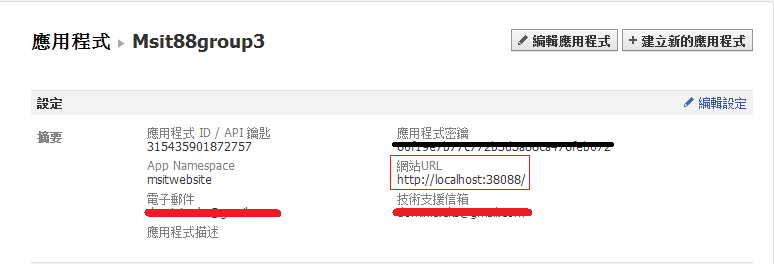
在實作Facebook API以前,首先第一步是要先到Facebook開發者網站申請一個網頁應用程式的ID及密鑰如下圖,其中最重要的是要填寫網站URL(SiteURL),這個網址在開發階段使用http://localhost:port/就可以,網站上線以後記得改成正式的網址。
2. 使用NuGet在Visual Studio 2010的Web應用程式下載相關套件
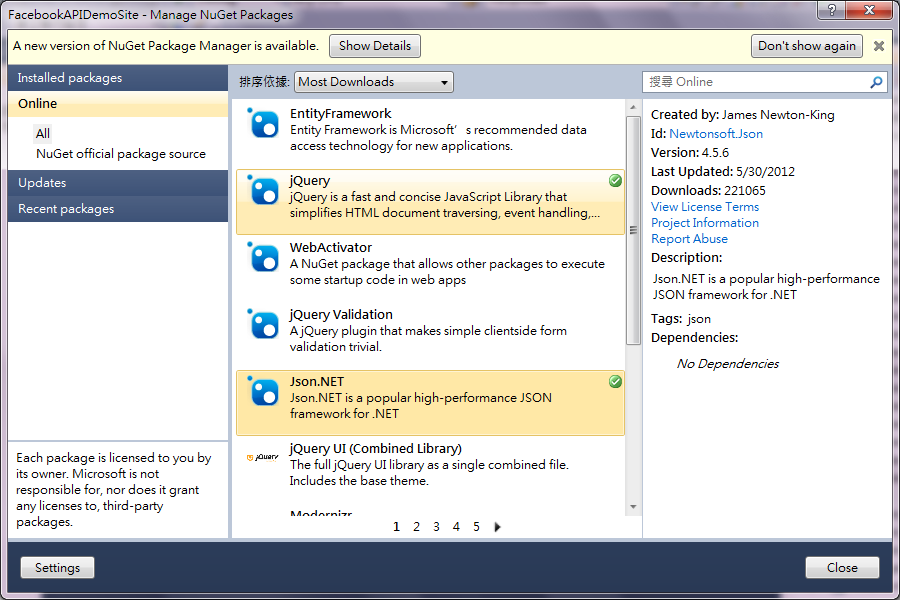
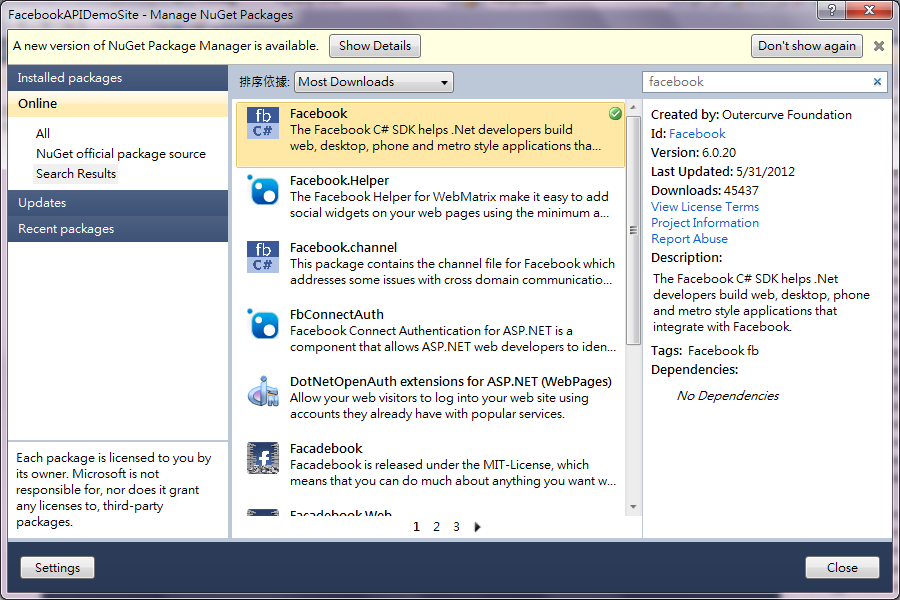
當然直接使用Facebook提供的Javascript SDK就可以在ASP.NET的網站應用程式中做出登入的功能,但是為了便於處理Facebook回傳的資料以及與Facebook的Graph API溝通,建議透過NuGet下載以下套件:
jQuery
Json.NET
Facebook C# SDK
3. 設定專案的執行環境
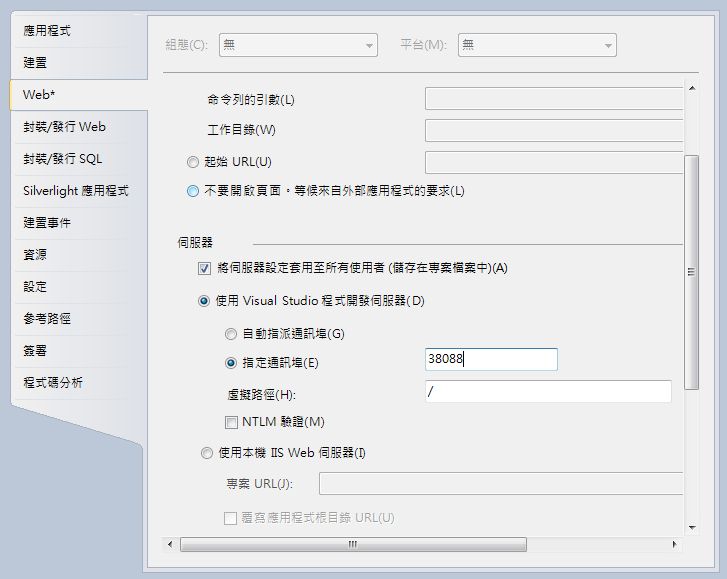
在專案上按滑鼠右鍵,進入專案設定的畫面,選擇Web,在"使用Visual Studio程式開發伺服器"中,選擇"指定通訊埠",填入通訊埠的號碼,記得填入的號碼要和Facebook應用程式的網站URL一致。
三、簡單的Facebook C# SDK範例
當以上的準備工作完成之後,就可以開始第一個使用Facebook C# SDK的網頁應用程式。
首先建立一個GetData.aspx的文件,在<form></form>的地方插入以下的程式碼,來顯示從Graphic API取得的資訊。
<form id="form1" runat="server">
<div>
<table id="facebookinfo">
<tr>
<td width="140"><b>Facebook ID:</b></td> |
然後在GetData.aspx.cs中加入以下程式碼:
其中HttpUtility.HtmlDecode()是把Htmlcode轉成一般的文字
using Facebook;
...
	protected void Page_Load(object sender, EventArgs e)
        {
            /* FBClient.Get("573332230") = "https://graph.facebook.com/573332230"
             * 573332230是Facebook的物件ID,也可以用登入ID取代
             */
            var FBClient = new FacebookClient();
            dynamic meinfo = FBClient.Get("573332230");

            if (!Page.IsPostBack)
            {
                this.txtFacebookID.Text = HttpUtility.HtmlDecode(meinfo.id);
                this.txtName.Text = HttpUtility.HtmlDecode(meinfo.name);
                this.txtLink.Text = HttpUtility.HtmlDecode(meinfo.link);
                this.txtGender.Text = HttpUtility.HtmlDecode(meinfo.gender);
                this.txtLocale.Text = HttpUtility.HtmlDecode(meinfo.locale);
            }
        }
|
如此就完成了第一個使用Facebook Graph API的ASP.NET應用程式。
以上的範例並不需要註冊應用程式ID,也不需要被查詢的人的同意,所以能取得的資訊也很有限。以下的範例就是取得使用者同意下,能存取更多Facebook的物件。
四、實作Facebook Javascript SDK與Facebook C# SDK作登入
首先建立一個LoginAuth.aspx的文件,在<form></form>的地方插入以下的程式碼,來顯示從Facebook API取得的相關資訊。
    <form id="form1" runat="server">
    <div>
        <b>屬性:</b><asp:DropDownList ID="ddlUserInfo" runat="server"
            AutoPostBack=true
            onselectedindexchanged="ddlUserInfo_SelectedIndexChanged">
        </asp:DropDownList>
        <br />
        <b>值:</b><asp:TextBox ID="txtValue" runat="server" Width="300"></asp:TextBox>
    </div>
    </form>
|
然後參考Facebook C# SDK說明文件的說明,加入以下的Facebook Javascript SDK,並使用jQuery的$.post()的AJAX函數來把應用程式對使用者的Access Token傳回給伺服器端。
<script type="text/javascript">
    window.fbAsyncInit = function () {
        FB.init({
            appId: '應用程式ID/API KEY', // App ID
            status: true, // check login status
            cookie: true, // enable cookies to allow the server to access the session
            xfbml: true  // parse XFBML
        });

        // 處理當使用者按下登入按鈕
FB.Event.subscribe('auth.authResponseChange', function (response) {
if (response.status === 'connected') {
// the user is logged in and has authenticated your
// app, and response.authResponse supplies
// the user's ID, a valid access token, a signed
// request, and the time the access token
// and signed request each expire
var uid = response.authResponse.userID;
var accessToken = response.authResponse.accessToken;
// TODO: Handle the access token
$.post("FacebookLoginHandler.ashx", { AccessToken: accessToken });
} else if (response.status === 'not_authorized') {
// the user is logged in to Facebook,
// but has not authenticated your app
} else {
// the user isn't logged in to Facebook.
}
});
// 處理當使用者已經登入 FB.getLoginStatus(function (response) {
if (response.status === 'connected') {
// the user is logged in and has authenticated your
// app, and response.authResponse supplies
// the user's ID, a valid access token, a signed
// request, and the time the access token
// and signed request each expire
var uid = response.authResponse.userID;
var accessToken = response.authResponse.accessToken;
$.post("FacebookLoginHandler.ashx", { AccessToken: accessToken });
} else if (response.status === 'not_authorized') {
// the user is logged in to Facebook,
// but has not authenticated your app
} else {
// the user isn't logged in to Facebook.
}
});
};
// Load the SDK Asynchronously
(function (d) {
var js, id = 'facebook-jssdk', ref = d.getElementsByTagName('script')[0];
if (d.getElementById(id)) { return; }
js = d.createElement('script'); js.id = id; js.async = true;
js.src = "//connect.facebook.net/en_US/all.js";
ref.parentNode.insertBefore(js, ref);
} (document));
</script>
|
最後加入Facebook Login Button:
fb-login-button的屬性可以參考Facebook官網的說明。
<div class="fb-login-button" data-show-faces="true" data-width="200" data-max-rows="1" scope="email,user_birthday">Login with Facebook</div> |
如此就完成了瀏覽頁面UI的設計,接下來是伺服器端要如何去接收使用者的Access Token及如何運用Access Token取得使用者在Facebook的資訊。
首先新增一個"泛型處理常式"的項目FacebookLoginHandler.ashx,注意檔名要和$.post()指定的URL要一樣。
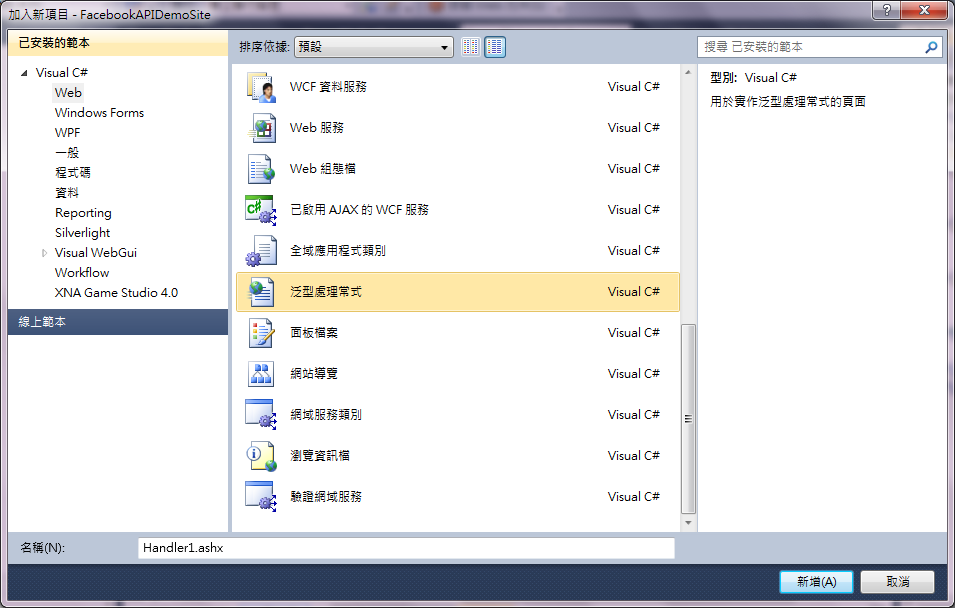
並在FacebookLoginHandler.ashx.cs加入以下的程式碼:
using System.Web.SessionState;
...
    /* 在Handler裡如何取得、設定Session的值?
     * 1. using System.Web.SessionState;
     * 2. 實作IRequiresSessionState介面
     */
    public class FacebookLoginHandler : IHttpHandler, IRequiresSessionState
    {

        public void ProcessRequest(HttpContext context)
        {

            var accessToken = context.Request.Params["AccessToken"];
            //把AccessToken存到一個Session物件
            context.Session["AccessToken"] = accessToken;
	    //重新導向回到LoginAuth.aspx
            context.Response.Redirect("LoginAuth.aspx");

        }

        public bool IsReusable
        {
            get
            {
                return false;
            }
        }
    }
|
最後在LoginAuth.aspx使用使用者的Access Token來取得使用者的個人資料,程式碼如下:
using Facebook;
...
IDictionary |
其中me是關鍵字,代表符合acessToken的使用者。IDictionary則是參考Facebook C# SDK的文件,代表Facebook C# SDK回傳的資料型態。