前一篇測試了 Scriban,主要目的就是希望在 .NET 10 裡面
可以讓前端頁面在執行期直接修改,不用每次都重新 Build、Publish、Deploy..
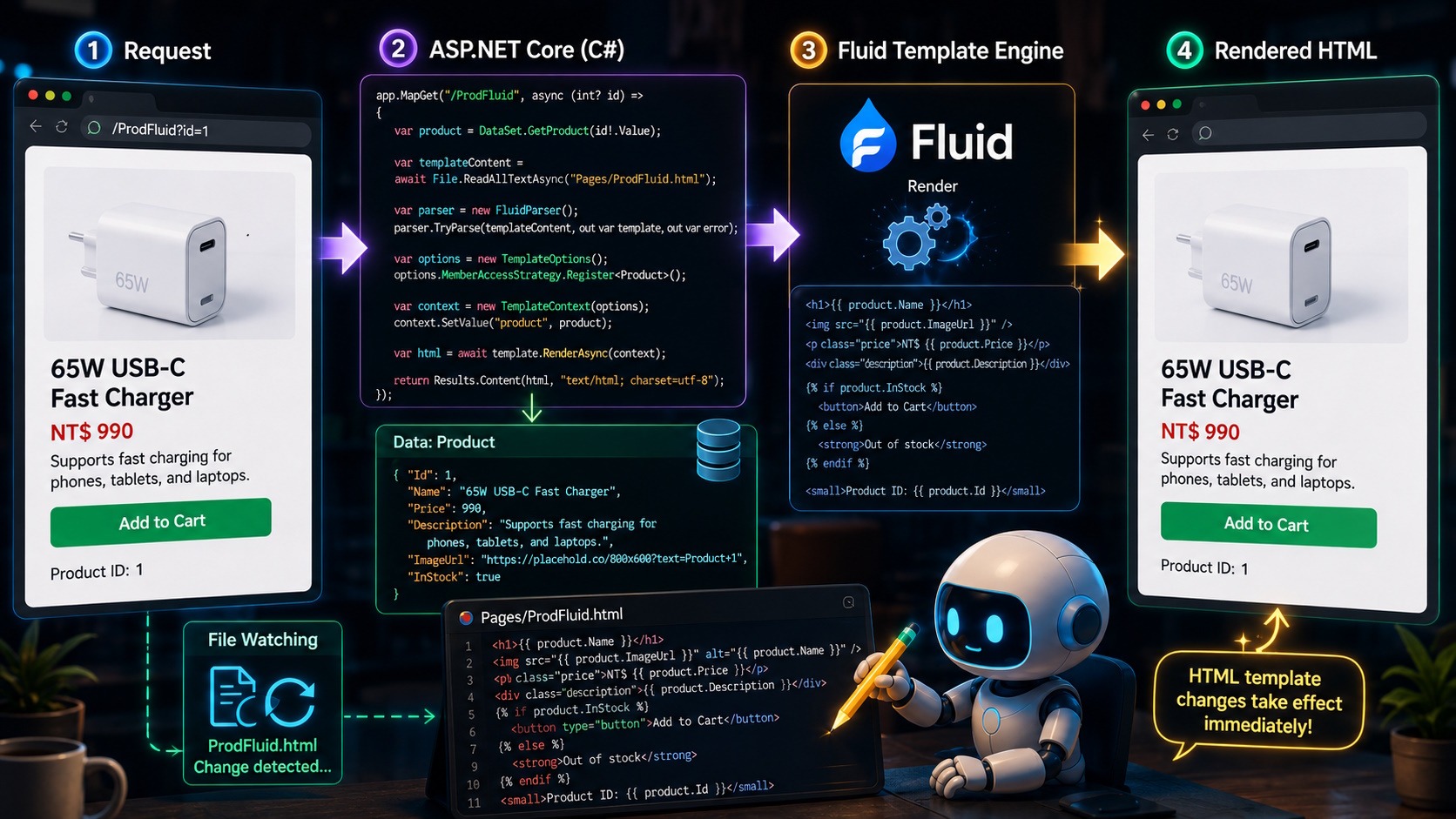
今天再測另外一套 Fluid
它也是後端 Template Engine,一樣可以由 .NET 取得資料之後,Render 完整 HTML 回傳
所以 SSR 還是在,SEO 也沒有問題
這次一樣沿用前面的商品案例
目標就是:
/ProdFluid?id=1然後可以在程式執行中直接修改 Pages/ProdFluid.html,不需要重新 Build
1. 先安裝 Fluid
dotnet add package Fluid.Core2. Product Model 一樣沿用之前的
namespace TestWebApp.Models;

public sealed class Product
{
    public int Id { get; init; }

    public string Name { get; init; } = string.Empty;

    public decimal Price { get; init; }

    public string Description { get; init; } = string.Empty;

    public string ImageUrl { get; init; } = string.Empty;

    public bool InStock { get; init; }
}
DataSet 也一樣,單純測試就先用記憶體資料
using TestWebApp.Models;

namespace TestWebApp.Data;

public static class DataSet
{
    public static IReadOnlyDictionary<int, Product> Products { get; } =
        new Dictionary<int, Product>
        {
            [1] = new Product
            {
                Id = 1,
                Name = "65W USB-C 快充充電器",
                Price = 990,
                Description = "支援手機、平板及筆電快速充電。",
                ImageUrl = "https://placehold.co/800x600?text=Product+1",
                InStock = true
            },
            [2] = new Product
            {
                Id = 2,
                Name = "藍牙無線喇叭",
                Price = 1680,
                Description = "小型輕量設計,支援藍牙連線。",
                ImageUrl = "https://placehold.co/800x600?text=Product+2",
                InStock = false
            },
            [3] = new Product
            {
                Id = 3,
                Name = "多功能無線充電座",
                Price = 1280,
                Description = "可同時替手機、耳機及智慧手錶充電。",
                ImageUrl = "https://placehold.co/800x600?text=Product+3",
                InStock = true
            }
        };

    public static Product? GetProduct(int id)
    {
        return Products.TryGetValue(id, out var product)
            ? product
            : null;
    }
}
3. 建立 Pages/ProdFluid.html
Fluid 用的是 Liquid 語法,取值也是兩個大括號
{{ product.Name }}if 則是:
{% if product.InStock %}

{% else %}

{% endif %}
這邊有一個要特別注意
Fluid 對 Property 名稱大小寫有要求
如果 C# 是:
public string Name { get; init; }

public string ImageUrl { get; init; }

public bool InStock { get; init; }
那 Template 就直接照原本名稱寫:
{{ product.Name }}

{{ product.ImageUrl }}

{{ product.InStock }}
我一開始寫成:
{{ product.name }}

{{ product.image_url }}

{{ product.in_stock }}
結果頁面不會直接報錯,但是資料全部是空的
所以這邊大小寫要特別注意
完整的 ProdFluid.html:
<!DOCTYPE html>
<html lang="zh-Hant">

<head>
    <meta charset="utf-8">

    <meta name="viewport"
          content="width=device-width, initial-scale=1">

    <title>{{ product.Name }}|Test Store</title>

    <meta name="description"
          content="{{ product.Description }}">

    <style>
        body {
            margin: 0;
            font-family: Arial, sans-serif;
            background: #f4f4f4;
        }

        .product {
            width: min(900px, calc(100% - 40px));
            margin: 60px auto;
            padding: 30px;
            background: white;
            border-radius: 16px;
        }

        .product img {
            width: 100%;
            max-width: 420px;
        }

        .price {
            margin: 20px 0;
            font-size: 28px;
            font-weight: bold;
        }
    </style>
</head>

<body>

    <main class="product">

        <h1>{{ product.Name }}</h1>

        <img src="{{ product.ImageUrl }}"
             alt="{{ product.Name }}">

        <p>
            {{ product.Description }}
        </p>

        <div class="price">
            NT$ {{ product.Price }}
        </div>

        {% if product.InStock %}

            <button type="button">
                加入購物車
            </button>

        {% else %}

            <strong>
                目前缺貨
            </strong>

        {% endif %}

        <hr>

        <small>
            商品編號:{{ product.Id }}
        </small>

    </main>

</body>

</html>
4. 接著 Program.cs 加上 Route
app.MapGet(
    "/ProdFluid",
    async (
        int? id,
        IWebHostEnvironment environment,
        CancellationToken cancellationToken) =>
    {
        if (id is null)
        {
            return Results.BadRequest("缺少商品 id。");
        }

        var product = DataSet.GetProduct(id.Value);

        if (product is null)
        {
            return Results.NotFound("找不到商品。");
        }

        var templatePath = Path.Combine(
            environment.ContentRootPath,
            "Pages",
            "ProdFluid.html");

        if (!File.Exists(templatePath))
        {
            return Results.Problem(
                title: "找不到商品模板",
                detail: templatePath);
        }

        var templateContent =
            await File.ReadAllTextAsync(
                templatePath,
                cancellationToken);

        var parser = new FluidParser();

        if (!parser.TryParse(
            templateContent,
            out var template,
            out var error))
        {
            return Results.Problem(
                title: "模板解析失敗",
                detail: error);
        }

        var options = new TemplateOptions();

        options.MemberAccessStrategy.Register<Product>();

        var context =
            new Fluid.TemplateContext(options);

        context.SetValue(
            "product",
            product);

        var html =
            await template.RenderAsync(context);

        return Results.Content(
            html,
            "text/html; charset=utf-8");
    });
這邊比較重要的是:
options.MemberAccessStrategy.Register<Product>();要先讓 Fluid 可以讀取 Product 的 Property
接著再用:
context.SetValue(
    "product",
    product);
把商品資料丟進 Template
啟動之後直接開 /ProdFluid?id=1
就可以看到商品資料
而且這時直接去修改 Pages/ProdFluid.html
重新整理頁面就會看到變更,不用重新 Build
原因是目前這個測試版本每次 Request 都會重新讀取 Template
ReadAllTextAsync
↓
TryParse
↓
RenderAsync
所以檔案一改,下一次 Request 就會直接使用新的內容
當然正式環境不會建議每一次都重新讀檔跟 Parse
真的要用的話後面還是會加 Cache,不過這篇先確認 Fluid 能不能做到我要的 Runtime Template 就好
目前測下來,Fluid 跟 Scriban 都可以做到後端 SSR Render,而且 Template 可以放在 DLL 外面直接修改
這樣 AI 或設計師就只需要碰 HTML Template,核心的商品、會員、訂單、金流還是留在 .NET 裡面
Fluid 目前唯一比較容易踩到的就是 Property 大小寫
C# 是 Name,Template 就先照著寫 Name
不然它不一定會直接噴錯,而是很安靜的給你空值,這邊繞了一點時間,筆記一下給之後有需要的人..
---
Before you read this, the article was in a superposition of human and AI. Upon observation, the wave function collapsed into a sleep-deprived developer.


