[ASP.NET修練營] 仿控制項的ToolTip,讓特定字串提供ToolTip即時顯示功能
適用情境:
- 以 ToolTip 的方式,顯示會員基本資料
- 文章中出現的專有名詞,提供 ToolTip 解釋名詞
例如:(當滑鼠移到 Messenger 時,出現該英文字詞的翻譯)
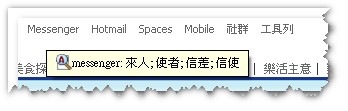
這篇文章要來實作第一種情境:
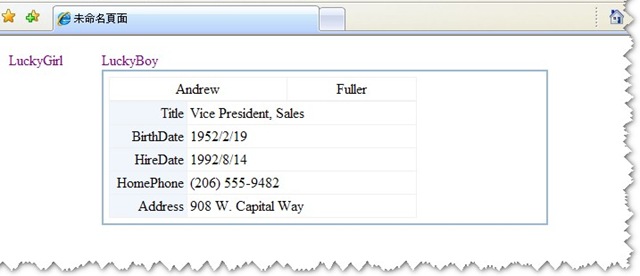
滑鼠移至畫面上的員工名稱,就即時顯示員工的基本資料。
※使用DB:Northwind資料庫,Table:Employees
關鍵作法:
- 在畫面上隱藏一個字串,存放 ToolTip 所要顯示的內容
- 找出要提供 ToolTip 的原始字串
- 以 HTML tag a 取代該字串
- 以 Table方式,組出ToolTip顯示內容
- 利用 JavaScript 或 jQuery 的方式控制其 table 的顯示及方位
實作:
①
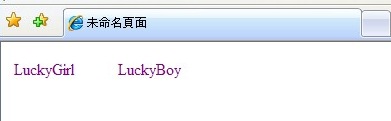
畫面上兩個 Label : LuckyGirl 與 LuckyBoy分別是待會要取代的字串。
28行的 tag,拿來存放即時顯示內容。在以下內容會稱他為隱藏 tag。
Default.aspx
<%@ Page Language="VB" AutoEventWireup="false" CodeFile="Default.aspx.vb" Inherits="_Default" %>

<!DOCTYPE html PUBLIC "-//W3C//DTD XHTML 1.0 Transitional//EN" "http://www.w3.org/TR/xhtml1/DTD/xhtml1-transitional.dtd">
 <script type="text/javascript" src="JS/JScript.js"></script>
 <script src="JS/jquery.js" type="text/javascript"></script>
<html xmlns="http://www.w3.org/1999/xhtml" >
<head runat="server">
    <title>未命名頁面</title>
    <link href="CSS/StyleSheet.css" rel="stylesheet" type="text/css" />

</head>
<body>
    <form id="form1" runat="server">
    <div>
        <table>
            <tr>
                <td style="width:100px;">
                <asp:Label ID="LuckyGirl" runat="server" Text="LuckyGirl"></asp:Label>
                </td>
                <td  style="width:100px;">
                 <asp:Label ID="LuckyBoy" runat="server" Text="LuckyBoy"></asp:Label>
                </td>

            </tr>
        </table>
    </div>
     <div>
    <%=tag%>
    </div>
    </form>
</body>
</html>
②
撰寫一個 Class,做取代字串,組Html 等處理動作。
參數依照您所要取得的資料而定,因需要員工 ID 來取得員工的基本資料,並且要對原始字串做處理。
所以 employeeID 及 orignalString 為必要傳入參數。
EmployeeInfoUtility.vb
Imports Microsoft.VisualBasic
Imports System.Data
Imports System.Data.SqlClient
Imports System.Web.Configuration

Public Class EmployeeInfoUtility

  '將原始字串取代成Html的A元素,並回傳一陣列,存放即時顯示的 Table 內容,及取代後的 tag a 字串
  Public Shared Function ReplaceString(ByVal employeeID As String, ByVal orignalString As String) As Array
    Dim newString As String = String.Empty

    Dim employeeInfoTag(1) As String
    Dim employeeInfoTableHtml As String = String.Empty

    employeeInfoTableHtml &= WriteEmployeeInfoTag(employeeID)
    newString = Replace(orignalString, orignalString, "<a id=""account_" & employeeID _
      & """ onmouseover='controlDiv(""account_" & employeeID _
      & """,this);' onmouseout='closeDiv(""account_" & employeeID _
      & """);' class=""pediaword"" style=""color:purple;cursor:pointer;""><span>" & orignalString + "</span></a>", 1, 1)

    employeeInfoTag(1) = employeeInfoTableHtml
    employeeInfoTag(0) = newString
    Return employeeInfoTag

  End Function

  '隱藏於Tag的內容。內容包含所要呈現的資料
  Public Shared Function WriteEmployeeInfoTag(ByVal id As String) As String
    Dim employeeHtml As String = GetEmployeeInfoHtml(id)
    Dim htmtemp As String = String.Empty
    htmtemp &= "<Table id='inc_account_" & id & "' class='cssData'><tbody>"
    htmtemp &= "<tr><td>" & employeeHtml & "</td></tr></tbody></table>"
    Return htmtemp
  End Function

  '即時顯示內容
  '將所要呈現的資料,以Table方式組合成Html字串
  Public Shared Function GetEmployeeInfoHtml(ByVal id As String) As String
    Dim sqlString As String = String.Empty
    Dim tableHtm As String = String.Empty
    Dim ConnString As String = WebConfigurationManager.ConnectionStrings("NorthwindConnection").ConnectionString
    Dim cnn As SqlConnection
    Dim myCommand As SqlCommand
    Dim myReader As SqlDataReader
    cnn = New SqlConnection(ConnString)
    Try

      '此段 Sql 通常依照使用者所要呈現什麼資料而定
      sqlString = "select * from dbo.Employees where EmployeeID = @account"

      cnn.Open()
      myCommand = New SqlCommand(sqlString, cnn)
      myCommand.Parameters.AddWithValue("@account", id)
      myReader = myCommand.ExecuteReader
      If myReader.Read Then

        'table的內容也是自訂的
        tableHtm &= "<table>"
        tableHtm &= "<tbody>"
        tableHtm &= "<tr>"
        tableHtm &= "<td>"
        tableHtm &= "<table width='100%' cellspacing='1' cellpadding='3' border='0' bgcolor='#f0f0f0' >"
        tableHtm &= "<tbody>"
        tableHtm &= "<tr >"
        tableHtm &= "<td bgcolor='#ffffff' align='center'>" & IIf(Convert.ToString(myReader("FirstName")) = "", "No FirstName", myReader("FirstName")) & "</td>"
        tableHtm &= "<td bgcolor='#ffffff' align='center'>" & IIf(Convert.ToString(myReader("LastName")) = "", "No LastName", myReader("LastName")) & "</td>"
        tableHtm &= "</tr>"
        tableHtm &= "</tbody>"
        tableHtm &= "</table>"
        tableHtm &= "<table width='100%' cellspacing='1' cellpadding='3' border='0' bgcolor='#f0f0f0' >"
        tableHtm &= "<tbody>"

        tableHtm &= "<tr >"
        tableHtm &= "<td bgcolor='#f1f6fc' align='right' width='80'>  Title  </td>"
        tableHtm &= "<td bgcolor='#ffffff' width='250px'>"
        tableHtm &= IIf(Convert.ToString(myReader("Title")) = "", "無 ", myReader("Title")) & "</td>"
        tableHtm &= "</tr>"

        tableHtm &= "<tr >"
        tableHtm &= "<td bgcolor='#f1f6fc' align='right' width='80'>  BirthDate  </td>"
        tableHtm &= "<td bgcolor='#ffffff' width='250px'>"
        tableHtm &= IIf(Convert.ToString(myReader("BirthDate")) = "", "無 ", myReader("BirthDate")) & "</td>"
        tableHtm &= "</tr>"

        tableHtm &= "<tr >"
        tableHtm &= "<td bgcolor='#f1f6fc' align='right' width='80'>  HireDate  </td>"
        tableHtm &= "<td bgcolor='#ffffff' width='250px'>"
        tableHtm &= IIf(Convert.ToString(myReader("HireDate")) = "", "無 ", myReader("HireDate")) & "</td>"
        tableHtm &= "</tr>"

        tableHtm &= "<tr >"
        tableHtm &= "<td bgcolor='#f1f6fc' align='right' width='80'>  HomePhone  </td>"
        tableHtm &= "<td bgcolor='#ffffff' width='250px'>"
        tableHtm &= IIf(Convert.ToString(myReader("HomePhone")) = "", "無 ", myReader("HomePhone")) & "</td>"
        tableHtm &= "</tr>"

        tableHtm &= "<tr >"
        tableHtm &= "<td bgcolor='#f1f6fc' align='right' width='80'>  Address  </td>"
        tableHtm &= "<td bgcolor='#ffffff' width='250px'>"
        tableHtm &= IIf(Convert.ToString(myReader("Address")) = "", "無 ", myReader("Address")) & "</td>"
        tableHtm &= "</tr>"

        tableHtm &= "</tbody>"
        tableHtm &= "</table>"
        tableHtm &= "</td>"
        tableHtm &= "</tr>"
        tableHtm &= "</tbody>"
        tableHtm &= "</table>"

      End If

      If Not myReader.IsClosed Then
        myReader.Close()
      End If
      myCommand.Dispose()

    Catch ex As Exception
    End Try
    Return tableHtm
  End Function

End Class
③
回到 Default 頁面,只要使用方才撰寫好的 class,即可讓原本一般的字串,有ToolTip的功能,顯示自訂內容。
Default.aspx.vb
Partial Class _Default
  Inherits System.Web.UI.Page

  '初始化tag
  Protected tag As String = ""

  Protected Sub Page_Load(ByVal sender As Object, ByVal e As System.EventArgs) Handles Me.Load

    Me.LuckyGirl.Text = TagProcess("8", Me.LuckyGirl.Text)

    Me.LuckyBoy.Text = TagProcess("2", Me.LuckyBoy.Text)

  End Sub

  Function TagProcess(ByVal id As String, ByVal orignalString As String) As String
    'id : sql's where condition key world
    'orignalString : be replace string

    Dim stringArr
    stringArr = EmployeeInfoUtility.ReplaceString(id, orignalString)
    '陣列(0)存放取代後,以 A tag 包住的字串
    '陣列(1)存放要以ToolTip顯示的內容,將內容append到隱藏的tag上

    Dim replacedString = stringArr(0)

    tag &= stringArr(1)

    Return replacedString

  End Function

End Class
④
使用 jQuery 控制隱藏的Tag內容
JScript.js
function controlDiv(id,st)
{
var element = "#inc_" + id;
    if ($(element).css("display")=="none"){
        $(element).show();
        }
	else{
	    $(element).hide();
	}
	setxy(id,st);
}

function closeDiv(id)
{
var element = "#inc_" + id;
    if ($(element).css("display")=="none"){
        $(element).show();
        }
	else{
	    $(element).hide();
	}
}

function setxy(divid,sst)
{
   divid= "inc_"+divid
   var element = sst;
   //取得元素相對於當前視窗左上角的位置偏移量
   var xPos = element.offsetLeft;
   var yPos = element.offsetTop;
   while( element = element.offsetParent )
    {
        yPos += element.offsetTop;
        xPos += element.offsetLeft;
    }
   document.getElementById(divid).style.left = xPos + "px";
   document.getElementById(divid).style.top = yPos + 20 + "px";
}
⑤
用了一小小段 CSS ,設定隱藏tag的樣式
.cssData
{
    width:500px;
    position: absolute;
    display:none;
    z-index:7;
    BACKGROUND-COLOR: #FFFFFF;
    border: solid 2px #96b8d2;
} ⑥完成!!!
【結果展示】
將滑鼠移至”LuckyBoy”,將出現該員工的一些基本資料。
程式碼下載→ViewInTime.rar
※ 第一次發文,發現真是不簡單耶。要將需求描述清楚,並且清楚的解釋程式碼......
我的表達能力實在有待加強! Orz
還有許多需要改進的,不管是程式方面,或者表達的方式,還請大家多多指教。