目的:
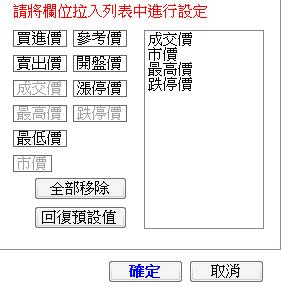
1.左邊Label可直接拉進右邊ListBox
2.右邊ListBox內容可直接拉動調整順序
3.右邊ListBox拉出即刪除該項
目的:
1.左邊Label可直接拉進右邊ListBox
2.右邊ListBox內容可直接拉動調整順序
3.右邊ListBox拉出即刪除該項
圖示
程式碼:
        object m_DragItem;
        int m_iLastY = -99;
        //由列表拉進頁面時動作
        private void tabPrice_DragEnter(object sender, DragEventArgs e)
        {
            Graphics G = VPriceView.CreateGraphics();
            if (m_iLastY != -99)
                G.DrawLine(new Pen(Color.White, 1.5F), 0, m_iLastY, VPriceView.ClientSize.Width, m_iLastY);
            e.Effect = DragDropEffects.All;
        }
        //在頁面放開滑鼠時動作
        private void tabPrice_DragDrop(object sender, DragEventArgs e)
        {
            BkKernel.C_Unit.KeyValuePairEx oItem = (BkKernel.C_Unit.KeyValuePairEx)VPriceView.SelectedItem;
            if (tabPrice.Controls.ContainsKey(oItem.Key))
                tabPrice.Controls[oItem.Key].Enabled = true;
            VPriceView.Items.Remove(VPriceView.SelectedItem);
        }
        //拉動至Label時動作
        private void LabelItem_DragEnter(object sender, DragEventArgs e)
        {
            Graphics G = VPriceView.CreateGraphics();
            if (m_iLastY != -99)
                G.DrawLine(new Pen(Color.White, 1.5F), 0, m_iLastY, VPriceView.ClientSize.Width, m_iLastY);
            e.Effect = DragDropEffects.All;
        }
        //放開至Label時動作
        private void LabelItem_DragDrop(object sender, DragEventArgs e)
        {
            BkKernel.C_Unit.KeyValuePairEx oItem = (BkKernel.C_Unit.KeyValuePairEx)VPriceView.SelectedItem;
            if (tabPrice.Controls.ContainsKey(oItem.Key))
                tabPrice.Controls[oItem.Key].Enabled = true;
            VPriceView.Items.Remove(VPriceView.SelectedItem);
        }
        //在ListBox時放開動作
        private void VPriceView_DragDrop(object sender, DragEventArgs e)
        {
            string sKey = string.Empty;
            string sValue = string.Empty;
            int iCount = VPriceView.Items.Count;
            Point pt = VPriceView.PointToClient(new Point(e.X, e.Y));
            int iDargPos = pt.Y / VPriceView.ItemHeight;

            if (m_DragItem.GetType() == typeof(Label))
            {
                Label tmpLabel = (Label)m_DragItem;
                sKey = tmpLabel.Name;
                sValue = tmpLabel.Text;
                ((Control)m_DragItem).Enabled = false;
            }
            else if (m_DragItem.GetType() == typeof(ListBox))
            {
                ListBox tmpListBox = (ListBox)m_DragItem;
                if (tmpListBox.SelectedIndex < iDargPos)
                    iDargPos--;
                BkKernel.C_Unit.KeyValuePairEx tmpItem = (BkKernel.C_Unit.KeyValuePairEx)tmpListBox.SelectedItem;
                sKey = tmpItem.Key;
                sValue = tmpItem.Value;
                VPriceView.Items.Remove(tmpItem);
            }
            else
                return;
            if (iDargPos >= iCount)
                VPriceView.Items.Add(new BkKernel.C_Unit.KeyValuePairEx(sKey, sValue));
            else
                VPriceView.Items.Insert(iDargPos, new BkKernel.C_Unit.KeyValuePairEx(sKey, sValue));
        }
        //拉進ListBox時動作
        private void VPriceView_DragEnter(object sender, DragEventArgs e)
        {
            int iMaxY = VPriceView.Items.Count * VPriceView.ItemHeight - 1;
            e.Effect = DragDropEffects.All;
            Point pt = VPriceView.PointToClient(new Point(e.X, e.Y));
            Graphics G = VPriceView.CreateGraphics();
            int iInsertY = (pt.Y / VPriceView.ItemHeight) * VPriceView.ItemHeight - 1;
            if (iInsertY > iMaxY)
                iInsertY = iMaxY;
            G.DrawLine(new Pen(Color.Red, 1.5F), 0, iInsertY, VPriceView.ClientSize.Width, iInsertY);
        }
        //在Label按下滑鼠時動作
        private void LabelItem_MouseDown(object sender, MouseEventArgs e)
        {
            m_DragItem = sender;
            this.DoDragDrop(this, DragDropEffects.Copy);
        }
        //在ListBox按下滑鼠時動作
        private void VPriceView_MouseDown(object sender, MouseEventArgs e)
        {
            ListBox listBox = (ListBox)sender;
            if (listBox.SelectedItem == null)
                return;
            m_DragItem = sender;
            this.DoDragDrop(this, DragDropEffects.Move);
        }
        //在ListBox滑鼠拉動時,顯示紅線以標示位置
        private void VPriceView_DragOver(object sender, DragEventArgs e)
        {
            int iMaxY = VPriceView.Items.Count * VPriceView.ItemHeight - 1;
            Point pt = VPriceView.PointToClient(new Point(e.X, e.Y));
            Graphics G = VPriceView.CreateGraphics();
            int iInsertY = (pt.Y / VPriceView.ItemHeight) * VPriceView.ItemHeight - 1;
            if (iInsertY > iMaxY)
                iInsertY = iMaxY;
            if (iInsertY == m_iLastY)
                return;
            if (m_iLastY != -99)
                G.DrawLine(new Pen(Color.White, 1.5F), 0, m_iLastY, VPriceView.ClientSize.Width, m_iLastY);
            G.DrawLine(new Pen(Color.Red, 1.5F), 0, iInsertY, VPriceView.ClientSize.Width, iInsertY);
            m_iLastY = iInsertY;
        }


//使用到的元件
namespace BkKernel
{
    public class C_Unit
    {
        public struct KeyValuePairEx
        {
            private TKey mKey;
            private TValue mValue;

            public KeyValuePairEx(TKey key, TValue value)
            {
                mKey = key;
                mValue = value;
            }

            public TKey Key
            {
                get
                {
                    return mKey;
                }
                set
                {
                    mKey = value;
                }
            }

            public TValue Value
            {
                get
                {
                    return mValue;
                }
                set
                {
                    mValue = value;
                }
            }

            public override string ToString()
            {
                return mValue.ToString();
            }
        }
    }
}
注意事項:
元件的AllowDrop屬性須為True