如何使用XSD (XML Schema Definition)驗證XML內容
STEP 1. 從應用程式執行 "Visual Studio 命令提示字元 (2010)"
此步驟或許需系統管理員身份執行, 以確保權限足夠.
STEP 2. 建立XML檔
建立待轉換的XML檔內容, 檔名為Query.xml, 存至C:\
<?xml version="1.0" encoding="UTF-8" ?>
<Root>
<Data>
<MerchantID></MerchantID>
<MerchantTradeNo></MerchantTradeNo>
<QueryDate></QueryDate>
</Data>
</Root>
STEP 3. 將XML檔轉換成XSD檔
執行以下指令, 假設XML檔名為Query.xml
xsd C:\Query.xml /O:C:\
將xml檔轉換成xsd檔, 並儲存在C:\.
XSD參數運用請參考:
http://msdn.microsoft.com/zh-tw/library/x6c1kb0s(v=VS.80).aspx
STEP 4. 修改XSD檔, 以符合格式驗證要求
產生的Query.xsd檔內容如下.
<?xml version="1.0" encoding="utf-8"?>
<xs:schema id="Root" xmlns="" xmlns:xs="http://www.w3.org/2001/XMLSchema" xmlns:msdata="urn:schemas-microsoft-com:xml-msdata">
<xs:element name="Root" msdata:IsDataSet="true" msdata:Locale="en-US">
<xs:complexType>
<xs:choice minOccurs="0" maxOccurs="unbounded">
<xs:element name="Data">
<xs:complexType>
<xs:sequence>
<xs:element name="MerchantID" type="xs:string" minOccurs="0" />
<xs:element name="MerchantTradeNo" type="xs:string" minOccurs="0" />
<xs:element name="QueryDate" type="xs:string" minOccurs="0" />
</xs:sequence>
</xs:complexType>
</xs:element>
</xs:choice>
</xs:complexType>
</xs:element>
</xs:schema>
先將schema id="Root" 改為 id="Query", 避免載入VS後造成衝突.
再來可以對每個element進行型態上的檢查.
原生型態如下:
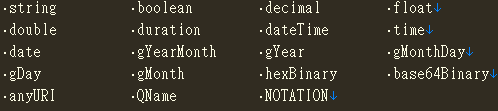
衍生型態如下:
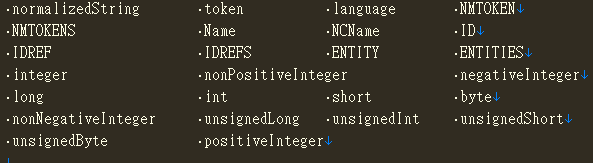
STEP 5. 透過限制 (Restrictions), 制訂更嚴謹的驗證
有以下的設定可更嚴謹的限制, 但非所有資料型態都能使用.
Restrictions for Datatypes
Constraint |
Description |
| enumeration | Defines a list of acceptable values |
| fractionDigits | Specifies the maximum number of decimal places allowed. Must be equal to or greater than zero |
| length | Specifies the exact number of characters or list items allowed. Must be equal to or greater than zero |
| maxExclusive | Specifies the upper bounds for numeric values (the value must be less than this value) |
| maxInclusive | Specifies the upper bounds for numeric values (the value must be less than or equal to this value) |
| maxLength | Specifies the maximum number of characters or list items allowed. Must be equal to or greater than zero |
| minExclusive | Specifies the lower bounds for numeric values (the value must be greater than this value) |
| minInclusive | Specifies the lower bounds for numeric values (the value must be greater than or equal to this value) |
| minLength | Specifies the minimum number of characters or list items allowed. Must be equal to or greater than zero |
| pattern | Defines the exact sequence of characters that are acceptable |
| totalDigits | Specifies the exact number of digits allowed. Must be greater than zero |
| whiteSpace | Specifies how white space (line feeds, tabs, spaces, and carriage returns) is handled |
STEP 6. 將XSD檔加入至Visual Studio專案中.
STEP 7. 透過XDocument驗證XML內容
使用XDocument需要加入以下的Namespace.
using System.Xml.Schema;
using System.Xml.Linq;
透過try catch可確認是否驗證失敗
try
{
XDocument xDoc = XDocument.Parse("需驗證的XMLData String");
XmlSchemaSet schemas = new XmlSchemaSet();
schemas.Add(string.Empty, "xsd位置");
xDoc.Validate(schemas, null);
}
catch (Exception)
{
return false;
}
null的部份可以改為使用Lambda Expression取得, 如下.
(o, e) =>{
Console.WriteLine(e.Message);
}
相關連結
- How to convert xml to xsd in .NET
- XML Schema 從看不懂到慢慢懂
- 使用XDocument驗証XML結構(範例)
- http://203.64.184.15/teaching/uploads/allpages/0601/10/wpp/_xml/xsd.html
- XML Schema Part 2: Datatypes Second Edition
以上內容為個人一點見解, 請路過此地的前輩,
若文章內容有誤, 或者有不同的看法,
請盡量提出告訴我, 謝謝.