摘要:Android Bluetooth API
這篇主要教大家怎麼用Bluetooth API去
- 搜尋裝置
- 連結裝置
- 傳送指令至裝置上
首先要先宣告下列三個物件與常數,
1 |
private static BluetoothAdapter mBluetoothAdapter = null; // 用來搜尋、管理藍芽裝置 |
2 |
private static BluetoothSocket mBluetoothSocket = null; // 用來連結藍芽裝置、以及傳送指令 |
3 |
private static final UUID MY_UUID = UUID.fromString("00001101-0000-1000-8000-00805F9B34FB"); // 一定要是這組 |
4 |
private static OutputStream mOutputStream = null; |
5 |
private final int REQUEST_ENABLE_BT=1; |
第一個物件是用來判斷android的藍芽是否有開啟,
或者可不可以用,以及利用該物件去搜尋裝置。
第二個物件是用來連結藍芽裝置的,
第三個常數是固定的,因為連線是用serial port,所以固定用這組。
第四個是等等用來傳指令的outputStream
接著下面的code,是用來做init的動作
01 |
mBluetoothAdapter = BluetoothAdapter.getDefaultAdapter(); |
02 |
if (mBluetoothAdapter == null) { |
03 |
// 如果裝置不支援藍芽 |
04 |
Toast.makeText(this, "Device doesn't support bluetooth", Toast.LENGTH_SHORT).show(); |
05 |
return; |
06 |
} |
07 |
|
08 |
// 如果藍芽沒有開啟 |
09 |
if (!mBluetoothAdapter.isEnabled()) { |
10 |
// 發出一個intent去開啟藍芽, |
11 |
Intent mIntentOpenBT = new Intent(BluetoothAdapter.ACTION_REQUEST_ENABLE); |
12 |
startActivityForResult(mIntentOpenBT, REQUEST_ENABLE_BT); |
13 |
} |
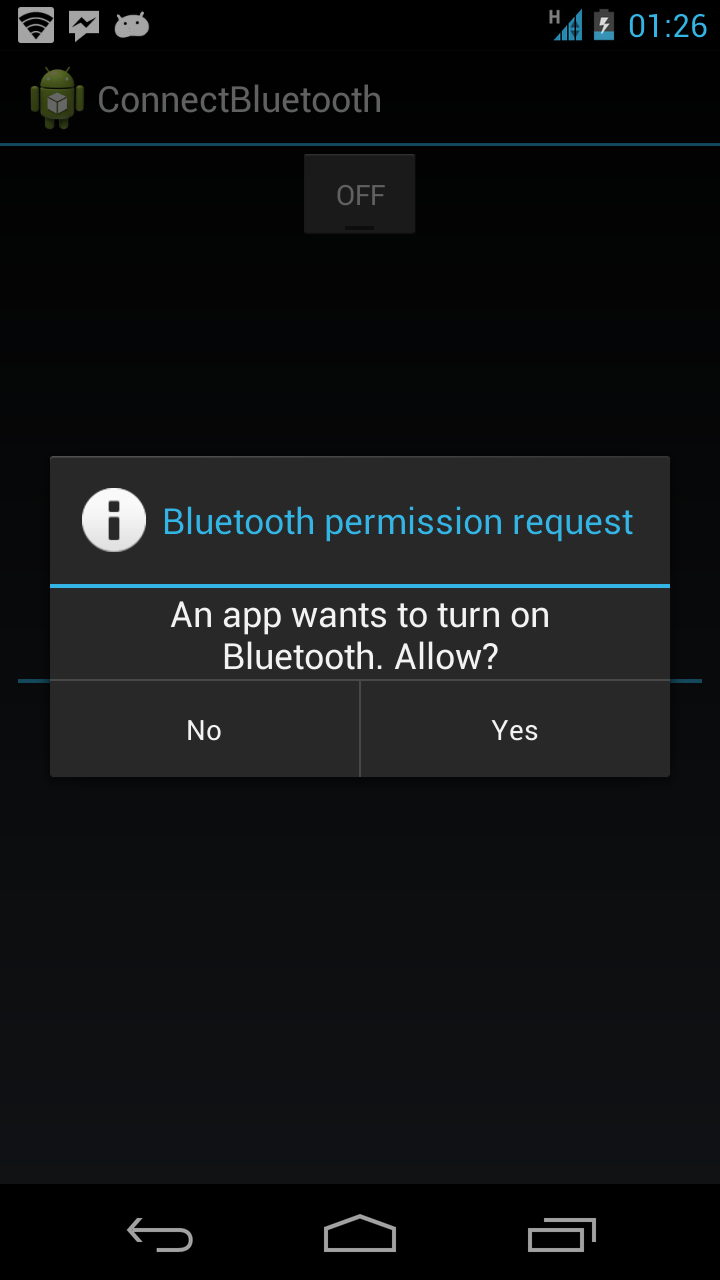
上段的第二個if當中,如果你手機的藍芽未開啟,
會進到if,進到if以後就會發出一個intent request去開啟藍芽,
基本上會看到下面的畫面,會詢問你是否要開啟藍芽。
如果按下Yes,接著會在onActivityResult接收到。
這裡就不多做說明。
這裡假設手機的藍芽已經開啟。
接著下段code是去判斷這台手機裡面,
是否有已經配對過的藍芽裝置,
當然,你也可以在for迴圈中判斷是否有你要連結的裝置名稱,
有的話,就可以直接在這裡連結至裝置。
但這裡假設我們要連結的裝置還沒有配對過
01 |
// 取得目前已經配對過的裝置 |
02 |
Set<bluetoothdevice> setPairedDevices = mBluetoothAdapter.getBondedDevices(); |
03 |
|
04 |
// 如果已經有配對過的裝置 |
05 |
if (setPairedDevices.size() > 0) { |
06 |
// 把裝置名稱以及MAC Address印出來 |
07 |
for (BluetoothDevice device : setPairedDevices) { |
08 |
mArrayAdapter.add(device.getName() + "\n" + device.getAddress()); |
09 |
} |
10 |
} |
接下來我們要註冊一個BroadcastReceiver,主要是用來接收【搜尋到附近藍芽裝置】的訊息
1 |
// 註冊一個BroadcastReceiver,等等會用來接收搜尋到裝置的消息 |
2 |
IntentFilter filter = new IntentFilter(BluetoothDevice.ACTION_FOUND); |
3 |
registerReceiver(mReceiver, filter); |
4 |
mBluetoothAdapter.startDiscovery(); //開始搜尋裝置 |
接著要宣告上段code使用到的BroadcastReceiver,
01 |
private final BroadcastReceiver mReceiver = new BroadcastReceiver() { |
02 |
public void onReceive(Context context, Intent intent) { |
03 |
// 當收尋到裝置時 |
04 |
if (BluetoothDevice.ACTION_FOUND.equals(intent.getAction())) { |
05 |
// 取得藍芽裝置這個物件 |
06 |
BluetoothDevice device = intent.getParcelableExtra(BluetoothDevice.EXTRA_DEVICE); |
07 |
|
08 |
// 判斷那個裝置是不是你要連結的裝置,根據藍芽裝置名稱判斷 |
09 |
if (device.getName().equals("MY_DEVICE_ID")){ |
10 |
try { |
11 |
// 一進來一定要停止搜尋 |
12 |
mBluetoothAdapter.cancelDiscovery(); |
13 |
|
14 |
// 連結到該裝置 |
15 |
mBluetoothSocket = device.createInsecureRfcommSocketToServiceRecord(MY_UUID); |
16 |
mBluetoothSocket.connect(); |
17 |
|
18 |
// 取得outputstream |
19 |
mOutputStream = mBluetoothSocket.getOutputStream(); |
20 |
|
21 |
// 送出訊息 |
22 |
String message = "hello"; |
23 |
mOutputStream.write(message.getBytes()); |
24 |
|
25 |
} catch (IOException e) { |
26 |
|
27 |
} |
28 |
} |
29 |
|
30 |
} |
31 |
} |
32 |
}; |
在上段code中的連結到該裝置的code,基本上會看到下圖,
要你輸入配置碼,輸入以後,就可以連結到該裝置,
並且可以傳送訊息到你的藍芽裝置上去了。

最後,記得要在關閉程式,或者暫停時,
把連線關掉!
01 |
@Override |
02 |
protected void onPause() { |
03 |
super.onPause(); |
04 |
try { |
05 |
if (mBluetoothSocket.isConnected()){ |
06 |
mBluetoothSocket.close(); |
07 |
} |
08 |
unregisterReceiver(mReceiver); |
09 |
} catch (IOException e) { |
10 |
e.printStackTrace(); |
11 |
} |
12 |
} |