摘要:[實作] Lenny Squid 2.7 + Cisco Router 2800 Wccp V1
Topology:
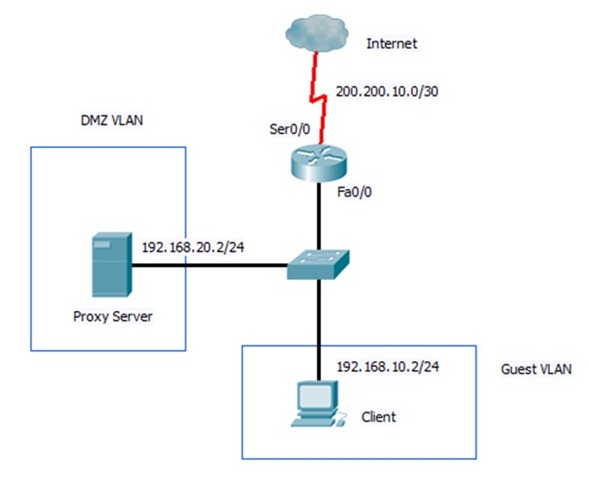
Pre-install Debian 5.0 on proxy server.
Install and configure squid on proxy server.
- Apt-get install squid.
- Vim /etc/squid/squid.conf
- Modify “http_port 3128”→“http_port 3128 transparent”
- Modify “http_access deny all”→”http_access allow all”
- Modify “wccp_router 0.0.0.0”→”wccp_router 192.168.20.1”
- Unmark “wccp_version 4”
Create tunnel interface.
Command:iptunnel add NAME mode gre remote REMOTE_IP local LOCAL_IP dev INTERFACE
- iptunnel add wccp0 mode gre remote 192.168.20.1 local 192.168.20.2 dev eth0
Bring tunnel interface up and set up a unused ip address.
- ifconfig wccp0 inet 127.0.0.2 netmask 255.255.255.255 up
Use iptables to redirect port 80 to 3128
- iptables –t nat –A PREROUTING –i wccp0 –p tcp --dport 80 –j REDIRECT --to-port 3128
Enable packet forwarding.
- echo 1 > /proc/sys/net/ipv4/ip_forward
Configure cisco router
Configure interfaces’ ip address.
- interface fa 0/0
no shutdown
interface fa 0/0.10
encapsulation dot1q 10
ip address 192.168.10.1 255.255.255.0
interface fa 0/0.20
encapsulation dot1q 20
ip address 192.168.20.1 255.255.255.0
interface ser 0/0
ip address 200.200.10.2 255.255.255.252
no shutdown
Enable wccp version 1 on cisco
- ip wccp version 1
- ip wccp web-cache
Configure interface to redirect out which is connected to internet.
- For this example:
interface ser0/0
ip wccp web-cache redirect out
Troubleshooting.
On router.
- debug ip wccp packet
On proxy server
- tcpdump –i wccp0
Enjoy it ~
likeant
