Web Forms Mvp 使用 (ASP.NET Model-View-Presenter tool)
簡單介紹用Web Forms Mvp component 來寫ASP.NET Model-View-Presenter pattern
雖然用 MVP(Model-View-Presenter) 模式寫 asp.net 有蠻長的一段時間了,但 code 幾乎都是自己實作出來
其實有一些third-party 的component 可以使用,現在要簡介是WebFormsMvp
因為之前都是CTP版,總覺得在正式專案中使用並不妥,不過到了2011年3月出了 V1 版,目前已到 V1.2 版
所以打算先來試看看,或許下一個專案會改用
此篇重心放在WebFormsMvp 介紹,關於Model-View-Presenter 的pattern 並不詳細說明,可以參考我之前的文章ASP.NETMVP UnitTest,或網路上search 也有一堆
至於使用它帶來的優缺點,自己或團隊要斟酌,不過我是覺得對於中大型的專案來說,是足以承擔MVP pattern所造成的成本,進而享受帶來的好處
1.首先加入WebFormsMvp library (WebFormsMvp 只支援NuGet)

除了Web forms MVP 本身外,另外也提供Presenter 支援數種 IoC ,例如Castle Windsor, Autofac, Unity….,不過在此做不說明了
2. 加入WebFormsMvp dll之後,我用一個簡單的範例來做說明,一個顯示人員的Page(ListPeopleWeb.aspx)
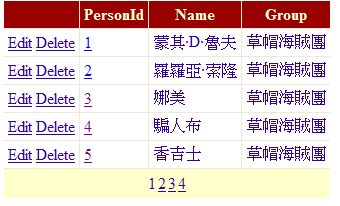
點選PersonId hyperlink進入單一人員Page(Person.aspx) 這2頁

首先建立一個Person class
	public class Person {

		public Int32 PersonId { get; set; }

		public String Name { get; set; }

		public String Group { get; set; }
	}
以及一個PersonService class,提供資料來源查詢
	public class PersonService {

		private static List<Person> People = new List<Person> {
				new Person{PersonId = 1, Name = "蒙其·D·魯夫", Group = "草帽海賊團"},
				new Person{PersonId = 2, Name = "羅羅亞·索隆", Group = "草帽海賊團"},
				new Person{PersonId = 3, Name = "娜美", Group = "草帽海賊團"},
				new Person{PersonId = 4, Name = "騙人布", Group = "草帽海賊團"},
				new Person{PersonId = 5, Name = "香吉士", Group = "草帽海賊團"},
				new Person{PersonId = 6, Name = "多尼多尼·喬巴", Group = "草帽海賊團"},
				new Person{PersonId = 7, Name = "妮可·羅賓", Group = "草帽海賊團"},
				new Person{PersonId = 8, Name = "佛朗基", Group = "草帽海賊團"},
				new Person{PersonId = 9, Name = "布魯克", Group = "草帽海賊團"},
				new Person{PersonId = 10, Name = "「鷹眼」喬拉可爾·密佛格", Group = "王下七武海"},
				new Person{PersonId = 11, Name = "「暴君」巴索羅繆·大熊", Group = "王下七武海"},
				new Person{PersonId = 12, Name = "唐吉訶德·多佛朗明哥", Group = "王下七武海"},
				new Person{PersonId = 13, Name = "「海賊女帝」波雅·漢考克", Group = "王下七武海"},
				new Person{PersonId = 14, Name = "克洛克達爾", Group = "王下七武海"},
				new Person{PersonId = 15, Name = "「海俠」甚平", Group = "王下七武海"},
				new Person{PersonId = 16, Name = "「黑鬍子」馬歇爾·D·汀奇", Group = "王下七武海"},
				new Person{PersonId = 17, Name = "「月光·摩利亞", Group = "王下七武海"},
			};

		public IList<Person> GetPeople() {
			return People;
		}


		public Person FindPerson(int personId) {
			return People.FirstOrDefault(p => p.PersonId == personId);
		}
	}
再來從ListPeople.aspx 下手,先建立一個ListPeopleView interface,繼承WebFormsMvp.IView interface
我個人習慣用event-driven,因此加入Query event,作為UI觸發display GridView event,而PeopleSource與TotalRowCount property 是給為UI Datasource object 使用
	public interface IListPeopleView : WebFormsMvp.IView {

		event QueryEventHandler Query;

		IEnumerable<Person> PeopleSource { set; }

		Int32 TotlaRowCount { set; }
	}
其中QueryEventHandler 會用到分頁的處理,因此加入StartIndex與MaxNumber property,當然如有需要,可以再加入Sorting 用的property
	public class QueryEventArgs {

		public int StartIndex { get; set; }

		public int MaxNumber { get; set; }

	}

	public delegate void QueryEventHandler(object sender, QueryEventArgs e);
另外建立處理的Presenter, ListPeoplePresenter,繼承WebFormsMvp.Presenter<>
	public class ListPeoplePresenter : WebFormsMvp.Presenter<IListPeopleView> {

		public ListPeoplePresenter(IListPeopleView view): base(view) {
			this.View.Query += new EventArguments.QueryEventHandler(View_Query);
		}

		void View_Query(object sender, EventArguments.QueryEventArgs e) {
			var service = new PersonService();
			this.View.TotlaRowCount = service.GetPeople().Count();
			this.View.PeopleSource = service.GetPeople().Skip(e.StartIndex).Take(e.MaxNumber);
		}
	}
最後完成ListPeopleWeb.aspx.cs,繼承WebFormsMvp.Web.MvpPage,並implement IListPeopleView
(若是UserControl ,則繼承WebFormsMvp.Web.MvpUserControl)
另用WebFormsMvp.PresenterBindingAttribute方式來宣告要用的Presenter
[PresenterBinding(typeof(ListPeoplePresenter))]
	public partial class ListPeopleWeb : WebFormsMvp.Web.MvpPage, IListPeopleView {

		protected void Page_Load(object sender, EventArgs e) {
			this.AutoDataBind = false;
		}

		#region IListPeopleView Members

		public event EventArguments.QueryEventHandler Query;

		public IEnumerable<Models.Person> PeopleSource {
			set { this.odsPeople.DataSource = value; }
		}

		public int TotlaRowCount {
			set { this.odsPeople.TotalRowCount = value; }
		}

		#endregion

		protected void odsPeople_Selecting(object sender, ObjectContainerDataSourceSelectingEventArgs e) {
			if (Query != null) {
				this.Query(this, new EventArguments.QueryEventArgs { StartIndex = e.Arguments.StartRowIndex, MaxNumber = e.Arguments.MaximumRows });
			}
		}

	}
上面的code 中,我的GridView 使用的DataSource 是ObjectContainerDataSource,雖然Web Forms MVP 有提供PageDataSource
但我個人還是喜歡用這個DataSource,主要的原因還是在於該object 是以event-driven 為出發點來設計
如此一來 ListPeopleWeb.aspx 即完成
3. 再來設計顯示單一Person 資料(PersonWeb.aspx),同樣先針對View與Presenter 做設計
IPersonView interface,繼承IView<Model> ,這裡的Model 有點像是ASP.NET MVC 中的Model 概念
	public interface IPersonView : IView<Person>{

		Int32 PersonId { get; }
	}
所以若是習慣用ViewModel方式來處理Page 的資訊呈現,像是上面的ListPeopleView 也可以修改成ViewModel 方式,不過要多寫class 就是了
PersonPresenter class
	public class PersonPresenter : Presenter<IPersonView> {

		public PersonPresenter(IPersonView view) : base(view){
			this.View.Load += new EventHandler(View_Load);
		}

		void View_Load(object sender, EventArgs e) {
			var service = new PersonService();
			var person = service.FindPerson(this.View.PersonId);
			this.View.Model = person ?? new Person();
		}
	}
PersonWeb.aspx.cs,繼承MvpPage<Person> class
	[PresenterBinding(typeof(PersonPresenter))]
	public partial class PersonWeb : MvpPage<Person>, IPersonView {

		protected void Page_Load(object sender, EventArgs e) {

		}

		#region IPersonView Members

		public int PersonId {
			get {
				int personId;
				if (Int32.TryParse(Request.QueryString["personId"], out personId)) {
					return personId;
				}

				return 0;
			}
		}

		#endregion
	}
PersonWeb.aspx 的webcontrol可以直接Bind Model class來使用
	<div>
		<div>
			Name : <%# Model.Name%>
		</div>
		<div>
			Group : <%# Model.Group %>
		</div>
	</div>
簡單介紹到此。如果你是第一次接觸MVP pattern ,建議還是先看其他Model-View-Presenter文章,瞭解其基本架構
下載Sample Code MVPSampleWeb.zip