WindowsRuntimeComponent、WinMD
WindowsRuntimeComponent
WindowsRuntimeComponent編譯後會包含metadata file(.WINMD),可使用在不同的語言,例如C++,C# 甚至 javascript。
因為WCL只能輸出WinRT type,所以實作上會有很多限制
-
對外不能有泛型
-
多型無法使用
-
class必須是sealed
-
公開方法必須是 - members, properties, methods,event
今天會Demo如何使用WindowsRuntimeComponent,並寫在javascript windows app上共用的情形
1.先建立一個 WindowsRuntimeComponent 專案
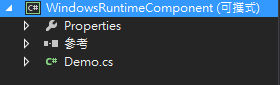
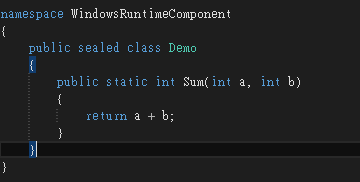
2.實作一個加法的method
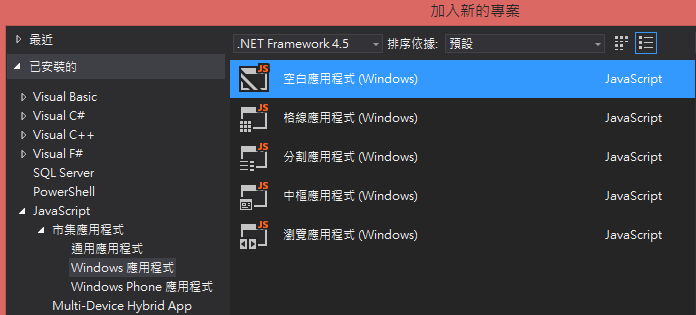
3.然後在同一個方案底下新增一個JavaScript Windows 應用程式
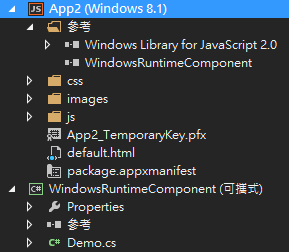
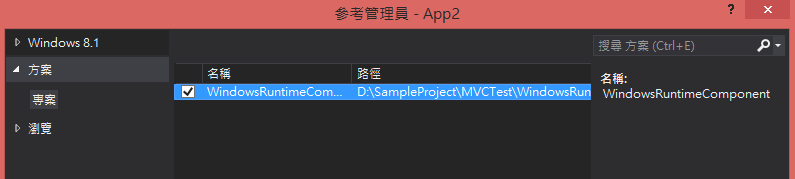
4.Windows 應用程式 加入 WindowsRuntimeComponent參考
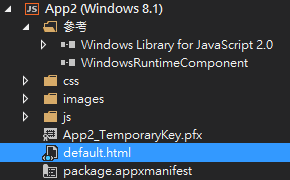
5.開啟default.html 並 實作一個加法的頁面
<!DOCTYPE html>
<html>
<head>
<meta http-equiv="Content-Type" content="text/html; charset=utf-8"/>
    <meta charset="utf-8" />
    <title>App2</title>

    <!-- WinJS 參考 -->
    <link href="//Microsoft.WinJS.2.0/css/ui-dark.css" rel="stylesheet" />
    <script src="//Microsoft.WinJS.2.0/js/base.js"></script>
    <script src="//Microsoft.WinJS.2.0/js/ui.js"></script>

    <!-- App2 參考 -->
    <link href="/css/default.css" rel="stylesheet" />
    <script src="/js/default.js"></script>

    <script>
        // 使用 WindowsRuntimeComponent Method
        function DoSum() {
            result.value = WindowsRuntimeComponent.Demo.sum(v1.value, v2.value);
        }
    </script>

</head>
<body>
    <!--測試頁面-->
    <p>測試</p>
    <input id="v1" type="text" value="1" /> +
    <input id="v2" type="text" value="2"/>
    <input id="add" type="button" onclick="DoSum();" value="=" style="height:20px; width:20px" />
    <input id="result" type="text" />
</body>
</html>
6.Demo 結果

就這樣輕易地完成了。
開發windows app 或 windows phone 有相同邏輯,且又跨語言時,就可以採用此方式,邏輯便不會散落在各處。
一天一分享,身體好健康。
該追究的不是過去的原因,而是現在的目的。