摘要:ASP.NET 執行(同步/ 非同步)本機端程式(二) Spwan a Process by ASP.NET
根據第一篇 ASP.NET 執行(同步/ 非同步)本機端程式(一) 的介紹有些基礎之後, 接下來我們來討論另外一種比較實務上應用的方式
目的: 讓 ASP.NET(透過http) 可以呼叫本機端程式(Spwan a Process) , 當然排除安全性考量因素
首先要先知道(參考來自微軟技術內文)一些東西如下:
若要模擬(impersonated)的使用者內容下執行的處理序繁衍 (Spawn),您不能使用 System.Diagnostics.Process.Start 方法。這是因為在執行緒層級,而不在程序層級,模擬執行 ASP.NET 中。因此,ASP.NET 背景工作處理序內容下並不在模擬的內容下,會執行任何從 ASP.NET 繁衍 (Spawn) 的處理序。
所以我們需要有: 1. task ID 2. 執行者身分
這是完成的結果!!
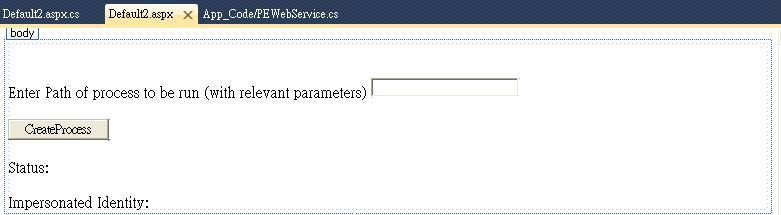
開始之前, 我們先看看這些步驟:
第一步: 新增一個網頁, default2.aspx
第二步: 加入參考 (有兩個要加入的參考)
第三步: 宣告該結構與定義API
最後: 記得要執行的程式寫到網頁上的 textbox 裡喔!! 例如 "SystemDriver\Windows\Notepad.exe " 或是 "C:\abc.exe" 都可以, 結束要記得關掉喔 ^^ 如: CloseHandle(pi.hProcess); CloseHandle(pi.hThread);
就來複製下列程式碼, 就可以摟^__^
public partial class Default2 : System.Web.UI.Page
{
[StructLayout(LayoutKind.Sequential)]
public struct STARTUPINFO
{
public int cb;
public String lpReserved;
public String lpDesktop;
public String lpTitle;
public uint dwX;
public uint dwY;
public uint dwXSize;
public uint dwYSize;
public uint dwXCountChars;
public uint dwYCountChars;
public uint dwFillAttribute;
public uint dwFlags;
public short wShowWindow;
public short cbReserved2;
public IntPtr lpReserved2;
public IntPtr hStdInput;
public IntPtr hStdOutput;
public IntPtr hStdError;
}
[StructLayout(LayoutKind.Sequential)]
public struct PROCESS_INFORMATION
{
public IntPtr hProcess;
public IntPtr hThread;
public uint dwProcessId;
public uint dwThreadId;
}
[StructLayout(LayoutKind.Sequential)]
public struct SECURITY_ATTRIBUTES
{
public int Length;
public IntPtr lpSecurityDescriptor;
public bool bInheritHandle;
}
[DllImport("kernel32.dll", EntryPoint = "CloseHandle", SetLastError = true, CharSet = CharSet.Auto, CallingConvention = CallingConvention.StdCall)]
public extern static bool CloseHandle(IntPtr handle);
[DllImport("advapi32.dll", EntryPoint = "CreateProcessAsUser", SetLastError = true, CharSet = CharSet.Ansi, CallingConvention = CallingConvention.StdCall)]
public extern static bool CreateProcessAsUser(IntPtr hToken, String lpApplicationName, String lpCommandLine, ref SECURITY_ATTRIBUTES lpProcessAttributes,
ref SECURITY_ATTRIBUTES lpThreadAttributes, bool bInheritHandle, int dwCreationFlags, IntPtr lpEnvironment,
String lpCurrentDirectory, ref STARTUPINFO lpStartupInfo, out PROCESS_INFORMATION lpProcessInformation);
[DllImport("advapi32.dll", EntryPoint = "DuplicateTokenEx")]
public extern static bool DuplicateTokenEx(IntPtr ExistingTokenHandle, uint dwDesiredAccess,
ref SECURITY_ATTRIBUTES lpThreadAttributes, int TokenType,
int ImpersonationLevel, ref IntPtr DuplicateTokenHandle);
protected void Button1_Click(object sender, EventArgs e)
{
IntPtr Token = new IntPtr(0);
IntPtr DupedToken = new IntPtr(0);
bool ret;
Label2.Text += WindowsIdentity.GetCurrent().Name.ToString();
SECURITY_ATTRIBUTES sa = new SECURITY_ATTRIBUTES();
sa.bInheritHandle = false;
sa.Length = Marshal.SizeOf(sa);
sa.lpSecurityDescriptor = (IntPtr)0;
Token = WindowsIdentity.GetCurrent().Token;
const uint GENERIC_ALL = 0x10000000;
const int SecurityImpersonation = 2;
const int TokenType = 1;
ret = DuplicateTokenEx(Token, GENERIC_ALL, ref sa, SecurityImpersonation, TokenType, ref DupedToken);
if (ret == false)
Label1.Text += "DuplicateTokenEx failed with " + Marshal.GetLastWin32Error();
else
Label1.Text += "DuplicateTokenEx SUCCESS";
STARTUPINFO si = new STARTUPINFO();
si.cb = Marshal.SizeOf(si);
si.lpDesktop = "";
string commandLinePath;
commandLinePath = TextBox1.Text;
PROCESS_INFORMATION pi = new PROCESS_INFORMATION();
ret = CreateProcessAsUser(DupedToken, null, commandLinePath, ref sa, ref sa, false, 0, (IntPtr)0, "c:\\", ref si, out pi);
if (ret == false)
Label1.Text += "CreateProcessAsUser failed with " + Marshal.GetLastWin32Error();
else
{
Label1.Text += "CreateProcessAsUser SUCCESS. The child PID is" + pi.dwProcessId;
CloseHandle(pi.hProcess);
CloseHandle(pi.hThread);
}
ret = CloseHandle(DupedToken);
if (ret == false)
Label1.Text += Marshal.GetLastWin32Error();
else
Label1.Text += "CloseHandle SUCCESS";
}
}