摘要:Linux 選單(menu)
建立終端機登入的選單, 選單上有執行項目, 離開選單後, 終端機自動關閉, 類似同公司產品如下
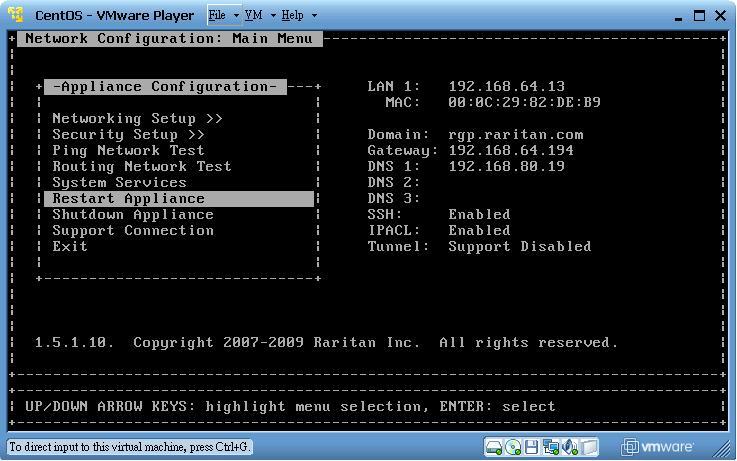
觀念介紹:
Linux 終端機登入的執行順序
1. /etc/profile ( 擴充所有使用者的PATH, 只要將.sh 放入此資料夾中, 登入後即可自動執行)
2. ~/.bash_profile (擴充使用者自己的PATH, 但是需要將執行路徑寫入)
3. ~/.bashrc (擴充自己的alias)
4. /etc/bashrc (擴充所有使用者的alias)
另外, 登入的系統歡迎訊息, 修改檔案如下
1. /etc/issue
2. /etc/motd
最後, 在介紹兩個很棒不相關的指令
1. ps-ef | grep tata | grep bash | awk {‘print $1’} (找出第二個字串)
2. usermod 修改使用者參數(待會會用到, 一個非常重要的指令)
至於shell的內容勒?? 以下是一個示範:
#!/bin/bash
# A menu driven Shell script which has following options
# Contents of /etc/passwd
# List of users currently logged
# Prsent handling directory
# Exit
# As per option do the job
# -----------------------------------------------
# Copyright (c) 2005 nixCraft project <http://cyberciti.biz/fb/>
# This script is licensed under GNU GPL version 2.0 or above
# -------------------------------------------------------------------------
while :
do
clear
echo " M A I N - M E N U"
echo "1. Contents of /etc/passwd"
echo "2. List of users currently logged"
echo "3. Prsent handling directory"
echo "4. Exit"
echo -n "Please enter option [1 - 4]"
read opt
case $opt in
1) echo "************ Conents of /etc/passwd *************";
more /etc/passwd;;
2) echo "*********** List of users currently logged";
who | more;;
3) echo "You are in $(pwd) directory";
echo "Press [enter] key to continue. . .";
read enterKey;;
4) echo "Bye $USER";
exit 1;;
*) echo "$opt is an invaild option. Please select option between 1-4 only";
echo "Press [enter] key to continue. . .";
read enterKey;;
esac
done