摘要:折射Compositor Script版完成
之前折射Compositor是用程式兜起來的, 感覺有點麻煩(見http://rswh.blogspot.tw/2012/07/blog-post_25.html)
該部落格不方便發表程式列表, 所以在這裏另起爐灶
回到原題, 把折射Compositor寫成Script一方面確定自己的觀念無誤
一方面讓程式更模組化
再來就是方便放到MOGRE上不用再改寫成C#版
Compositor如下
compositor Rz/Compositor/Refraction
{
    technique
    {
		//compositor_logic Refraction

        // Temporary textures
        texture rt0 		target_width target_height PF_A8R8G8B8
        texture rt1 		target_width target_height PF_A8R8G8B8
		texture rt_color 	target_width target_height PF_A8R8G8B8

        target rt0
        {
            // Render output from previous compositor (or original scene)
            input previous
        }

        target rt1
        {
			//for distortion

            input none
			//Visibility_ForDistort = 2
			visibility_mask 2
			material_scheme distort

			pass clear
			{
				buffers colour depth
				colour_value 0.5 0.5 1.0 1.0
			}

			pass render_scene
			{
				//NormalPass
				identifier 0
			}
        }

		target rt_color
		{

            input none
			//Visibility_ForDistort = 2
			visibility_mask 2
			material_scheme Default

			pass clear
			{
				buffers colour depth
				colour_value 0 0 0 1.0
			}

			pass render_scene
			{
				//NormalPass
				identifier 0
			}
		}

		target_output
        {
			visibility_mask 0

            pass render_quad
            {
				//OutputTargetPass = 1
				identifier 1
				material Rz/Compositor/SpaceDistortPass
                input 0 rt0
				input 1 rt1
				input 2 rt_color
            }
        }
    }
}
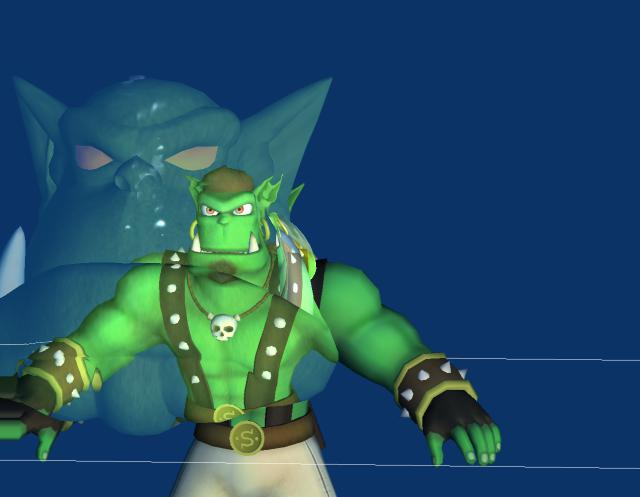
執行結果確認無誤
咦... 畫面左側有手指頭Clamp的情形...
經過檢查確認, 原來是 clear語法有誤, 造成normal的Colour Buffer沒有清成0.5 0.5 1.0
所以以下是修正過的 Compositor
compositor Rz/Compositor/Refraction
{
    technique
    {
	//compositor_logic Refraction

        // Temporary textures
        texture rt0 		target_width target_height PF_A8R8G8B8
        texture rt1 		target_width target_height PF_A8R8G8B8
	texture rt_color 	target_width target_height PF_A8R8G8B8

        target rt0
        {
            // Render output from previous compositor (or original scene)
            input previous
        }

        target rt1
        {
			//for distortion

            input none
			//Visibility_ForDistort = 2
			visibility_mask 2
			material_scheme distort

			pass clear
			{
				clear
				{
					buffers colour depth
					colour_value 0.5 0.5 1.0 1.0
				}
			}

			pass render_scene
			{
				//NormalPass
				identifier 0
			}
        }

		target rt_color
		{

                        input none
			//Visibility_ForDistort = 2
			visibility_mask 2
			material_scheme Default

			pass clear
			{
				clear
				{
					buffers colour depth
					colour_value 0 0 0 1.0
				}
			}

			pass render_scene
			{
				//NormalPass
				identifier 0
			}
		}

		target_output
        {
			visibility_mask 0

            pass render_quad
            {
				//OutputTargetPass = 1
				identifier 1
				material Rz/Compositor/SpaceDistortPass
                input 0 rt0
				input 1 rt1
				input 2 rt_color
            }
        }
    }
}
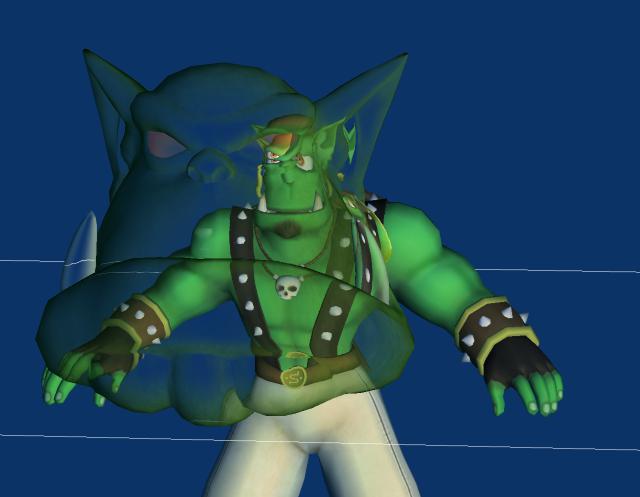
材質加一些FallOff好像會比較好:
 |
|