Selenium 實現自動登入
【功能介紹】實現網站自動登入操作
【指令介紹】用於Web自動化操作
【安裝方式】
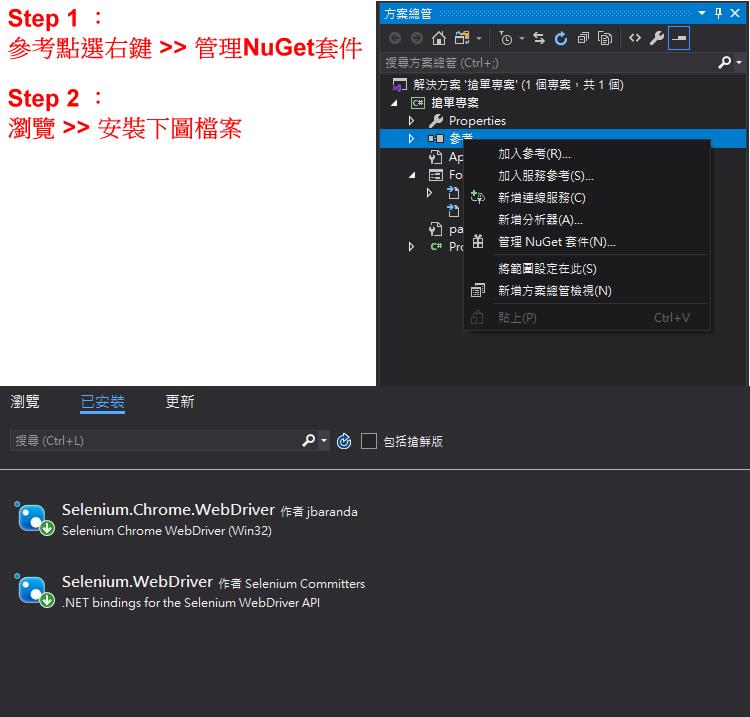
【檔案名稱】
1. Selenium.WebDriver
2. Selenium.Chrome.WebDrier
【程式步驟】
一、片段程式解釋
1. 新增 using 指示詞
using System.Threading; //使用間隔讀秒
using OpenQA.Selenium; //安裝Selenium 新增
using OpenQA.Selenium.Chrome; //安裝Selenium Chrome新增
2.
            string ID = textBox1.Text;
            string Password = textBox2.Text;

            IWebDriver driver = new ChromeDriver();
            //開啟網頁
            string str = "http://www86.eyny.com/member.php?mod=logging&action=login";
            driver.Navigate().GoToUrl(str);
            //隱式等待 - 直到畫面跑出資料才往下執行
            driver.Manage().Timeouts().ImplicitWait = TimeSpan.FromSeconds(10000);
先建立帳號及密碼的宣告
IWebDriver driver → 啟動程序
driver.Navigate().GoToUrl(目標網址) 本篇使用伊莉登入網站做範例
3.
            //輸入帳號
            IWebElement inputAccount = driver.FindElement(By.Name("username"));
            Thread.Sleep(200);
            inputAccount.SendKeys(ID);
            Thread.Sleep(200);

            //輸入密碼
            IWebElement inputPassword = driver.FindElement(By.Name("password"));
            Thread.Sleep(200);
            inputPassword.SendKeys(Password);
            Thread.Sleep(200);

            //登入
            IWebElement submitButton = driver.FindElement(By.XPath("//*[@class='rfm mbw bw0']/table/tbody/tr[1]/td[1]/button"));
            Thread.Sleep(200);
            submitButton.Click();
首先要尋找 IWebElement 網頁源碼
源碼搜尋方式可直接開啟Chrome >> 右鍵 >> 檢查
查詢 By.Name("此為源碼裡Name 名稱")
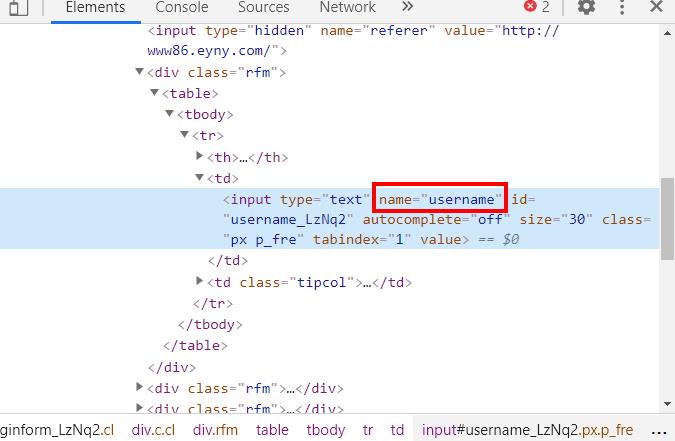
inputAccount.SendKeys(輸入使用文字);
查詢 By.XPath("此為目錄式的搜尋")
二、程式整體
    public partial class Form1 : Form
    {
        public Form1()
        {
            InitializeComponent();
        }

        private void button1_Click(object sender, EventArgs e)
        {
            string ID = textBox1.Text;
            string Password = textBox2.Text;

            IWebDriver driver = new ChromeDriver();
            //開啟網頁
            string str = "http://www86.eyny.com/member.php?mod=logging&action=login";
            driver.Navigate().GoToUrl(str);
            //隱式等待 - 直到畫面跑出資料才往下執行
            driver.Manage().Timeouts().ImplicitWait = TimeSpan.FromSeconds(10000);

            //輸入帳號
            IWebElement inputAccount = driver.FindElement(By.Name("username"));
            Thread.Sleep(200);
            inputAccount.SendKeys(ID);
            Thread.Sleep(200);

            //輸入密碼
            IWebElement inputPassword = driver.FindElement(By.Name("password"));
            Thread.Sleep(200);
            inputPassword.SendKeys(Password);
            Thread.Sleep(200);

            //登入
            IWebElement submitButton = driver.FindElement(By.XPath("//*[@class='rfm mbw bw0']/table/tbody/tr[1]/td[1]/button"));
            Thread.Sleep(200);
            submitButton.Click();


        }
    }
