c# for運用 輸入數值顯示能被7整除的數字
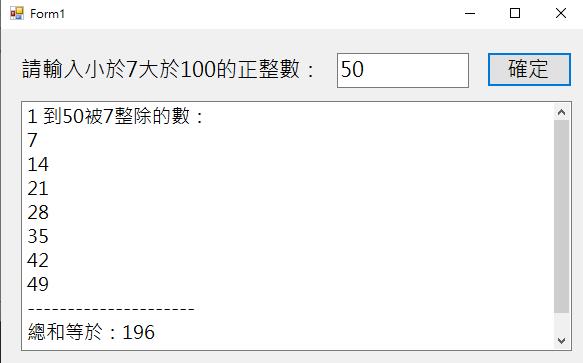
【功能介紹】輸入數值顯示能被7整除的數字
【程式步驟】
一、片段程式解釋
1.用來判斷 textbox 內容是否為數字,輸入非數字的字串就會跳視窗並返回。
            try
            {
                x = Convert.ToInt32(textBox1.Text);
            }
            catch(Exception ex)
            {
                MessageBox.Show("請輸入數值");
                textBox1.Clear();
                return;
            }
2.題目中只能輸入 7 - 100 的數值,所以用 if 指令去判斷 7 - 100的數值
            if (x < 7 || x > 100)
            {
                MessageBox.Show("請輸入大於7小於100的正整數");
                return;
            }
3.用 for迴圈 去處理能被7除於的正整數
            for (int i = 1; i < x; i++)
            {
                if (i % 7 == 0)
                {
                    textBox2.AppendText(i + "\r\n");
                    num += i;
                }
            }
            for (int i = 執行的初始數值; i < 輸入內容執行次數; i++)
            {
                if (i % 7 == 0) //條件判斷
                {
                    textBox2.AppendText(i + "\r\n");
                    num += i; //相加的總和
                }
            }
二、程式整體
    public partial class Form1 : Form
    {
        public Form1()
        {
            InitializeComponent();
        }

        private void button1_Click(object sender, EventArgs e)
        {
            int x; //數值
            int num = 0;
            textBox2.Clear();

            try
            {
                x = Convert.ToInt32(textBox1.Text);
            }
            catch(Exception ex)
            {
                MessageBox.Show("請輸入數值");
                textBox1.Clear();
                return;
            }

            if (x < 7 || x > 100)
            {
                MessageBox.Show("請輸入大於7小於100的正整數");
                return;
            }

            textBox2.AppendText("1 到" + x + "被7整除的數:" + "\r\n");

            for (int i = 1; i < x; i++)
            {
                if (i % 7 == 0)
                {
                    textBox2.AppendText(i + "\r\n");
                    num += i;
                }
            }
            textBox2.AppendText("---------------------" + "\r\n");
            textBox2.AppendText("總和等於:" + num + "\r\n");
        }
    }