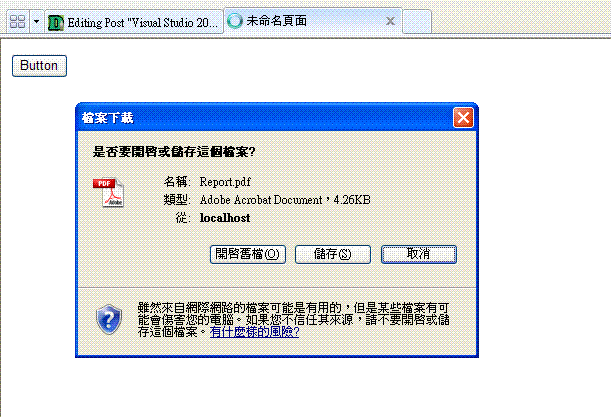
摘要:Visual Studio 2008 創建RDLC
最近一直在研究ReportViewer...
花了好多時間在開發,
終於完成我的報表,
那今天就整理一下使用vs2008做的報表吧!
現在我們就從頭做起吧!
1.(建立一個新的專案)
開啟Visual Studio 2008 選檔案→新增→專案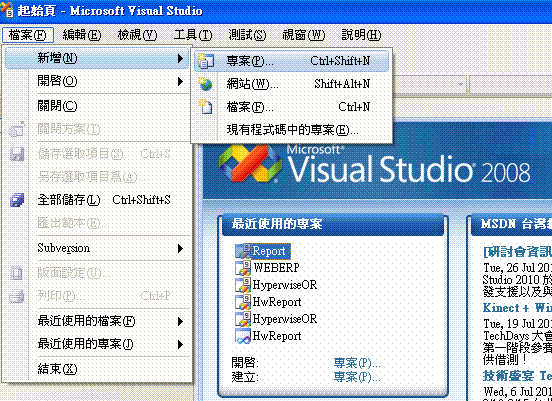
2.由於我目前是用MVC的架構開發程式所以
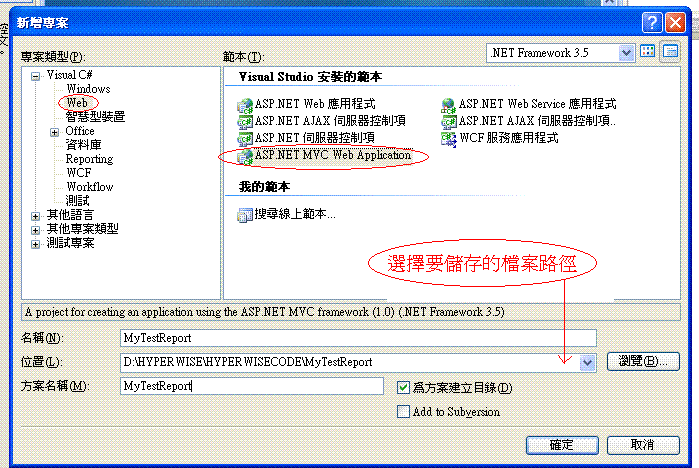
選擇Web→ASP.NET MVC Web Application→輸入專案名稱→選擇存檔的路徑
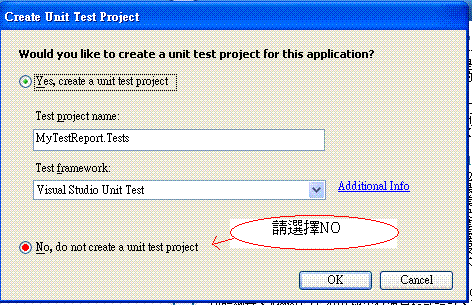
3.確定之後會問你要不要建立測試檔(目前不需要)
→依使用者的需求決定
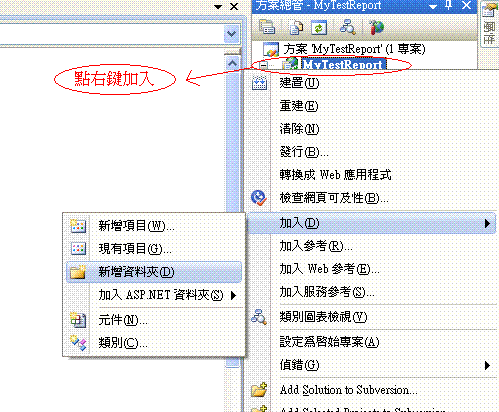
4.新增等下要用的資料夾"ReportDataSet"
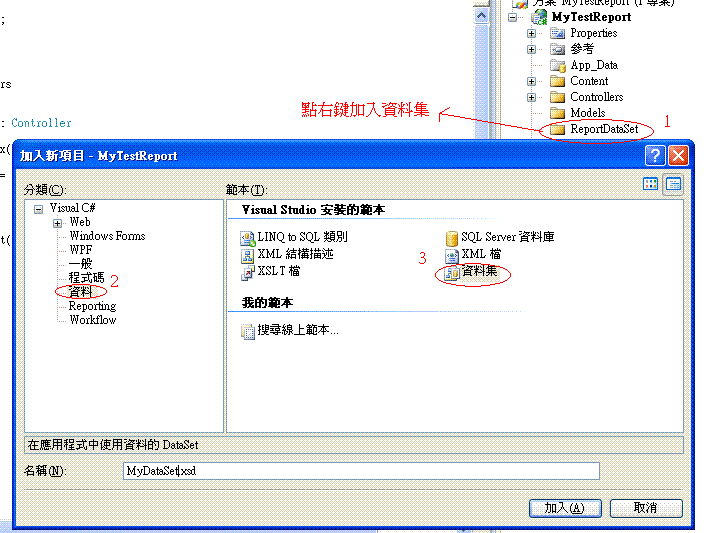
5.加入資料集
6.在工具箱選擇"TableAdapter"→選擇資料連結→將連接字串儲存到應用程式組態檔(採用系統的預設"是")→下一步(選擇命令類型)→下一步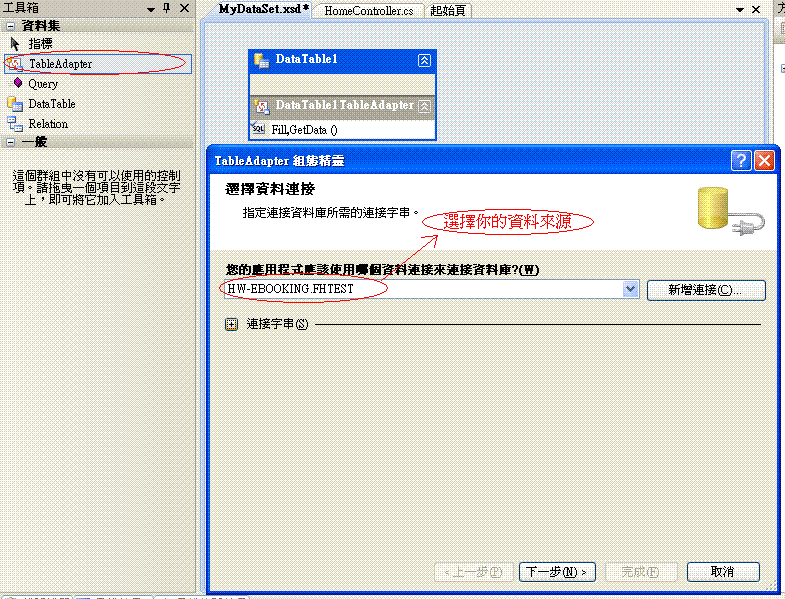
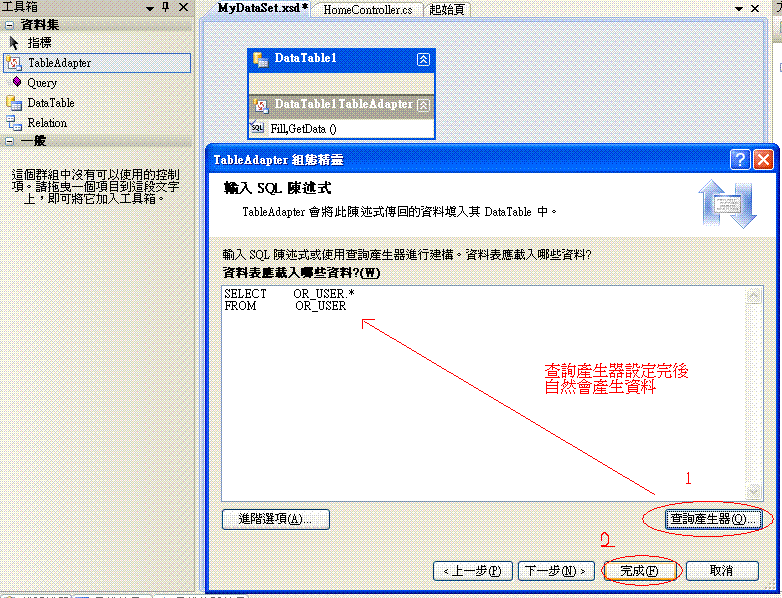
7.輸入SQL陳述式→完成
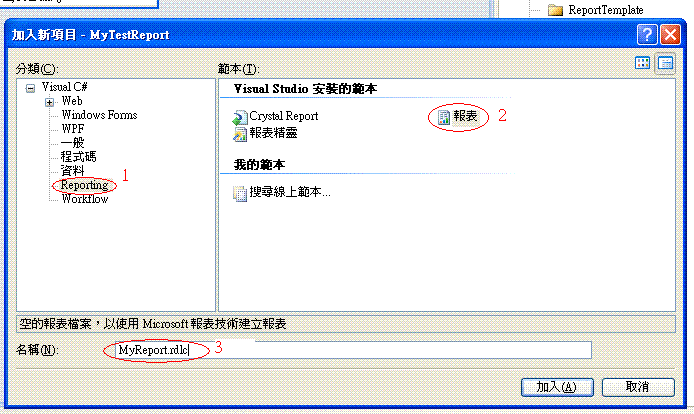
8.同步驟4新增資料夾"ReportTemplate"→加入報表
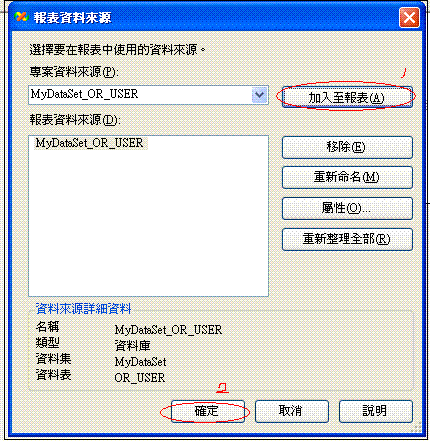
9.設定報表資料來源
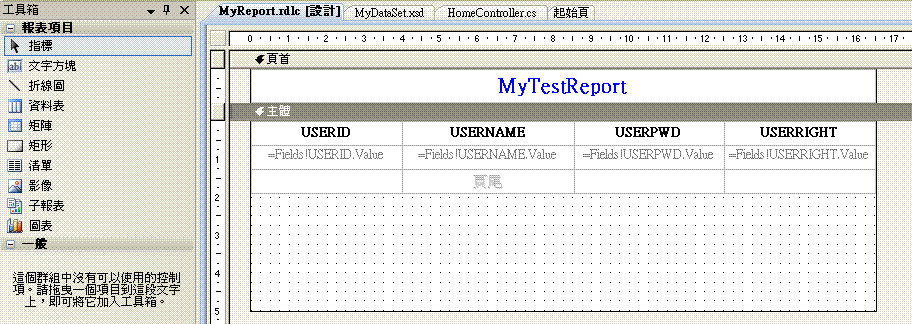
10.設定報表Table
11.Modify Default.aspx
<%@ Page Language="C#" AutoEventWireup="true" CodeBehind="Default.aspx.cs" Inherits="MyTestReport.Default" %>
<html xmlns="http://www.w3.org/1999/xhtml" >
<head runat="server">
<title>未命名頁面</title>
</head>
<body>
<form id="form1" runat="server">
<div>
<asp:button ID="Button1" text="Button" onclick="Unnamed1_Click" runat="server"/>
</div>
</form>
</body>
</html>
12.Modify Default.aspx.cs
using System.Web;
using System.Web.Mvc;
using System.Web.UI;

using System;
using System.Collections;
using System.Configuration;
using System.Data;
using System.Linq;
using System.Web.Security;
using System.Web.UI.HtmlControls;
using System.Web.UI.WebControls;
using System.Web.UI.WebControls.WebParts;
using System.Data.SqlClient;
using System.Collections.Generic;
using System.Xml.Linq;
using Microsoft.Reporting.WinForms;

namespace Report
{
    public partial class _Default : CustomPageBase
    {
         protected void Page_Load(object sender, System.EventArgs e)
         {
         }

          protected void Unnamed1_Click(object sender, EventArgs e)
          {
              List reportDataSource = new List();
              DataSet ds = new DataSet();

              string templatePath = string.Empty;

              //LoggingConnectionString
              //同等於Data Source=XXX;Persist Security Info=True;User ID=XXX;Password=XXX
              //可以從資料集(MyDataSet.xsd)Table點選右鍵選"設定"至"選擇資料連結"
              //打開"連接字串"就可以找到

              //獲得數據
                SqlConnection conn = new SqlConnection("LoggingConnectionString");
              SqlDataAdapter da = new SqlDataAdapter("SELECT * FROM OR_USER", conn);
              da.Fill(ds, "MyDataSet_OR_USER");

              ds.DataSetName = "OR_USER";

              //把獲取的數據集合提供给在報表中名為MyDataSet_OR_USER數據集
                reportDataSource.Add(new ReportDataSource("MyDataSet_OR_USER", ds.Tables[0]));

              //指定報表模板
                templatePath = "ReportTemplate/MyReport.rdlc";

              List parameterList = new List();

              //Generate Report, 報表可以生成PDF,EXCEL及以其它形式,根據需求去設置
                GetReportMultipleDataSourceFile(reportDataSource, templatePath, parameterList, "pdf");
          }

    }
}
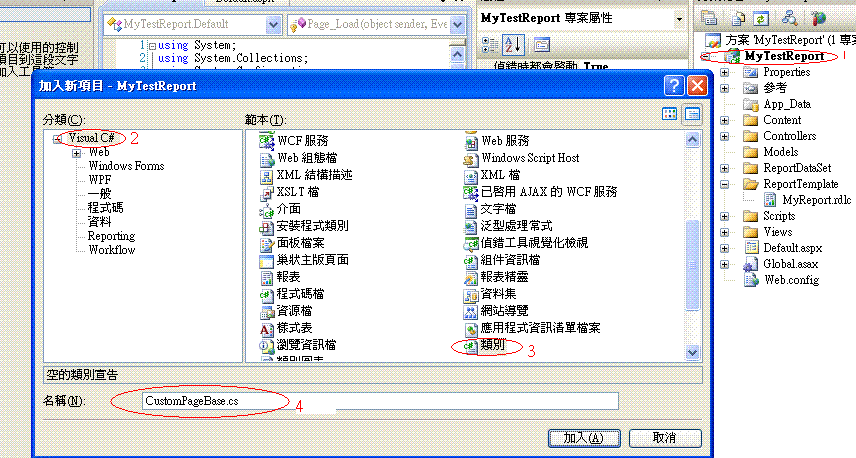
13.再新增一個CustomPageBase 讓Default.aspx.cs 可以繼承
14.編輯CustomPageBase.cs
using System;
using System.Data;
using System.Configuration;
using System.Linq;
using System.Web;
using System.Web.Security;
using System.Web.UI;
using System.Web.UI.HtmlControls;
using System.Web.UI.WebControls;
using System.Web.UI.WebControls.WebParts;
using System.Xml.Linq;
using Microsoft.Reporting.WinForms;
using System.Collections.Generic;
using System.ComponentModel;
using System.IO;
using System.Data.SqlClient;
//可實現並產生報表
namespace MyTestReport
{
public class CustomPageBase:Page
{
public void GetReportMultipleDataSourceFile(List reportDateSource, string TemplatePath, List parameterList, string FileType)
{
string reportFormat = FileType;
//報表名稱
string outputfile = "Report.";
ReportViewer rview = new ReportViewer();
rview.ProcessingMode = ProcessingMode.Local;
rview.LocalReport.ReportPath = Server.MapPath(TemplatePath);
rview.LocalReport.DataSources.Clear();
foreach (ReportDataSource re in reportDateSource)
{
rview.LocalReport.DataSources.Add(re);
}
if (parameterList.Count > 0)
rview.LocalReport.SetParameters(parameterList);
string mimeType, encoding, extension, deviceInfo;
string[] streamids;
Warning[] warnings;
deviceInfo = "" + "True " + " ";
byte[] bytes = rview.LocalReport.Render(reportFormat, deviceInfo, out mimeType, out encoding, out extension, out streamids, out warnings);
HttpContext.Current.Response.Buffer = true;
HttpContext.Current.Response.Clear();
HttpContext.Current.Response.ContentType = mimeType;
HttpContext.Current.Response.AddHeader("Content-Disposition", "attachment; filename=" + outputfile + extension + ";");
HttpContext.Current.Response.BinaryWrite(bytes);
HttpContext.Current.Response.End();
}
}
}
15.執行畫面