如題
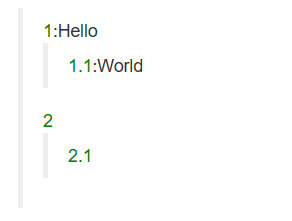
想要編輯與展示的資料如圖
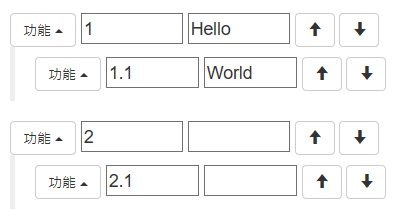
可以利用[上][下]來同層調整順序。
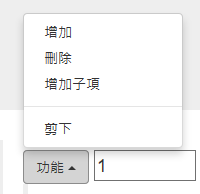
利用[功能]來新增刪除或剪下貼上節點。
 顯示樹結構的Html與樣板(遞迴顯示用)
                <blockquote>
                    <p ng-repeat="node in ctl.Nodes" ng-include="'temp_view.html'"></p>
                </blockquote>
        <!--顯示樣版-->
        <script type="text/ng-template" id="temp_view.html">
            <span style="color:green">{{node.Name}}</span><span ng-show="node.Value">:</span><span>{{node.Value}}</span>
            <blockquote ng-if="node.Nodes">
                <p ng-repeat="node in node.Nodes" ng-include="'temp_view.html'"></p>
            </blockquote>
        </script>
編輯樹結構的Html與樣板(遞迴顯示用)
 <blockquote>
       <p ng-repeat="node in ctl.Nodes" ng-include="'temp_view.html'"></p>
 </blockquote>

        <!-- 編輯樣板 -->
        <script type="text/ng-template" id="temp_update.html"  >
            <div class="dropup" ng-if="node != ctl.Clipboard">
                <button class="btn btn-default dropdown-toggle" type="button" id="dropdownMenu2" data-toggle="dropdown" aria-haspopup="true" aria-expanded="false">
                    功能
                    <span class="caret"></span>
                </button>
                <ul class="dropdown-menu" aria-labelledby="dropdownMenu2">
                    <li><a href="#" ng-click="ctl.addBrother(node)">增加</a></li>
                    <li><a href="#" ng-click="ctl.remove(node)">刪除</a></li>
                    <li><a href="#" ng-click="ctl.addChild(node)">增加子項</a></li>
                    <li role="separator" class="divider"></li>
                    <li ng-if="!ctl.Clipboard"><a href="#" ng-click="ctl.cut(node)" >剪下</a></li>
                    <li ng-if="ctl.Clipboard"><a href="#" ng-click="ctl.paste(node)">貼上</a></li>
                    <li ng-if="ctl.Clipboard"><a href="#" ng-click="ctl.cutCancel()">取消</a></li>
                </ul>
                <input type="text" ng-model="node.Name" />
                <input type="text" ng-model="node.Value" />
                <button type="button" class="btn btn-default" ng-click="ctl.moveUp(node)">
                    <span class="glyphicon glyphicon-arrow-up"></span>
                </button>
                <button type="button" class="btn btn-default" ng-click="ctl.moveDown(node)">
                    <span class="glyphicon glyphicon-arrow-down"></span>
                </button>
            </div>
            <blockquote ng-if="node.Nodes[0]">
                <p ng-repeat="node in node.Nodes" ng-include="'temp_update.html'" ng-if="node != ctl.Clipboard"></p>
            </blockquote>
        </script>
AngularJS宣告注意 as ctl 這個宣告。
這個語法可以讓Controller物件的方法直接binding到View上來,不用$scope物件。
<body ng-app="app" ng-controller="HomeCtrl as ctl">
寫 HomeCtrl 使用TypeScript(tree.ts)
TypeScipt 在 asp.net core環境 會自動轉成 JavaScipt 只要向一般Script引用。但是把.ts改成.js就可以。
/// <reference path="../typings/angularjs/angular.d.ts" />
module app0 {

    /** 節點定義 */
    export interface INode {
        /**名稱*/
        Name?: string;
        /**值*/
        Value?: string;
        /**子節點*/
        Nodes?: Array<INode>;

    }


    /**
     * Controller
     */
    export class HomeCtrl {

        static $inject = ["$scope"];

        /**節點清單*/
        private Root: INode = { Nodes: [] };

        /**Nodes */
        get Nodes(): Array<INode>
        {
            return this.Root.Nodes;
        }

        /**剪下的節點*/
        Clipboard: INode=null;

        constructor(public $scope: ng.IScope) {

            this.Root.Nodes = [
                {
                    Name: '1', Nodes: [
                        {
                            Name:'1.1'
                        }
                    ]
                },
                {
                    Name: '2', Nodes: [
                        {
                            Name: '2.1'
                        }
                    ]
                },
            ];
        }

        /**
         * 增加子節點
         * @param node
         */
        addChild(node: INode): void {
            let n: INode = { Name: 'New Node' };
            if (node.Nodes)
                node.Nodes.push(n);
            else
                node.Nodes = [ n ];
        }


        /**
         * 增加兄弟節點於給定節點的下方
         * @param node
         */
        addBrother(node: INode): void {
            let p = this.findParent(node);
            let idx = p.Nodes.indexOf(node);
            let n = { Name: 'New Node' } as INode;
            p.Nodes.splice(idx + 1, 0, n);
        }

        /**
         * 移除節點
         * @param node
         */
        remove(node: INode): void {
            let p = this.findParent(node);
            let idx = p.Nodes.indexOf(node);
            p.Nodes.splice(idx, 1);
        }

        /**
         * 節點同層向上移動
         * @param node
         */
        moveUp(node: INode): void {
            let p = this.findParent(node);
            let idx = p.Nodes.indexOf(node);
            if (idx <= 0)
                return;
            p.Nodes.splice(idx, 1);
            p.Nodes.splice(idx - 1, 0, node);
        }

        /**
         * 節點同層向上移動
         * @param node
         */
        moveDown(node: INode): void {
            let p = this.findParent(node);
            let idx = p.Nodes.indexOf(node);
            if (idx >= p.Nodes.length - 1)
                return;
            p.Nodes.splice(idx, 1);
            p.Nodes.splice(idx +1, 0, node);
        }

        /**
         * 剪下節點
         * @param node
         */
        cut(node: INode): void {
            this.Clipboard = node;
        }

        /**
         * 取消剪貼簿
         * @param node
         */
        cutCancel(node: INode): void {
            this.Clipboard = null;
        }

        /**
         * 貼上節點
         * @param node
         */
        paste(node: INode): void {
            //remove from original
            {

              let p = this.findParent(this.Clipboard);
              let idx = p.Nodes.indexOf(this.Clipboard);
              p.Nodes.splice(idx, 1);
            }
            //insert to new place
            {
                let p = this.findParent(node);
                let idx = p.Nodes.indexOf(node);
                p.Nodes.splice(idx + 1, 0, this.Clipboard);
                this.Clipboard = null;
            }

        }

        /**
         * 搜尋父節點
         * @param node
         */
        findParent(node: INode): INode {

            function ff(theNode: INode): INode {
                if (!theNode.Nodes)
                    return null;
                let idx = theNode.Nodes.indexOf(node);
                if (idx >= 0)
                    return theNode;

                for (var x of theNode.Nodes) {
                    let r = ff(x);
                    if (r)
                        return r;
                }
                return null;
            }

            return ff(this.Root);
        }

        hello(): void {
            alert('Hello World');
        }
    }
}


//註冊Controller
angular.module('app', [])
    .controller('HomeCtrl', app0.HomeCtrl)
    ;
完整的HTML
<!DOCTYPE html>
<html lang="zh-tw">
<head>
    <meta charset="utf-8">
    <meta http-equiv="X-UA-Compatible" content="IE=edge">
    <meta name="viewport" content="width=device-width, initial-scale=1">
    <!-- The above 3 meta tags *must* come first in the head; any other head content must come *after* these tags -->
    <title>AngularJS樹狀顯示與編輯</title>

    <!-- Bootstrap -->
    <link rel="stylesheet" href="https://maxcdn.bootstrapcdn.com/bootstrap/3.3.7/css/bootstrap.min.css">
    <!-- jQuery (necessary for Bootstrap's JavaScript plugins) -->
    <script src="https://ajax.googleapis.com/ajax/libs/jquery/1.12.4/jquery.min.js"></script>
    <!-- Include all compiled plugins (below), or include individual files as needed -->
    <script src="https://maxcdn.bootstrapcdn.com/bootstrap/3.3.7/js/bootstrap.min.js"></script>
    <script src="https://ajax.googleapis.com/ajax/libs/angularjs/1.5.5/angular.min.js"></script>
    <script src="https://ajax.googleapis.com/ajax/libs/angularjs/1.5.5/angular-route.min.js"></script>
    <script src="tree.js"></script>

    <!-- HTML5 shim and Respond.js for IE8 support of HTML5 elements and media queries -->
    <!-- WARNING: Respond.js doesn't work if you view the page via file:// -->
    <!--[if lt IE 9]>
      <script src="https://oss.maxcdn.com/html5shiv/3.7.3/html5shiv.min.js"></script>
      <script src="https://oss.maxcdn.com/respond/1.4.2/respond.min.js"></script>
    <![endif]-->
    <style>
        div > input
        {
            width:20%
        }
    </style>
</head>
<body ng-app="app" ng-controller="HomeCtrl as ctl">
    <div class="container">
        <div class="jumbotron">
            <h2>AngularJS樹狀顯示與編輯</h2>
            <p>
               展示如何利用AngularJS來做樹狀結構的顯示與編輯。
            </p>
            <p>
                <button class="btn btn-primary btn-lg" ng-click="ctl.hello()" >Say Hello</button>
            </p>
        </div>

        <!-- 編輯樣板 -->
        <script type="text/ng-template" id="temp_update.html"  >
            <div class="dropup" ng-if="node != ctl.Clipboard">
                <button class="btn btn-default dropdown-toggle" type="button" id="dropdownMenu2" data-toggle="dropdown" aria-haspopup="true" aria-expanded="false">
                    功能
                    <span class="caret"></span>
                </button>
                <ul class="dropdown-menu" aria-labelledby="dropdownMenu2">
                    <li><a href="#" ng-click="ctl.addBrother(node)">增加</a></li>
                    <li><a href="#" ng-click="ctl.remove(node)">刪除</a></li>
                    <li><a href="#" ng-click="ctl.addChild(node)">增加子項</a></li>
                    <li role="separator" class="divider"></li>
                    <li ng-if="!ctl.Clipboard"><a href="#" ng-click="ctl.cut(node)" >剪下</a></li>
                    <li ng-if="ctl.Clipboard"><a href="#" ng-click="ctl.paste(node)">貼上</a></li>
                    <li ng-if="ctl.Clipboard"><a href="#" ng-click="ctl.cutCancel()">取消</a></li>
                </ul>
                <input type="text" ng-model="node.Name" />
                <input type="text" ng-model="node.Value" />
                <button type="button" class="btn btn-default" ng-click="ctl.moveUp(node)">
                    <span class="glyphicon glyphicon-arrow-up"></span>
                </button>
                <button type="button" class="btn btn-default" ng-click="ctl.moveDown(node)">
                    <span class="glyphicon glyphicon-arrow-down"></span>
                </button>
            </div>
            <blockquote ng-if="node.Nodes[0]">
                <p ng-repeat="node in node.Nodes" ng-include="'temp_update.html'" ng-if="node != ctl.Clipboard"></p>
            </blockquote>
        </script>

        <!--顯示樣版-->
        <script type="text/ng-template" id="temp_view.html">
            <span style="color:green">{{node.Name}}</span><span ng-show="node.Value">:</span><span>{{node.Value}}</span>
            <blockquote ng-if="node.Nodes">
                <p ng-repeat="node in node.Nodes" ng-include="'temp_view.html'"></p>
            </blockquote>
        </script>

        <div class="row">
            <div class="col-sm-6">
                <blockquote>
                    <p ng-repeat="node in ctl.Nodes" ng-include="'temp_view.html'"></p>
                </blockquote>
            </div>
            <div class="col-sm-6">
                <blockquote>
                    <p ng-repeat="node in ctl.Nodes" ng-include="'temp_update.html'" ng-if="node != ctl.Clipboard"></p>
                </blockquote>
            </div>
        </div>
        <div class="row">
            <div class="col-sm-12">
                <pre class="code">{{ ctl.Nodes | json }}</pre>
            </div>
        </div>

    </div>
</body>
</html>