通過物件導向的設計是可以讓程式碼更加簡潔、可讀性更高,所以現在我們來改寫前面的程式碼吧。
到目前為止我們添加圖片、動畫的方式,大家有沒有感到非常繁雜,其實通過物件導向的設計是可以讓程式碼更加簡潔、可讀性更高,所以現在我們來改寫前面的程式碼吧。以人物移動為例子,我們可以設計一個Sprite類別繼DrawableGameComponent類別,專們用來處理移動、動畫並有自我繪製功能。
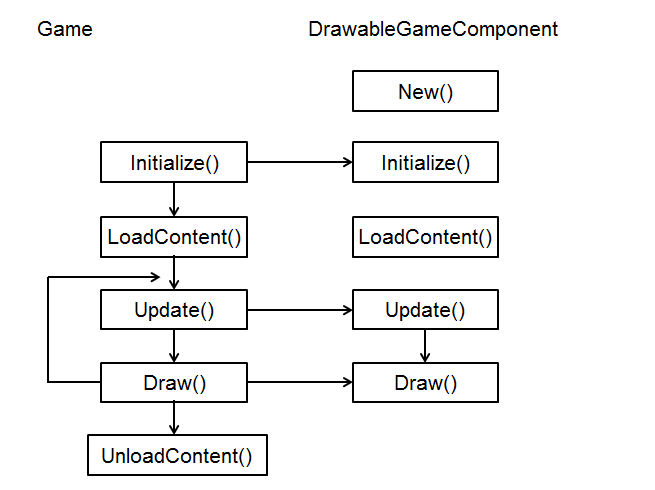
此類別的物件會跟著主程式同步更新,也同步繪製。
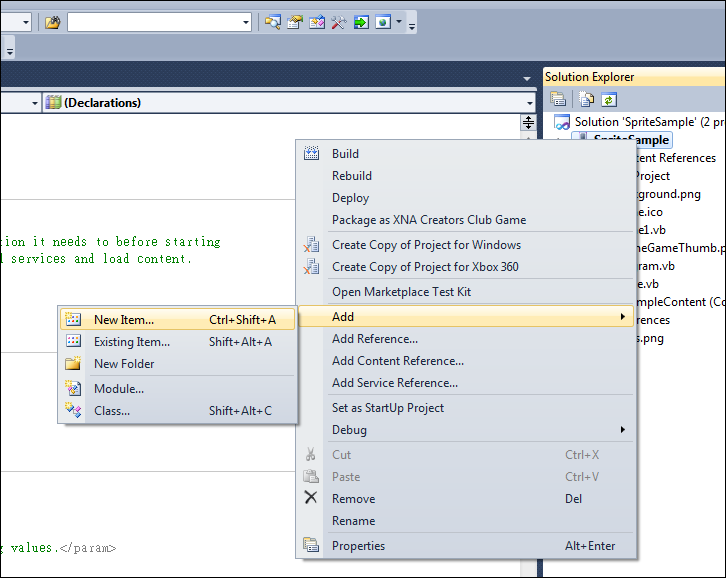
現在開始新增Sprite類別,對專案按右鍵新增新項目。
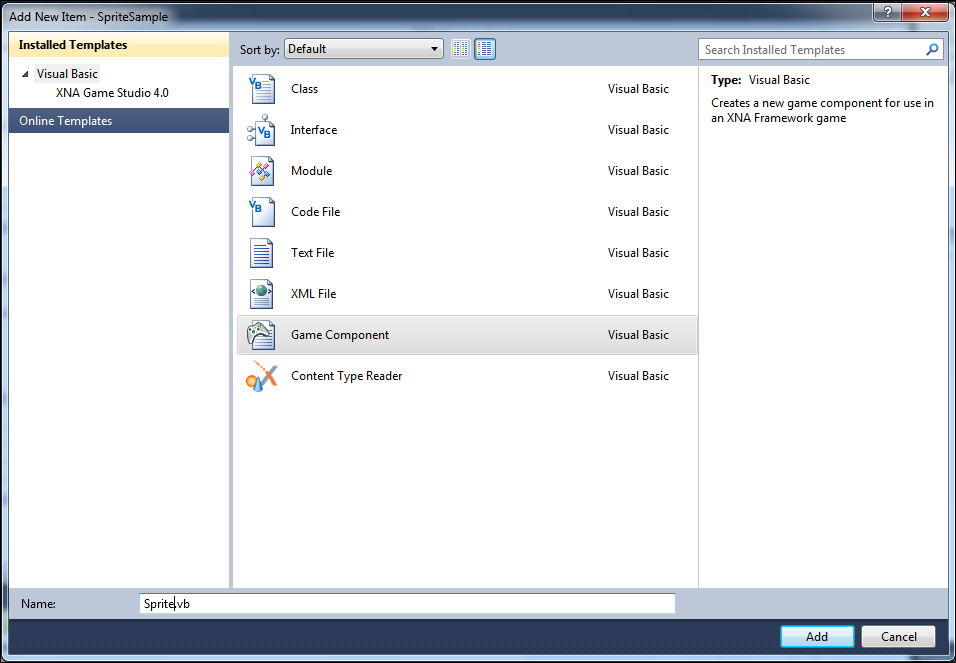
選擇遊戲元件,修改名稱為Sprite.vb
新增完畢後雙擊Spite.vb進入編輯,將繼承GameComponent改為DrawableGameComponent,兩者的差別在於GameComponent不會同步繪製。

Sprite類別完整內容如下,相信大家看過前面的章節應該都很熟悉了。
Public Class Sprite
Inherits Microsoft.Xna.Framework.DrawableGameComponent
Dim SpriteBatch As SpriteBatch
'***************************************************************
Public Texture As Texture2D '紋理
Public Position As Vector2 = Vector2.Zero '位置
Public Rotation As Single = 0 '旋轉
Public Width As Integer '寬度
Public Height As Integer '高度
Public Scale As Single = 1 '比例
'***************************************************************
Public Velocity As Vector2 = Vector2.Zero '速度
Public Acceleration As Integer = 0 '加速度
Public IsJumping As Boolean = False '跳躍旗標
'***************************************************************
Public SourceRect As Rectangle '矩形邊界
Public CollisionRect As Rectangle '碰撞邊界
Public Origin As Vector2 = Vector2.Zero '原點
'***************************************************************
Public FrameSheet() As Integer '動畫圖片每一列的欄數
Public FrameSize As Point = New Point(0, 0) '動畫小圖的大小
Public CurrentFrame As Point = New Point(0, 0) '當前小圖片位置
Public LastGameTime As Integer '調整動畫速度:累積時間用
Public FrameDelay As Integer = 60 '調整動畫速度(毫秒)
Public Type As SpriteType = SpriteType.Animation '精靈種類(動畫/靜止)
'***************************************************************
Public Color As Color = Color.White '顏色
Public SpriteEffects As SpriteEffects = SpriteEffects.None '效果
Public LayerDepth As Single = 0 '圖層深度
Enum SpriteType As Integer
Animation = 0
Rest = 1
End Enum
Public Sub New(ByVal game As Game, textureName As String, x As Integer, y As Integer, mType As SpriteType)
MyBase.New(game)
' TODO: Construct any child components here
Texture = game.Content.Load(Of Texture2D)(textureName)
SourceRect = New Rectangle(0, 0, x, y)
FrameSize.X = x
FrameSize.Y = y
Width = x
Height = y
Type = mType
End Sub
''' <summary>
''' Allows the game component to perform any initialization it needs to before starting
''' to run. This is where it can query for any required services and load content.
''' </summary>
Public Overrides Sub Initialize()
' TODO: Add your initialization code here
MyBase.Initialize()
End Sub
Protected Overrides Sub LoadContent()
' TODO: Add your initialization code here
SpriteBatch = New SpriteBatch(GraphicsDevice)
MyBase.LoadContent()
End Sub
''' <summary>
''' Allows the game component to update itself.
''' </summary>
''' <param name="gameTime">Provides a snapshot of timing values.</param>
Public Overrides Sub Update(ByVal gameTime As GameTime)
' TODO: Add your update code here
'X軸增量
Position.X += Velocity.X
'Y軸增量
If IsJumping Then
Velocity.Y = Velocity.Y + CInt(Acceleration * gameTime.ElapsedGameTime.TotalSeconds) '拋物線運動公式
Position.Y = Position.Y + CInt(Velocity.Y * gameTime.ElapsedGameTime.TotalSeconds) + CInt(0.5 * Acceleration * (gameTime.ElapsedGameTime.TotalSeconds) ^ 2)
End If
'播放動畫
LastGameTime += gameTime.ElapsedGameTime.Milliseconds
If LastGameTime > FrameDelay Then
LastGameTime = 0
CurrentFrame.X += 1
If CurrentFrame.X >= FrameSheet(CurrentFrame.Y) + 1 Then
CurrentFrame.X = 0
End If
End If
MyBase.Update(gameTime)
End Sub
Public Overrides Sub Draw(ByVal gameTime As GameTime)
' TODO: Add your update code here
SpriteBatch.Begin(SpriteSortMode.BackToFront, BlendState.AlphaBlend)
'SpriteBatch.Begin()
If Type = SpriteType.Animation Then
SpriteBatch.Draw( _
Texture, _
Position, _
New Rectangle(CurrentFrame.X * FrameSize.X, CurrentFrame.Y * FrameSize.Y, FrameSize.X, FrameSize.Y), _
Color, _
Rotation, _
Origin, _
Scale, _
SpriteEffects, _
LayerDepth)
Else
SpriteBatch.Draw( _
Texture, _
Position, _
SourceRect, _
Color, _
Rotation, _
Origin, _
Scale, _
SpriteEffects, _
LayerDepth)
End If
SpriteBatch.End()
MyBase.Draw(gameTime)
End Sub
End Class
建立完Sprite類別後,我們就可以在Game1主程式裡宣告三個Sprite遊戲元件。
Public Class Game1
Inherits Microsoft.Xna.Framework.Game
Private WithEvents graphics As GraphicsDeviceManager
Private WithEvents spriteBatch As SpriteBatch
Dim player1 As Sprite
Dim player2 As Sprite
Dim player3 As Sprite
End Class
在Initialize()初始化遊戲元件,並把它加入元件集合。
player1設定速度與加速度使它跳躍
player2設定水平速度使它水平移動
player3為靜止
三個都有設定動畫相關參數
Protected Overrides Sub Initialize()
' TODO: Add your initialization logic here
player1 = New Sprite(Me, "lucas", 40, 48, Sprite.SpriteType.Animation)
player1.Position = New Vector2(20, 400)
player1.Velocity = New Vector2(5, -300)
player1.Acceleration = 500
player1.IsJumping = True
player1.FrameSheet = {2, 7, 8}
player1.CurrentFrame.Y = 1
player1.FrameDelay = 60
Components.Add(player1)
player2 = New Sprite(Me, "lucas", 40, 48, Sprite.SpriteType.Animation)
player2.Position = New Vector2(750, 400)
player2.Velocity = New Vector2(-5, 0)
player2.FrameSheet = {2, 7, 8}
player2.CurrentFrame.Y = 1
player2.FrameDelay = 60
player2.SpriteEffects = SpriteEffects.FlipHorizontally
Components.Add(player2)
player3 = New Sprite(Me, "lucas", 40, 48, Sprite.SpriteType.Animation)
player3.Position = New Vector2(50, 50)
player3.FrameSheet = {2, 7, 8}
player3.CurrentFrame.Y = 0
player3.FrameDelay = 60
player3.Initialize()
Components.Add(player3)
MyBase.Initialize()
End Sub
在Update()撰寫反彈程式碼
Protected Overrides Sub Update(ByVal gameTime As GameTime)
' Allows the game to exit
If GamePad.GetState(PlayerIndex.One).Buttons.Back = ButtonState.Pressed Then
Me.Exit()
End If
' TODO: Add your update logic here
If player1.Position.Y >= 400 Then '跳躍落到地板
player1.Position.Y = 400
player1.Velocity.Y = -300
End If
If player1.Position.X <= 0 Then '跳躍碰到兩邊牆壁
player1.Velocity.X *= -1
player1.SpriteEffects = SpriteEffects.None
ElseIf player1.Position.X + player1.Width >= 800 Then
player1.Velocity.X *= -1
player1.SpriteEffects = SpriteEffects.FlipHorizontally
End If
If player2.Position.X <= 0 Then '跑步碰到牆壁
player2.Velocity *= -1
player2.SpriteEffects = SpriteEffects.None
ElseIf player2.Position.X + player2.Width >= 800 Then
player2.Velocity *= -1
player2.SpriteEffects = SpriteEffects.FlipHorizontally
End If
MyBase.Update(gameTime)
End Sub
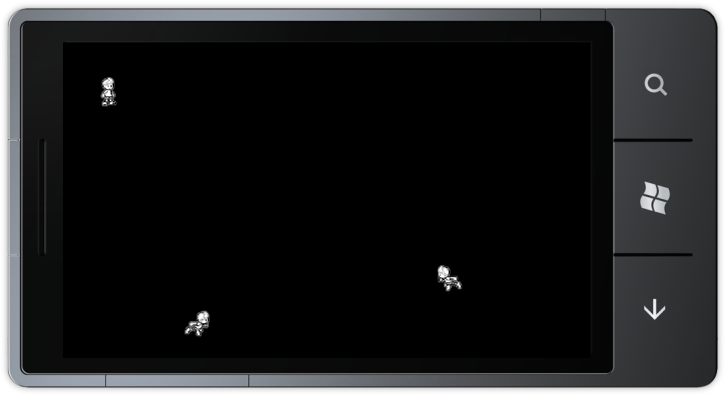
程式執行結果如下 (範例下載)
經過了這樣的改寫程式是不是簡潔多了。