製作 PictureBox 的可移動框選區域框
本文為原創,若轉載請標明出處,作者:Wade Chen
製作可移動的框選區域,讓使用者在選取圖片區域用的!
畫面擷圖: 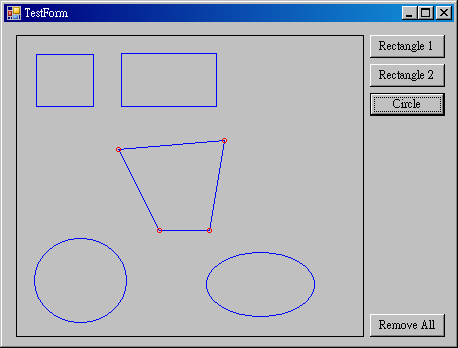
程式碼:Region_Src.zip
程式碼包含 VB.NET 與 C# 程式碼,但是 VB.Net 我沒有寫註釋喔!
執行檔:Region_Bin.zip
首先我定義了一個介面,用來設定框選區域要畫到哪一個 PictureBox 上,加入要繪出來的可操作圖形 IDrawItem,與滑鼠控制事件。
    public interface IDrawManager
    {
        void SetPictureBox(PictureBox oPictureBox);//設定目標PictureBox,只能設定一個喔!
        void ClearPictureBox();//清除設定的目標
        void AddDrawItem(IDrawItem oItem);//加入項目,例如圓、方框……
        bool RemoveDrawItem(IDrawItem oItem);//移除項目
        void ClearDrawItem();//清除所有項目
        void MouseMove(Object sender, System.Windows.Forms.MouseEventArgs e);//滑鼠在PictureBox移動時的處理事件
        void MouseUp(Object sender, System.Windows.Forms.MouseEventArgs e);//滑鼠在PictureBox按鍵彈起時的處理事件
        void MouseDown(Object sender, System.Windows.Forms.MouseEventArgs e);//滑鼠在PictureBox按鍵按下時的處理事件
    }
定義要畫到 PictureBox 的物件需要有的功能。
    public interface IDrawItem
    {
        bool IsContains(System.Drawing.Point location); //目前滑鼠座標是否在物件位置
        bool IsContains(int x, int y);                  //目前滑鼠座標是否在物件位置
        bool IsCtlContains(Point location);             //目前滑鼠座標是否在控制點位置
        bool IsCtlContains(int x, int y);               //目前滑鼠座標是否在控制點位置

        bool SetCurrentCtl(Point location);             //設定目前選取的控制點
        void SetCtlOffset(int x, int y);                //設定控制點新坐標

        void Paint(Object sender, System.Windows.Forms.PaintEventArgs e);//把自己繪製在 PictureBox 的事件

        bool IsVisible { get; set; }                    //主體是否顯示
        bool IsControlPointVisible{get;set;}            //控制點是否顯示

        Cursor Cursor { get; set; }//滑鼠指標的樣式
        Point Location { get; set; }//繪製物件的左上座標(left, top)
        int Top { get; set; }
        int Left { get; set; }
        Size Size { get; set; }//繪製物件的寬、高(width, height)
        int Height { get; set; }
        int Width { get; set; }
        Color Color { get; set; }//物件的線條顏色
        Color ControlPointColor { get; set; }//控制點的顏色
    }
實作 IDrawManager(1)
先定義幾個程式中需要的物件,因為要畫出來的框框可能不只一個,所以我用 List
    public class DrawManager : IDrawManager
    {
        private PictureBox m_PictureBox;    //繪圖區
        private List m_IDrawItemList = new List();//繪圖物件清單

        private IDrawItem m_SelectedItem;   //目前選中的繪圖物件
        private bool IsDragging = false;    //拖拽狀態
        private bool IsCtlPoint = false;    //控制點狀態

        Point oldPoint;                     //舊滑鼠坐標


    }
實作 IDrawManager(2)
實作加入、移除繪製物件時所要執行的事件;加入時要將 Paint 事件附加到 PictureBox 上,移除時卸除
實作加入、移除 PictureBox 時要執行的事件;加入時要將 Mouse 事件附加,移除時卸除。
    public class DrawManager : IDrawManager
    {
        //...
        //...
        public void ClearDrawItem()
        {
            if (m_PictureBox != null)
            {
                foreach (IDrawItem item in m_IDrawItemList)
                {
                    //移除Paint事件
                    m_PictureBox.Paint -= item.Paint;
                }
                m_PictureBox.Refresh();
            }
            m_IDrawItemList.Clear();
        }

        public bool RemoveDrawItem(IDrawItem oItem)
        {
            if (m_IDrawItemList.Contains(oItem))
            {
                if (m_PictureBox != null)
                {
                    //移除Paint事件
                    m_PictureBox.Paint -= oItem.Paint;
                    m_PictureBox.Refresh();
                }
                return m_IDrawItemList.Remove(oItem);
            }
            else
            {
                return false;
            }
        }

        public void AddDrawItem(IDrawItem oItem)
        {
            if (!m_IDrawItemList.Contains(oItem))
            {
                m_IDrawItemList.Add(oItem);
                //加入Paint事件
                m_PictureBox.Paint += oItem.Paint;
            }
            else
            {
                throw new Exception("清單中已有該物件");
            }
            if (m_PictureBox!=null)
            {
                m_PictureBox.Refresh();
            }
        }

        public void ClearPictureBox()
        {
            foreach (IDrawItem item in m_IDrawItemList)
            {
                //移除Paint事件
                m_PictureBox.Paint -= item.Paint;
            }

            m_PictureBox.MouseMove -= this.MouseMove;
            m_PictureBox.MouseDown -= this.MouseDown;
            m_PictureBox.MouseUp -= this.MouseUp;
            m_PictureBox = null;
        }


        public void SetPictureBox(PictureBox oPictureBox)
        {
            if (m_PictureBox!=null)
            {
                //移除滑鼠事件
                m_PictureBox.MouseMove -= this.MouseMove;
                m_PictureBox.MouseDown -= this.MouseDown;
                m_PictureBox.MouseUp -= this.MouseUp;

                foreach (IDrawItem  item in m_IDrawItemList)
                {
                    //移除Paint事件
                    m_PictureBox.Paint -= item.Paint;
                }
            }

            m_PictureBox = oPictureBox;
            //加入滑鼠事件
            m_PictureBox.MouseMove += this.MouseMove;
            m_PictureBox.MouseDown += this.MouseDown;
            m_PictureBox.MouseUp += this.MouseUp;

            foreach (IDrawItem item in m_IDrawItemList)
            {
                //加入 Paint 事件
                m_PictureBox.Paint += item.Paint;
            }

            m_PictureBox.Refresh();
        }

        //...
        //...

    }
實作 IDrawManager(3)
實作滑鼠事件,判斷滑鼠在物件上所能執行的操作。
    public class DrawManager : IDrawManager
    {
        //...
        //...

        public void MouseDown(Object sender, System.Windows.Forms.MouseEventArgs e)
        {
            bool flag = false;              //是否有點到物件的標記

            if (m_SelectedItem == null)
            {
                foreach (IDrawItem item in m_IDrawItemList)
                {
                    if (item.IsContains(e.Location))
                    {
                        m_SelectedItem = item;
                        m_SelectedItem.IsControlPointVisible = true;
                        flag = true;
                        break;
                    }
                }
            }
            else
            {//有選取物件

                foreach (IDrawItem item in m_IDrawItemList)
                {
                    if ( item.Equals(m_SelectedItem) == false && item.IsContains(e.Location) )
                    {
                        m_SelectedItem.IsControlPointVisible = false;
                        m_SelectedItem = item;
                        m_SelectedItem.IsControlPointVisible = true;
                        flag = true;
                        break;
                    }
                    else if (item.Equals(m_SelectedItem) == true && item.IsCtlContains(e.Location) )
                    {//控制點
                        if (item.SetCurrentCtl(e.Location) == true)
                        {
                            IsCtlPoint = true;
                            //oldPrePoint = e.Location;   //記錄物體坐標
                            oldPoint = e.Location;
                            flag = true;
                            break;
                        }
                    }

                }
            }

            if (flag == false && m_SelectedItem!=null )
            {
                m_SelectedItem.IsControlPointVisible = false;
                m_SelectedItem = null;
            }

            ((PictureBox)sender).Refresh();
        }

        public void MouseUp(Object sender, System.Windows.Forms.MouseEventArgs e)
        {
            if (IsCtlPoint==true)
            {
                IsCtlPoint = false;
                ((PictureBox)sender).Refresh();
            }

        }

        public void MouseMove(Object sender, System.Windows.Forms.MouseEventArgs e)
        {
            bool flag = false;              //是否在範圍內標記
            bool flagSelected = false;      //是否已選中標記
            bool flagCtlPoint = false;      //是否在控制點標記

            if (m_SelectedItem == null)
            {
                //未選取物件,改變鼠標為手型

                foreach (IDrawItem item in m_IDrawItemList)
                {
                    if (item.IsContains(e.Location))
                    {
                        flag = true;
                        break;
                    }
                }
                if (flag == true )
                {
                    ((PictureBox)sender).Cursor = Cursors.Hand;
                }
                else
                {
                    ((PictureBox)sender).Cursor = Cursors.Default;
                }


            }
            else
            {
                //有選取物件

                if (IsDragging == false && IsCtlPoint==false)
                { //有選取物件、未拖拽

                    //若移到目前已選的項目,鼠標變成 Cross
                    //若移到其它物件上,鼠標變成 Hand


                    foreach (IDrawItem item in m_IDrawItemList)
                    {
                        if (m_SelectedItem.Equals(item) && item.IsCtlContains(e.Location))
                        {//移到已選取的項目控制點上
                            flag = true;
                            flagSelected = true;
                            flagCtlPoint = true;
                            m_SelectedItem.SetCurrentCtl(e.Location);
                        }
                        else if (m_SelectedItem.Equals(item) && item.IsContains(e.Location) )
                        {//移到已選取的項目上
                            flag = true;
                            flagSelected = true;
                            flagCtlPoint = false;
                            break;
                        }
                        else if (m_SelectedItem.Equals(item) == false && item.IsContains(e.Location))
                        {//移到未選取的項目上
                            flag = true;
                            flagSelected = false;
                            flagCtlPoint = false;
                            break;
                        }
                    }

                    if (flag == true && flagSelected == true && flagCtlPoint==false)
                    {
                        ((PictureBox)sender).Cursor = Cursors.NoMove2D;
                    }
                    else if (flag == true && flagSelected == true && flagCtlPoint==true)
                    {
                        ((PictureBox)sender).Cursor = m_SelectedItem.Cursor;
                    }
                    else if (flag == true && flagSelected != true)
                    {
                        ((PictureBox)sender).Cursor = Cursors.Hand;
                    }
                    else
                    {
                        ((PictureBox)sender).Cursor = Cursors.Default;
                    }
                }
                else if (IsCtlPoint==true)
                {//選取控制點

                    m_SelectedItem.SetCtlOffset((e.X - oldPoint.X), (e.Y - oldPoint.Y));
                    oldPoint = e.Location;

                    ((PictureBox)sender).Refresh();
                }
            }
        }
        //...
        //...

    }
實作 IDrawItem ,作一個 DrawItemBase 類別
因為是否可見、控制點是否可見等是通用的,所以我寫在 DrawItemBase 類別中。
    public abstract class DrawItemBase:IDrawItem
    {

        protected bool m_IsVisible = true;                    //是否可見
        protected bool m_IsControlPointVisible = false;       //控制點是否可見
        protected System.Windows.Forms.Cursor m_Cursor = System.Windows.Forms.Cursors.Default;

        protected System.Drawing.Pen m_ColorPen = new System.Drawing.Pen(System.Drawing.Color.Blue,1);            //主體顏色
        protected System.Drawing.Pen m_ControlPointColorPen = new System.Drawing.Pen(System.Drawing.Color.Red,1); //控制點顏色

        #region IDrawItem Members

        public virtual bool IsContains(System.Drawing.Point location)
        {
            throw new NotImplementedException();
        }

        public virtual bool IsContains(int x, int y)
        {
            throw new NotImplementedException();
        }

        public virtual bool IsCtlContains(System.Drawing.Point location)
        {
            throw new NotImplementedException();
        }

        public virtual bool IsCtlContains(int x, int y)
        {
            throw new NotImplementedException();
        }

        public virtual bool SetCurrentCtl(System.Drawing.Point location)
        {
            throw new NotImplementedException();
        }

        public virtual void SetCtlOffset(int x, int y)
        {
            throw new NotImplementedException();
        }

        public virtual void Paint(object sender, System.Windows.Forms.PaintEventArgs e)
        {
            throw new NotImplementedException();
        }

        public bool IsVisible
        {
            get { return m_IsVisible; }
            set { m_IsVisible = value; }
        }


        public bool IsControlPointVisible
        {
            set { m_IsControlPointVisible = value; }
            get { return m_IsControlPointVisible; }
        }

        public System.Windows.Forms.Cursor Cursor
        {
            get { return m_Cursor; }
            set { m_Cursor = value; }
        }

        public virtual System.Drawing.Point Location
        {
            get{throw new NotImplementedException();}
            set{throw new NotImplementedException();}
        }

        public virtual int Top
        {
            get{throw new NotImplementedException();}
            set{throw new NotImplementedException();}
        }

        public virtual int Left
        {
            get{throw new NotImplementedException();}
            set{throw new NotImplementedException();}
        }

        public virtual System.Drawing.Size Size
        {
            get{throw new NotImplementedException();}
            set{throw new NotImplementedException();}
        }

        public virtual int Height
        {
            get{throw new NotImplementedException();}
            set{throw new NotImplementedException();}
        }

        public virtual int Width
        {
            get{throw new NotImplementedException();}
            set{throw new NotImplementedException();}
        }

        public System.Drawing.Color Color
        {
            get { return m_ColorPen.Color; }
            set { m_ColorPen.Color = value; }
        }

        public System.Drawing.Color ControlPointColor
        {
            get { return m_ControlPointColorPen.Color; }
            set { m_ControlPointColorPen.Color = value; }
        }

        #endregion
    }
繼承 DrawItemBase 實作 RectangleA ,畫出一個可以調整大小的方框
實作一個可以畫出方框的類別。
    public class RectangleA : DrawItemBase
    {
        //控製點會有的控制狀態
        enum ControlState
        {
            Move,
            Scale
        }

        Rectangle oItemRect;        //方框
        Rectangle oCtlSizeRect;     //調整大小控制點

        ControlState m_CurrentState;//目前控制點操作

        public RectangleA() : this(0, 0, 50, 50) { }

        public RectangleA(int x, int y, int width, int height)
        {
            oItemRect = new Rectangle(x, y, width, height);
            oCtlSizeRect = new Rectangle(0, 0, 4, 4);
        }


        public override void Paint(Object sender, System.Windows.Forms.PaintEventArgs e)
        {
            if (m_IsVisible)
            {
                e.Graphics.DrawRectangle(this.m_ColorPen, oItemRect);

                if (m_IsControlPointVisible)
                {
                    oCtlSizeRect.X = oItemRect.Right - 2;
                    oCtlSizeRect.Y = oItemRect.Bottom - 2;
                    e.Graphics.DrawEllipse(this.m_ControlPointColorPen, oCtlSizeRect);//畫調整大小控制點
                }
            }
        }

        public override bool IsContains(int x, int y)
        {
            return oItemRect.Contains(x, y);
        }

        public override bool IsContains(System.Drawing.Point location)
        {
            bool flag = false;
            if (this.IsContains(location.X, location.Y))
            {
                flag = true;
            }
            return flag;
        }

        public override bool IsCtlContains(int x, int y)
        {
            if (oItemRect.Contains(x,y))
            {
                m_CurrentState = ControlState.Move;
                return true;
            }
            if (oCtlSizeRect.Contains(x,y))
            {
                m_CurrentState = ControlState.Scale;
                return true;
            }
            return false;
        }

        public override bool IsCtlContains(Point location)
        {
            return this.IsCtlContains(location.X, location.Y);
        }
        #region "Properties"
        public override Point Location
        {
            get { return oItemRect.Location; }
            set { oItemRect.Location = value; }
        }

        public override Size Size
        {
            get { return oItemRect.Size; }
            set { oItemRect.Size = value; }
        }
        #endregion


        public override int Top
        {
            get { return oItemRect.Y; }
            set { oItemRect.Y = value; }
        }

        public override int Left
        {
            get { return oItemRect.X; }
            set { oItemRect.X = value; }
        }

        public override int Height
        {
            get { return oItemRect.Height; }
            set { oItemRect.Height = value; }
        }

        public override int Width
        {
            get { return oItemRect.Width; }
            set { oItemRect.Width = value; }
        }

        public override bool SetCurrentCtl(Point location)
        {
            if (oCtlSizeRect.Contains(location))
            {//在調整大小控制點位置
                m_Cursor = Cursors.SizeNWSE;
                return true;
            }

            if (oItemRect.Contains(location))
            {//在物件範圍內
                m_Cursor = Cursors.NoMove2D;
                return true;
            }

            m_Cursor = Cursors.Default;
            return false;
        }

        public override void SetCtlOffset(int x, int y)
        {

            switch (m_CurrentState)
            {
                case ControlState.Move:             //在拖拽控制範圍
                    oItemRect.X += x;
                    oItemRect.Y += y;
                    break;
                case ControlState.Scale:            //在調整大小控制點位置
                    oItemRect.Width += x;
                    oItemRect.Height += y;
                    break;
                default:
                    break;
            }

        }

    }
要使用時只要新建一個專案,在表單上加入一個 Form(TestForm),拉一個 PictureBox(PictureBox1),加一個Button(Button1),在加入如下所列的程式碼即可使用……
    public partial class TestForm : Form
    {
        ImageLibCS.DrawManager dm;

        private void TestForm_Load(object sender, EventArgs e)
        {
            dm = new ImageLibCS.DrawManager();
            dm.SetPictureBox(PictureBox1);
        }

        private void Button1_Click(object sender, EventArgs e)
        {
            ImageLibCS.RectangleA rect1 = new ImageLibCS.RectangleA(0, 0, 40, 40);//定義一個 Rectangle 物件
            dm.AddDrawItem(rect1);//加入到 DrawManager 中,就能在 PictureBox1 看到方框了
        }
    }
-------
一點一滴堆砌著夢想的執行者
