本文由資深軟體工程師團隊共同撰寫,基於真實專案經驗整理而成,旨在與同行分享 UML 在現代軟體開發中的落地實踐、常見陷阱與高效技巧。
前言:為什麼我們重新擁抱 UML?
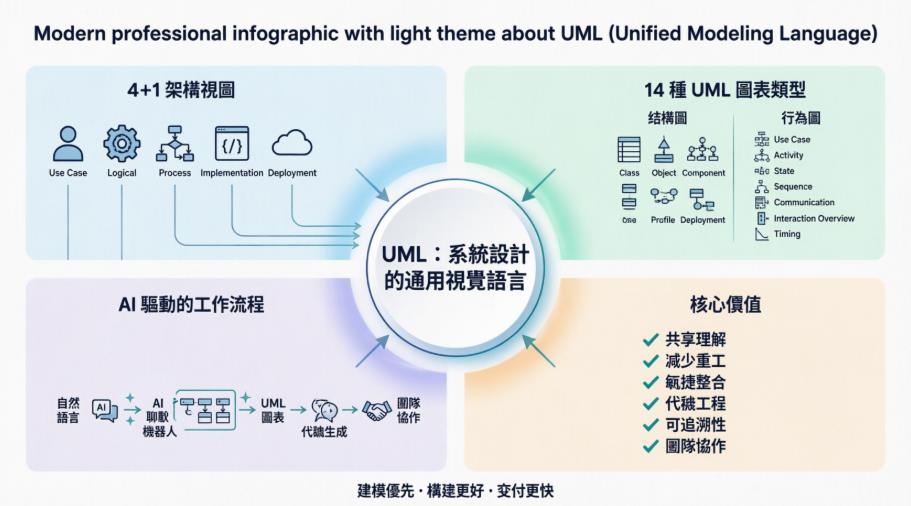
作為一支負責企業級微服務架構的開發團隊,我們曾經和許多人一樣,認為「UML 只是文件工作,寫程式才重要」。直到一次跨部門協作危機讓我們意識到:沒有共享的視覺語言,再好的程式碼也難以對齊業務目標。
經過兩年的實戰打磨,我們整理出這份經驗指南。這不是教科書複誦,而是工程師寫給工程師的「踩坑筆記」與「效率心法」。
一、重新認識 UML:工程師視角的價值定位
✅ UML 是什麼?(實務版定義)
- 不是:另一種程式語言、學術理論、額外負擔
- 而是:團隊溝通的「視覺協議」、設計決策的「可視化記錄」、複雜系統的「思維導圖」
💡 我們的認知轉變
| 過去想法 | 實戰後理解 |
|---|---|
| 「畫圖耽誤寫 code 時間」 | 「花 1 小時畫圖,省下 10 小時溝通與重構」 |
| 「只有架構師需要懂」 | 「每位工程師都該能讀寫核心圖表」 |
| 「文件寫完就過期」 | 「與程式碼同步維護的 UML 是活資產」 |
🔧 UML 的實際邊界
graph LR
    A[UML 核心能力] --> B[軟體系統建模]
    A --> C[非軟體流程建模]
    A --> D[業務規則可視化]
    A --> E[API 契約定義]
    B --> F[✅ 支援程式碼生成]
    C --> G[✅ 製造流程/工作流建模]
    D --> H[✅ 與產品經理對齊需求]
    E --> I[✅ 前後端協作依據]
📌 團隊經驗:我們規定「所有新微服務啟動前,必須產出 Use Case + Component Diagram」,這讓需求誤解率下降 60%。
二、4+1 架構視圖:我們如何落地實踐?
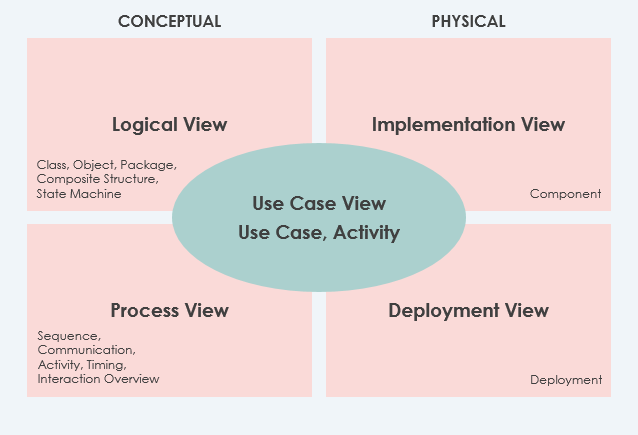
🎯 我們的視圖使用策略(附檢查清單)
1️⃣ Use Case View(必做|需求對齊核心)
@startuml
left to right direction
actor "會員" as User
actor "客服" as Support
rectangle "訂單系統" {
  User --> (下單)
  User --> (查詢訂單)
  Support --> (處理退貨)
  (下單) .> (庫存檢查) : include
  (下單) .> (支付流程) : extend
}
@enduml
✅ 我們的檢查清單:
- 每個 Use Case 都有明確的 Actor 與前置條件
- 複雜流程用 <> / <> 拆解
- 與 Product Owner 共同review並簽核
2️⃣ Logical View(必做|技術設計基準)

💡 實戰技巧:
- 用
<<interface>>明確界定模組邊界 - 標註
0..*、1..1等 multiplicity 避免資料庫設計歧義 - 將 Domain Entity 與 Infrastructure 層用 Package 分組
3️⃣ Implementation View(選做|大型專案推薦)
📦 src/
├── 📦 com.ourapp.order/
│   ├── 📄 OrderService.java
│   ├── 📄 PaymentAdapter.java
│   └── 📦 dto/
├── 📦 com.ourapp.inventory/
│   └── 📄 StockManager.java
└── 📦 config/
    └── 📄 DeploymentDescriptor.xml
⚠️ 常見陷阱:避免過度細分 Package,我們建議「按業務域 > 按技術層」的優先順序組織。
4️⃣ Process View(效能關鍵系統必做)
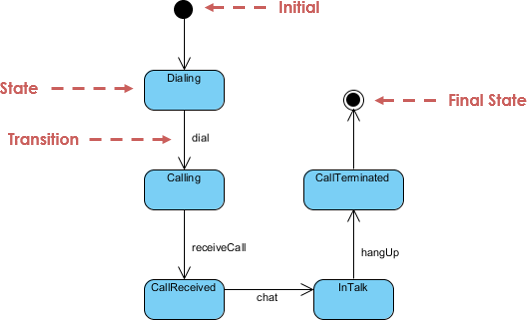
🔧 我們的監控整合技巧:
- 在 State 圖中标註
<<metric>>標籤,如<<latency_p99>> - 將 Critical Path 用紅色邊框突出
- 與 Prometheus/Grafana 儀表板建立超連結
5️⃣ Deployment View(雲原生必備)

☁️ 我們的 AWS 實戰標註規範:
node "EC2: App Server" <<aws:ec2>> {
  [Order Service] -- [Redis Cache]
}
node "RDS: Primary" <<aws:rds>> {
  database "orders_db"
}
[Order Service] ..> database : <<JDBC, pool=20>>
三、14 種 UML 圖:工程師的「按需選用」指南
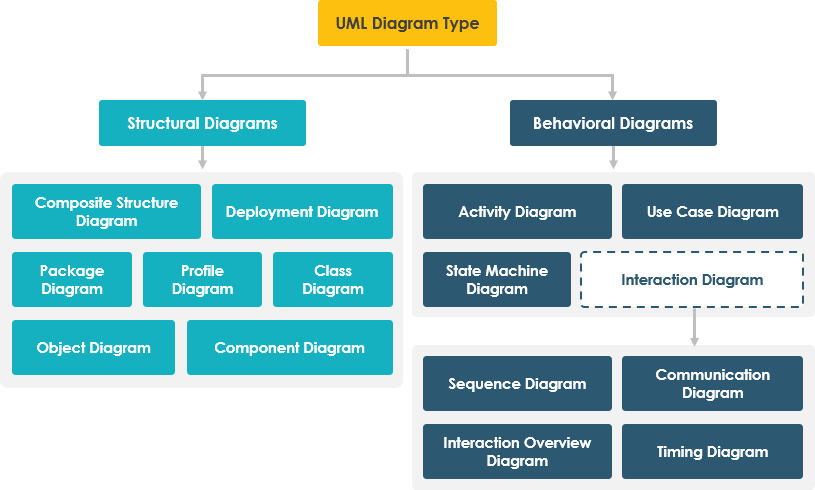
🏗️ 結構圖(Structural)— 我們的使用頻率與場景
| 圖表類型 | 使用頻率 | 最佳適用場景 | 團隊技巧 |
|---|---|---|---|
| Class Diagram | ⭐⭐⭐⭐⭐ | API 設計、Domain Modeling、Code Generation | 用 <<enum>>、<<value object>> 標註 DDD 概念 |
| Component Diagram | ⭐⭐⭐⭐ | 微服務邊界定義、模組依賴管理 | 標註 <<version>> 與 <<contract>> 避免整合衝突 |
| Deployment Diagram | ⭐⭐⭐⭐ | 雲架構規劃、CI/CD 管線設計 | 與 Terraform/CloudFormation 模板建立雙向同步 |
| Package Diagram | ⭐⭐⭐ | 大型專案模組組織、權限分區 | 用顏色區分 core / extension / legacy 模組 |
| Object Diagram | ⭐⭐ | 複雜物件狀態除錯、新人教學 | 僅在「狀態疑難排錯」時臨時繪製,不長期維護 |
| Composite Structure | ⭐⭐ | 內部演算法建模、設計模式說明 | 搭配 Sequence Diagram 解釋「內部協作流程」 |
| Profile Diagram | ⭐ | 領域特定擴展(如金融合規) | 建立團隊專屬 Stereotype 庫,避免重複定義 |
🎬 行為圖(Behavioral)— 動態流程建模心法
| 圖表類型 | 使用頻率 | 最佳適用場景 | 團隊技巧 |
|---|---|---|---|
| Use Case Diagram | ⭐⭐⭐⭐⭐ | 需求工作坊、User Story 拆解 | 用 <<epic>> / <<story>> 標註敏捷層級 |
| Sequence Diagram | ⭐⭐⭐⭐⭐ | API 流程設計、除錯分析、Code Review | 標註 <<async>>、<<timeout>> 等非同步細節 |
| Activity Diagram | ⭐⭐⭐⭐ | 業務流程建模、BPMN 對接、規則引擎輸入 | 用 <<decision>> 菱形明確標註業務規則分支 |
| State Machine | ⭐⭐⭐ | 訂單/支付/審核等狀態機建模 | 標註 <<entry>> / <<exit>> 動作方便實作 |
| Communication Diagram | ⭐⭐ | 物件協作優化、依賴注入設計 | 與 Sequence Diagram 互轉驗證邏輯一致性 |
| Interaction Overview | ⭐⭐ | 複雜場景導覽、多圖表關聯 | 作為「圖表地圖」連結其他詳細圖 |
| Timing Diagram | ⭐ | 即時系統、效能瓶頸分析 | 僅在「毫秒級優化」時使用,搭配 Profiler 數據 |
🎯 實戰範例:電商下單流程的圖表組合拳
Step 1: Use Case 定義範圍

Step 2: Sequence Diagram 設計流程
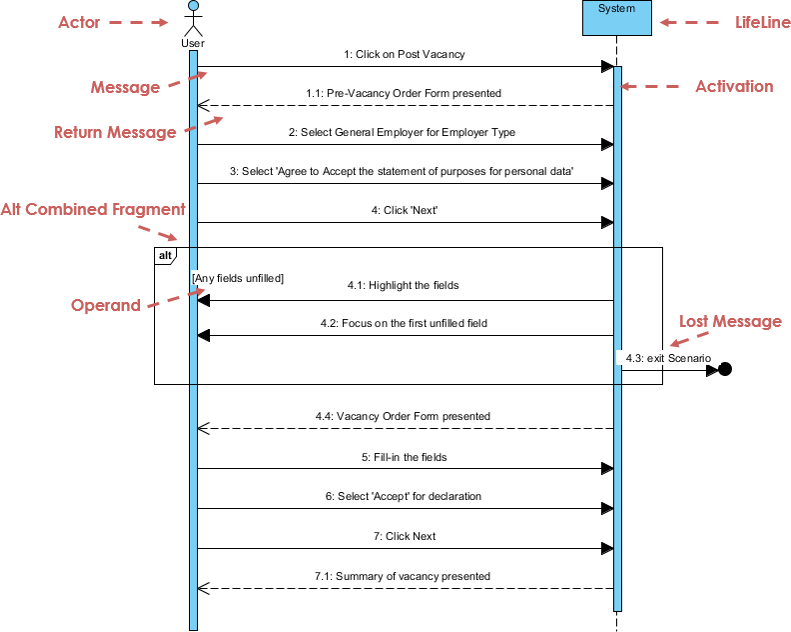
@startuml
actor Customer
participant "Order API" as API
participant "Inventory Service" as INV
participant "Payment Gateway" as PAY

Customer -> API: POST /orders
API -> INV: checkStock(itemId, qty)
INV --> API: {available: true}
API -> PAY: createCharge(amount)
PAY --> API: {transactionId: "tx_123"}
API -> Customer: 201 Created + orderNo
note right: 關鍵:所有外部呼叫標註 timeout 與重試策略
@enduml
Step 3: Class Diagram 落地實作

// 我們的實作規範:從 UML 直接生成骨架
public class Order {
    private OrderId id;          // <<value object>>
    private List<OrderItem> items;
    private PaymentStatus paymentStatus; // <<enum>>

    // 領域行為而非 getter/setter
    public void confirmPayment(TransactionId txId) { ... }
    public boolean canCancel() { ... } // 業務規則封裝
}
四、工具選擇實測:為什麼我們最終選用 Visual Paradigm?

🔍 我們評估過的工具矩陣
| 工具 | 優點 | 缺點 | 我們的結論 |
|---|---|---|---|
| Draw.io / diagrams.net | 免費、輕量、易上手 | 無模型追蹤、無法生成程式碼、協作弱 | ✅ 適合快速草圖,❌ 不適合企業級建模 |
| Lucidchart | 協作好、模板多 | UML 語法支援不完整、無法反向工程 | ✅ 適合業務流程圖,❌ 不適合技術設計 |
| Enterprise Architect | 功能強大、支援完整 UML | 學習曲線陡、價格高、介面較舊 | ⚠️ 適合大型傳統專案,❌ 不適合敏捷團隊 |
| Visual Paradigm | ✅ 完整 UML 2.x ✅ 程式碼雙向工程 ✅ 敏捷整合 ✅ AI 輔助 | 付費(但有 Community 版) | 🏆 團隊最終選擇 |
🚀 Visual Paradigm 的 5 個「真香」功能
1️⃣ 程式碼雙向工程(Code Engineering)
# 我們的 CI/CD 整合範例
$ vp-cli generate --from=OrderComponent.uml --lang=java --output=./src
$ vp-cli reverse --from=./src --update=OrderComponent.uml  # 程式碼變更同步回圖
💡 技巧:在 Class Diagram 標註 <<generated>> 標籤,避免手動修改被覆蓋。
2️⃣ 敏捷整合:Use Case → User Story 自動轉換

✅ 我們的 Jira 整合流程:
- 在 Use Case 標註
<<epic>>或<<story>> - 一鍵匯出至 Jira,自動建立 Issue 與 Epic Link
- 開發完成後,標記 Use Case 狀態為
<<implemented>>
3️⃣ AI 輔助建模:從自然語言到專業圖表
💬 AI Diagram Chatbot 實測:
👤 輸入:「設計一個支援第三方登入的會員系統,包含 Google、Facebook,
        需要記錄登入時間與 IP,並支援帳號停用」

🤖 輸出:
✅ 自動生成 Class Diagram(Member, LoginProvider, LoginLog)
✅ 建議 Sequence Diagram 流程(含 OAuth2.0 步驟)
✅ 標註安全注意事項(<<encrypt>> for IP, <<audit>> for login time)
4️⃣ 團隊協作:即時同步與衝突解決
🔧 我們的 Git 整合規範:
📦 uml-models/
├── 📄 .vpconfig          # 團隊共用設定
├── 📦 domains/
│   ├── 📄 order.vpp     # 訂單域模型(含版本號)
│   └── 📄 member.vpp
└── 📄 merge-rules.json  # 自定義合併規則
📌 經驗:設定「按 Package 鎖定」策略,避免多人同時修改同一模組。
5️⃣ 文件自動化:從模型到報告一鍵生成
📝 OpenDocs 實戰:
- 自動提取 Class Diagram 生成 API 文件
- 將 Sequence Diagram 轉為 Markdown 流程說明
- 支援 Word/PDF/HTML 多格式輸出,符合不同受眾需求
👉 免費下載 Visual Paradigm 試用 — 我們團隊的 Community 版已滿足 80% 需求。
五、工程師的 UML 實用技巧庫(含程式碼範例)
🛠️ 技巧 1:用 Stereotype 擴展 UML 語意
@startuml
class Order {
  <<aggregate root>>
  --
  +confirmPayment(): void
  +cancel(): boolean
}
class Payment {
  <<entity>>
  <<idempotent>>  # 冪等設計標註
  --
  +process(): TransactionResult
}
Order "1" *-- "0..1" Payment
note on link: <<eventual consistency>>\n支付成功後異步更新訂單狀態
@enduml
✅ 好處:讓圖表承載更多設計決策,Code Review 時一目了然。
🛠️ 技巧 2:標註非功能性需求(NFR)
component "Order Service" {
  [API Layer] -- [Domain Layer]
  [Domain Layer] -- [Repository]
}
note on component: <<scalability>>\n- 水平擴展: 無狀態設計\n- 快取策略: Redis L2\n- 降級方案: 本地 DB fallback
💡 應用場景:架構審查時,快速對齊效能、安全、可用性目標。
🛠️ 技巧 3:從 Sequence Diagram 生成測試骨架
// 我們的自動化腳本範例(基於 VP API)
@Test
public void testOrderCreation_withValidInput() {
    // 從 Sequence Diagram 自動提取的步驟
    given("庫存充足", () -> inventoryService.checkStock(itemId, qty).willReturn(true));
    when("呼叫下單 API", () -> orderApi.createOrder(request));
    then("應建立訂單並扣減庫存", () -> {
        verify(inventoryService).deductStock(itemId, qty);
        assertThat(order.getStatus()).isEqualTo(OrderStatus.CONFIRMED);
    });
}
🔧 實作:用 VP 的 Template 功能自定義程式碼片段,一鍵生成。
🛠️ 技巧 4:用 Color Coding 提升可讀性
| 顏色 | 含義 | 使用範例 |
|---|---|---|
| 🔵 藍色 | 核心領域物件 | Order, Member, Product |
| 🟢 綠色 | 外部依賴 | Payment Gateway, SMS Service |
| 🟠 橙色 | 技術基礎設施 | Redis, Kafka, Database |
| 🔴 紅色 | 風險/待優化 | <>, <> |
📌 團隊規範:在
.vpstyle檔案統一顏色定義,確保全員一致。
🛠️ 技巧 5:建立「圖表健康檢查」自動化
# 我們的 CI 檢查腳本範例(vp-health-check.py)
def check_uml_quality(model_path):
    issues = []

    # 檢查 1: 所有 Use Case 是否有對應的 Sequence
    if not has_sequence_for_usecase(model_path):
        issues.append("⚠️ Use Case 缺少流程細節")

    # 檢查 2: Class 是否有明確的責任單一原則
    if count_responsibilities_per_class(model_path) > 3:
        issues.append("⚠️ 類別職責過多,建議拆分")

    # 檢查 3: 外部依賴是否標註超时與重試
    if not has_timeout_annotation(model_path):
        issues.append("⚠️ 外部呼叫缺少容錯設計標註")

    return issues

# 整合至 GitHub Actions
# - name: UML Quality Gate
#   run: python vp-health-check.py --model=./uml
六、常見陷阱與避坑指南
❌ 陷阱 1:過度設計(Over-Modeling)
症狀:為簡單 CRUD 畫 10 張圖、追求「完美圖表」而延遲開發
✅ 我們的對策:
- 採用「Just Enough Modeling」原則:只畫「有決策價值」的圖
- 設定圖表維護成本上限:每張圖每月更新不超過 30 分鐘
- 用
<<draft>>標籤標記臨時圖,避免過度投入
❌ 陷阱 2:圖碼不同步(Model-Code Drift)
症狀:UML 是「上個月」的設計,程式碼已迭代 3 個版本
✅ 我們的對策:
graph LR
    A[程式碼提交] --> B{觸發 CI}
    B --> C[自動反向工程]
    C --> D[比對 UML 差異]
    D --> E{差異 > 閾值?}
    E -->|是| F[通知架構師 Review]
    E -->|否| G[自動更新模型版本]
❌ 陷阱 3:業務與技術語言脫節
症狀:工程師畫的圖,產品經理看不懂
✅ 我們的對策:
- 在 Use Case 圖中用「業務術語」而非技術名詞
- 為非技術成員製作「圖例速查卡」(Legend Card)
- 定期舉辦「圖表共讀會」,雙向翻譯需求與設計
❌ 陷阱 4:工具綁定風險
症狀:團隊深度依賴某工具,遷移成本極高
✅ 我們的對策:
- 優先使用 XMI 標準格式儲存模型(工具中立)
- 關鍵設計同時產出 PlantUML 文字版(版本控制友好)
- 建立「工具抽象層」:核心建模邏輯與工具解耦
七、給不同角色工程師的 UML 學習路徑
👨💻 初級工程師(0-2 年)
🎯 目標:能讀懂團隊圖表、參與簡單建模
📚 學習順序:
- Class Diagram(理解物件關係)
- Sequence Diagram(掌握流程邏輯)
- Use Case Diagram(連結業務需求)
💡 實戰任務:為負責的模組補上缺失的圖表,並通過 Team Review
👨💼 中級工程師(2-5 年)
🎯 目標:主導模組設計、產出可落地模型
📚 學習順序:
- Component + Deployment Diagram(模組邊界與部署)
- State Machine(複雜狀態管理)
- Profile Diagram(領域擴展)
💡 實戰任務:設計一個新微服務的全套 4+1 視圖,並通過架構委員會審核
👨🔧 資深工程師 / 架構師(5 年+)
🎯 目標:制定建模規範、推動團隊實踐、整合工具鏈
📚 學習重點:
- UML 與 DDD / Clean Architecture 的整合
- 自動化建模與 CI/CD 管線設計
- 跨團隊模型治理與版本策略
💡 實戰任務:建立團隊的 UML Style Guide 與自動化檢查機制
結語:我們的 UML 實踐心法
「UML 的價值不在於圖畫得多精美,而在於它是否讓團隊『想得更清楚、溝通更精準、交付更可靠』。」
經過兩年的持續實踐,我們團隊的共識是:
✅ UML 是思維工具,不是文件負擔 — 畫圖是為了釐清思路,不是為了交差
✅ 工具是手段,共識是目的 — 選擇能促進協作的工具,而非功能最多的
✅ 模型要「活」不要「死」 — 與程式碼、測試、文件形成閉環,持續演進
✅ 從「足夠好」開始,迭代優化 — 避免追求完美而延遲價值交付
最後分享一句我們白板上的座右銘:
「Model to Think, Diagram to Communicate, Code to Deliver」
(建模為了思考,繪圖為了溝通,程式碼為了交付)
希望這份筆記能為你的團隊帶來啟發。歡迎在下方留言分享你的 UML 實戰經驗,讓我們一起進步!🚀
參考資源(團隊精選)
- Visual Paradigm UML Tool Features: A comprehensive overview of Visual Paradigm's capabilities for creating various UML diagrams, including class, sequence, and state machine diagrams, highlighting its support for software engineering workflows.
- Comprehensive Guide to UML State Machine Diagrams with Visual Paradigm and AI: An in-depth tutorial explaining how to utilize Visual Paradigm alongside AI features to design and manage complex state machine diagrams for system modeling.
- Guide to Powered UML Diagram Generation via AI Chatbot: A guide demonstrating how to use the Visual Paradigm AI chatbot interface to generate UML diagrams through natural language prompts.
- Visual Paradigm Ecosystem: AI-Supported UML Diagram Features: An analysis of the broader Visual Paradigm ecosystem, focusing specifically on how integrated AI tools enhance the creation and maintenance of UML diagrams.
- Comprehensive Review of Visual Paradigm's AI Diagram Generation Features: A detailed review evaluating the effectiveness, accuracy, and user experience of the AI-driven diagram generation tools within Visual Paradigm.
- Video Tutorial: Visual Paradigm UML Basics: A video resource providing visual demonstrations and step-by-step instructions on using Visual Paradigm for UML modeling.
- AI-Assisted UML Class Diagram Generator: A dedicated tool page where users can input requirements or code snippets to automatically generate UML class diagrams using artificial intelligence.
- Visual Paradigm AI Chatbot Features: An overview of the specific AI chatbot integration within Visual Paradigm, detailing its ability to assist with diagram creation, code generation, and documentation.
- Visual Paradigm Feature Overview: The main hub listing all available features of the software, ranging from standard UML diagramming to advanced AI-assisted development tools.
- Visual Paradigm Official Website: The primary landing page for the Visual Paradigm platform, offering general information, downloads, and links to specific product features.
- AI-Assisted UML Class Diagram Generator Guide: A feature-specific article describing the workflow and benefits of using the AI generator to create accurate class diagrams from text descriptions.
- UML Class Diagram Tutorial: A step-by-step educational guide on how to construct, read, and interpret UML class diagrams using Visual Paradigm.
- Unleashing the Power of Visual Paradigm Community Edition: A guide highlighting the capabilities of the free Community Edition of Visual Paradigm, emphasizing it as a robust, non-commercial UML tool.
📬 團隊聯絡與交流
本文由「雲原生架構實踐小組」共同撰寫,歡迎透過以下方式交流:
- GitHub:
github.com/uml-practice-team- Slack:
#uml-best-practices- 部落格:
engineering.ourcompany.com/uml-notes最後更新:2026 年 4 月|版本:v2.3|遵循 CC BY-SA 4.0 授權