[Visual Studio 2012][Visual Studio 2013] Paste Special - 貼上 JSON 或 XML 文字 轉換類別
我很習慣透過序列化來處理 JSON/XML,地表上最強的IDE很貼心的提供了 Paste Special 功能,它能夠把 XML/JSON 文字,轉換成類別
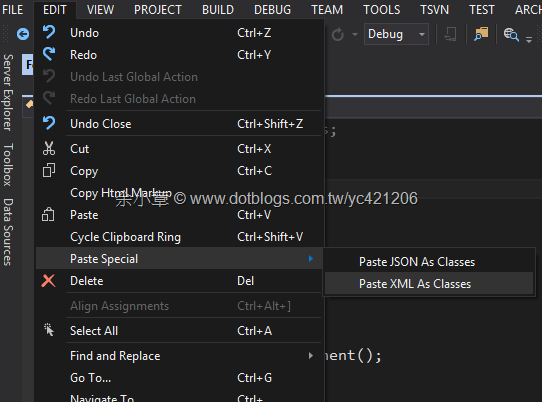
如上篇,http://www.dotblogs.com.tw/yc421206/archive/2011/12/26/63366.aspx 寫對應類別真的很煩人,所以說現在還在手動寫類別的話就落伍了
<epcis:EPCISDocument xmlns:xsi="http://www.w3.org/2001/XMLSchema-instance" xmlns:sensor="http://epcis.gs1hk.org/ns/sensor" xmlns:gs1hk="urn:epcglobal:gs1hk:xsd:ext" schemaVersion="1" creationDate="2010-09-15T04:07:52" xmlns:epcis="urn:epcglobal:epcis:xsd:1">
<EPCISBody>
<EventList>
<ObjectEvent>
<eventTime>2011-12-25T17:04:52</eventTime>
<eventTimeZoneOffset>+08:00</eventTimeZoneOffset>
<epcList>
<epc>BBAA99887766554400085172</epc>
<epc>BBAA99887766554400085173</epc>
</epcList>
<action>OBSERVE</action>
<bizStep>urn:epcglobal:fmcg:bizstep:Gate_In</bizStep>
<bizLocation>
<id>urn:epcglobal:fmcg:loc.MMMMM.202.MZMFG_Warehouse_Gate_Door,414.Gate_Door2</id>
</bizLocation>
<bizTransactionList>
<bizTransaction type="urn:gs1hk:ext:order">China</bizTransaction>
</bizTransactionList>
<sensor:temperature>20.5</sensor:temperature>
<sensor:state>Alram</sensor:state>
<sensor:temperaturereporturl>http://www.gts-portal.co/Z/Page/TempChart.aspx?EPC=BBAA99887766554400085172&Date=2011-12-25T17:04:52</sensor:temperaturereporturl>
</ObjectEvent>
</EventList>
</EPCISBody>
</epcis:EPCISDocument>
有了Paste Special 彈指間資料格式瞬間變成我要的類別,有夠驚人的
    [System.Xml.Serialization.XmlTypeAttribute(AnonymousType = true, Namespace = "urn:epcglobal:epcis:xsd:1")]
    [System.Xml.Serialization.XmlRootAttribute(Namespace = "urn:epcglobal:epcis:xsd:1", IsNullable = false)]
    public partial class EPCISDocument
    {

        private EPCISBody ePCISBodyField;

        private byte schemaVersionField;

        private System.DateTime creationDateField;

        /// <remarks/>
        [System.Xml.Serialization.XmlElementAttribute(Namespace = "")]
        public EPCISBody EPCISBody
        {
            get
            {
                return this.ePCISBodyField;
            }
            set
            {
                this.ePCISBodyField = value;
            }
        }

        /// <remarks/>
        [System.Xml.Serialization.XmlAttributeAttribute()]
        public byte schemaVersion
        {
            get
            {
                return this.schemaVersionField;
            }
            set
            {
                this.schemaVersionField = value;
            }
        }

        /// <remarks/>
        [System.Xml.Serialization.XmlAttributeAttribute()]
        public System.DateTime creationDate
        {
            get
            {
                return this.creationDateField;
            }
            set
            {
                this.creationDateField = value;
            }
        }
    }

    /// <remarks/>
    [System.Xml.Serialization.XmlTypeAttribute(AnonymousType = true)]
    [System.Xml.Serialization.XmlRootAttribute(Namespace = "", IsNullable = false)]
    public partial class EPCISBody
    {

        private EPCISBodyEventList eventListField;

        /// <remarks/>
        public EPCISBodyEventList EventList
        {
            get
            {
                return this.eventListField;
            }
            set
            {
                this.eventListField = value;
            }
        }
    }

    /// <remarks/>
    [System.Xml.Serialization.XmlTypeAttribute(AnonymousType = true)]
    public partial class EPCISBodyEventList
    {

        private EPCISBodyEventListObjectEvent objectEventField;

        /// <remarks/>
        public EPCISBodyEventListObjectEvent ObjectEvent
        {
            get
            {
                return this.objectEventField;
            }
            set
            {
                this.objectEventField = value;
            }
        }
    }

    /// <remarks/>
    [System.Xml.Serialization.XmlTypeAttribute(AnonymousType = true)]
    public partial class EPCISBodyEventListObjectEvent
    {

        private System.DateTime eventTimeField;

        private string eventTimeZoneOffsetField;

        private string[] epcListField;

        private string actionField;

        private string bizStepField;

        private EPCISBodyEventListObjectEventBizLocation bizLocationField;

        private EPCISBodyEventListObjectEventBizTransactionList bizTransactionListField;

        private decimal temperatureField;

        private string stateField;

        private string temperaturereporturlField;

        /// <remarks/>
        public System.DateTime eventTime
        {
            get
            {
                return this.eventTimeField;
            }
            set
            {
                this.eventTimeField = value;
            }
        }

        /// <remarks/>
        public string eventTimeZoneOffset
        {
            get
            {
                return this.eventTimeZoneOffsetField;
            }
            set
            {
                this.eventTimeZoneOffsetField = value;
            }
        }

        /// <remarks/>
        [System.Xml.Serialization.XmlArrayItemAttribute("epc", IsNullable = false)]
        public string[] epcList
        {
            get
            {
                return this.epcListField;
            }
            set
            {
                this.epcListField = value;
            }
        }

        /// <remarks/>
        public string action
        {
            get
            {
                return this.actionField;
            }
            set
            {
                this.actionField = value;
            }
        }

        /// <remarks/>
        public string bizStep
        {
            get
            {
                return this.bizStepField;
            }
            set
            {
                this.bizStepField = value;
            }
        }

        /// <remarks/>
        public EPCISBodyEventListObjectEventBizLocation bizLocation
        {
            get
            {
                return this.bizLocationField;
            }
            set
            {
                this.bizLocationField = value;
            }
        }

        /// <remarks/>
        public EPCISBodyEventListObjectEventBizTransactionList bizTransactionList
        {
            get
            {
                return this.bizTransactionListField;
            }
            set
            {
                this.bizTransactionListField = value;
            }
        }

        /// <remarks/>
        [System.Xml.Serialization.XmlElementAttribute(Namespace = "http://epcis.gs1hk.org/ns/sensor")]
        public decimal temperature
        {
            get
            {
                return this.temperatureField;
            }
            set
            {
                this.temperatureField = value;
            }
        }

        /// <remarks/>
        [System.Xml.Serialization.XmlElementAttribute(Namespace = "http://epcis.gs1hk.org/ns/sensor")]
        public string state
        {
            get
            {
                return this.stateField;
            }
            set
            {
                this.stateField = value;
            }
        }

        /// <remarks/>
        [System.Xml.Serialization.XmlElementAttribute(Namespace = "http://epcis.gs1hk.org/ns/sensor")]
        public string temperaturereporturl
        {
            get
            {
                return this.temperaturereporturlField;
            }
            set
            {
                this.temperaturereporturlField = value;
            }
        }
    }

    /// <remarks/>
    [System.Xml.Serialization.XmlTypeAttribute(AnonymousType = true)]
    public partial class EPCISBodyEventListObjectEventBizLocation
    {

        private string idField;

        /// <remarks/>
        public string id
        {
            get
            {
                return this.idField;
            }
            set
            {
                this.idField = value;
            }
        }
    }

    /// <remarks/>
    [System.Xml.Serialization.XmlTypeAttribute(AnonymousType = true)]
    public partial class EPCISBodyEventListObjectEventBizTransactionList
    {

        private EPCISBodyEventListObjectEventBizTransactionListBizTransaction bizTransactionField;

        /// <remarks/>
        public EPCISBodyEventListObjectEventBizTransactionListBizTransaction bizTransaction
        {
            get
            {
                return this.bizTransactionField;
            }
            set
            {
                this.bizTransactionField = value;
            }
        }
    }

    /// <remarks/>
    [System.Xml.Serialization.XmlTypeAttribute(AnonymousType = true)]
    public partial class EPCISBodyEventListObjectEventBizTransactionListBizTransaction
    {

        private string typeField;

        private string valueField;

        /// <remarks/>
        [System.Xml.Serialization.XmlAttributeAttribute()]
        public string type
        {
            get
            {
                return this.typeField;
            }
            set
            {
                this.typeField = value;
            }
        }

        /// <remarks/>
        [System.Xml.Serialization.XmlTextAttribute()]
        public string Value
        {
            get
            {
                return this.valueField;
            }
            set
            {
                this.valueField = value;
            }
        }
    }
一切都準備就緒後,就可以真的來寫程式碼
建立資料,資料來源就抄原始檔案
{
    EPCISBody = new EPCISBody()
    {
        EventList = new EPCISBodyEventList()
        {
            ObjectEvent = new EPCISBodyEventListObjectEvent()
            {
                eventTime = Convert.ToDateTime("2011-12-25T17:04:52"),
                eventTimeZoneOffset = "+08:00",
                epcList = new string[] { "BBAA99887766554400085172", "BBAA99887766554400085173" },
                action = "OBSERVE",
                bizStep = "urn:epcglobal:fmcg:bizstep:Gate_In",
                bizLocation = new EPCISBodyEventListObjectEventBizLocation()
                {
                    id = "urn:epcglobal:fmcg:loc.MMMMM.202.MZMFG_Warehouse_Gate_Door,414.Gate_Door2"
                },
                bizTransactionList = new EPCISBodyEventListObjectEventBizTransactionList()
                {
                    bizTransaction = new EPCISBodyEventListObjectEventBizTransactionListBizTransaction()
                    {
                        type = "urn:gs1hk:ext:order",
                        Value = "China"
                    }
                },
                state = "Alram",
                temperature = (decimal)20.5d,
                temperaturereporturl =
                "http://www.gts-portal.co/Z/Page/TempChart.aspx?EPC=BBAA99887766554400085172&Date=2011-12-25T17:04:52"
            }
        }
    }
};
epcisDocument.creationDate = Convert.ToDateTime("2010-09-15T04:07:52");
epcisDocument.schemaVersion = 1;
序列化檔案,XML 的命名空間還是必須要手動自己建立
namespaces.Add("xsi", "http://www.w3.org/2001/XMLSchema-instance");
namespaces.Add("sensor", "http://epcis.gs1hk.org/ns/sensor");
namespaces.Add("gs1hk", "urn:epcglobal:gs1hk:xsd:ext");
namespaces.Add("epcis", "urn:epcglobal:epcis:xsd:1");
StreamWriter writer = null;

var xml = new XmlSerializer(epcisDocument.GetType());
using (var stream = new FileStream("AA.xml", FileMode.Create, FileAccess.Write, FileShare.Read))
using (writer = new StreamWriter(stream, Encoding.UTF8))
{
    xml.Serialize(writer, epcisDocument, namespaces);
}
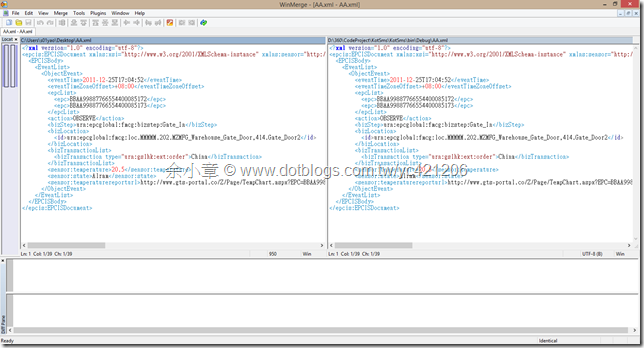
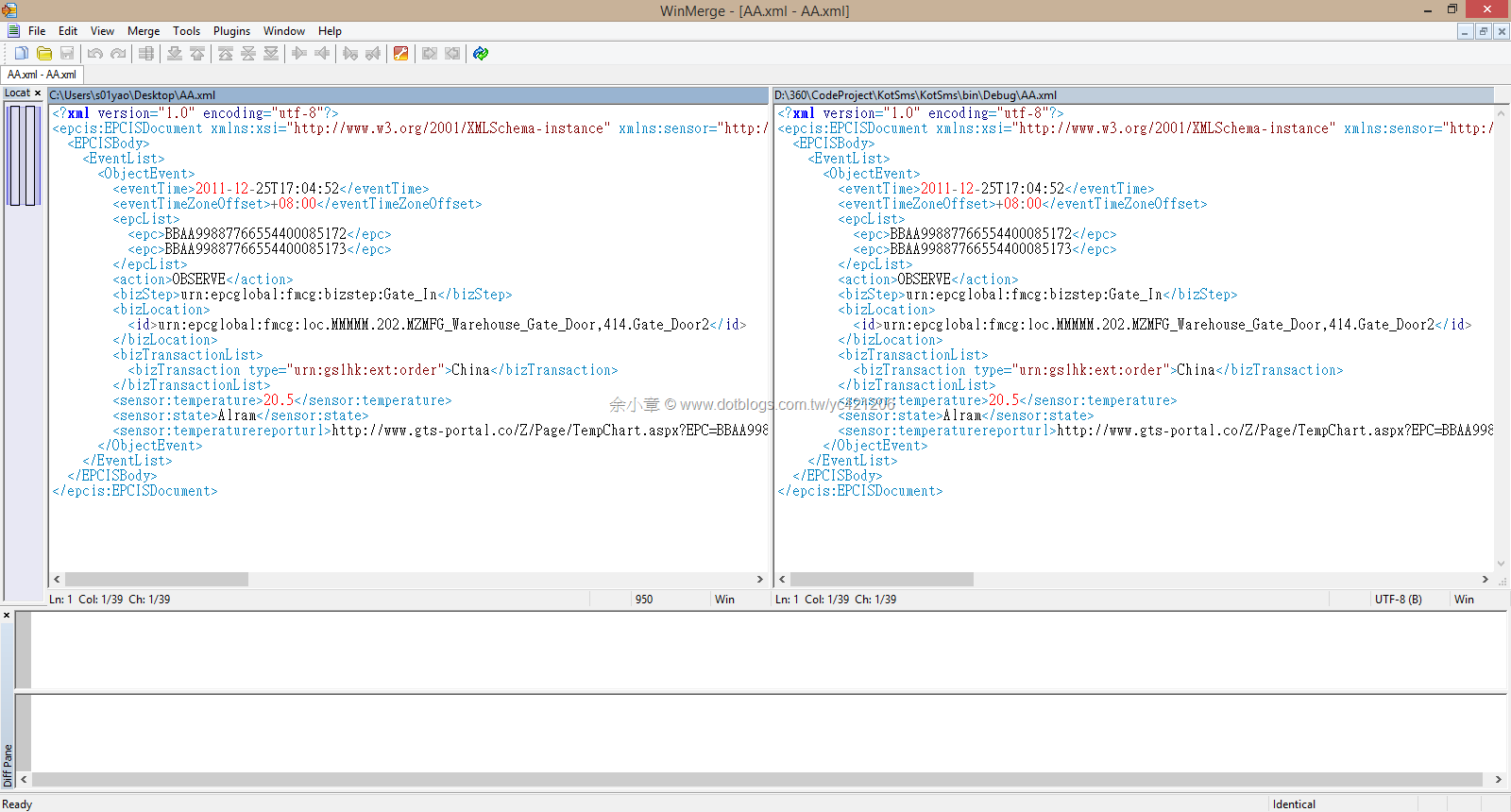
因為懶得寫單元測試所以就使用 WinMerge 來比對是否產生結果是否正確,下圖沒有任何標記代表原始來源與程式結果一致
文章出自:http://www.dotblogs.com.tw/yc421206/archive/2014/03/05/144250.aspx
若有謬誤,煩請告知,新手發帖請多包涵

Microsoft MVP Award 2010~2017 C# 第四季
Microsoft MVP Award 2018~2025 .NET
