[C#.NET][Sharepoint 2013] 如何使用 CSOM 更新清單欄位
續上篇,http://www.dotblogs.com.tw/yc421206/archive/2014/06/03/145354.aspx
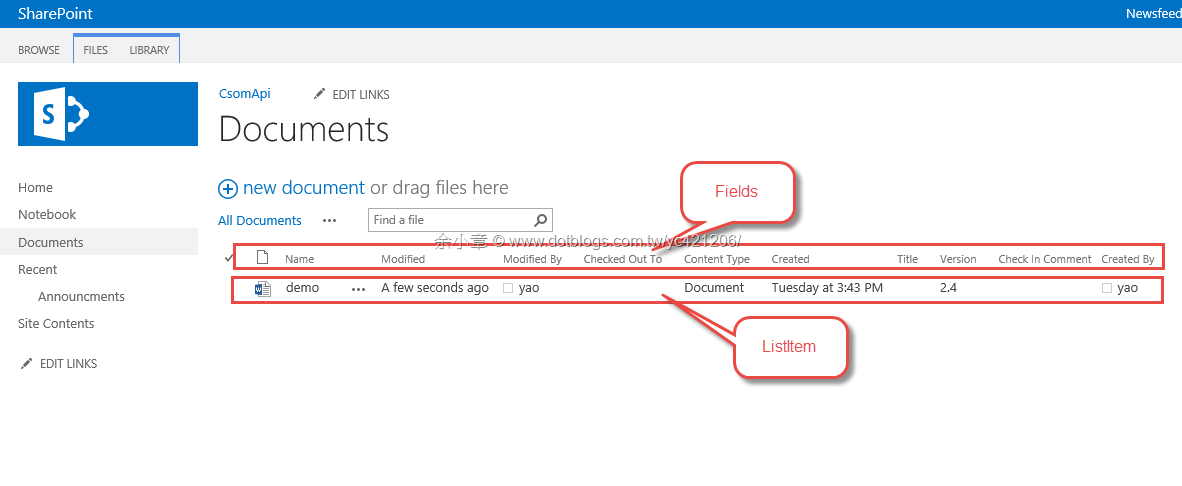
這次要處理的內容是下圖的第 4 項目 Field

對應到實際內容清單,就很明確的知道要處理哪一部份,不過並不是所有的 Field 都可以變更
程式碼很簡單
- 找出 demo.docx 的 Field,也就是調用 var items = file.ListItemAllFields
- 針對 Field 變更狀態 ,items["Title"] = "Updated Title 1.5";
private static void updateItemProperty()
{
    ClientContext client = new ClientContext("http://sps2013/CsomApi/");
    client.Credentials = new NetworkCredential("your account", "your password");
    var list = client.Web.Lists.GetByTitle("Documents");
    var file = list.RootFolder.Files.GetByUrl("demo.docx");
    var items = file.ListItemAllFields;
    items["Title"] = "Updated Title 1.5";
    client.Load(items);
    items.Update();
    client.ExecuteQuery();
}
除上述的方法,也可以透過CAML
- 產生 CamlQuery,調用 CamlQuevary.CreateAllItemsQuery(1000);
- 調用 FileLeafRef 取得正確的項目 var item = items.FirstOrDefault(o => o["FileLeafRef"].ToString() == "demo.docx");
程式碼如下:
private static void updateItemProperty2()
{
    ClientContext client = new ClientContext("http://sps2013/CsomApi/");
    client.Credentials = new NetworkCredential("your Account", "your password");
    var list = client.Web.Lists.GetByTitle("Documents");
    CamlQuery query = CamlQuery.CreateAllItemsQuery(1000);
    ListItemCollection items = list.GetItems(query);
    //ListItem item = items.GetById(1);
    client.Load(items);
    client.ExecuteQuery();
    var item = items.FirstOrDefault(o => o["FileLeafRef"].ToString() == "demo.docx");

    if (item != null)
    {
        item["Title"] = "Updated Title.";
        item.Update();
        client.ExecuteQuery();
    }
}
我嘗試著要變更 CheckInComment,
items["_CheckinComment"] = "正式版2.0";
會得到例外
An unhandled exception of type 'Microsoft.SharePoint.Client.ServerException' occurred in Microsoft.SharePoint.Client.Runtime.dll
Additional information: Invalid data has been used to update the list item. The field you are trying to update may be read only.
所以不是每個欄位都可以透過上述的兩種方法處理
文章出自:http://www.dotblogs.com.tw/yc421206/archive/2014/06/05/145383.aspx
若有謬誤,煩請告知,新手發帖請多包涵

Microsoft MVP Award 2010~2017 C# 第四季
Microsoft MVP Award 2018~2025 .NET
