秘密管理員工具,預設會在專案的開發期間儲存機密資料,絕對不要將密碼或其他敏感性資料儲存在原始程式碼中,機密資料不應與應用程式一起部署。應該透過像是環境變數或 Azure 金鑰保存庫等受控方式來存取生產秘密。 您可以透過 Azure Key Vault 設定提供者 儲存及保護 Azure 測試與生產祕密。
2021-04-09
如何使用應用程式秘密組態
- 2655
- 0
- Configuration
秘密管理員工具,預設會在專案的開發期間儲存機密資料,絕對不要將密碼或其他敏感性資料儲存在原始程式碼中,機密資料不應與應用程式一起部署。應該透過像是環境變數或 Azure 金鑰保存庫等受控方式來存取生產秘密。 您可以透過 Azure Key Vault 設定提供者 儲存及保護 Azure 測試與生產祕密。
Microsoft.Extensions.Hosting.WindowsServices 實作 IHostLifetime,可以讓我們輕鬆地將 Console 應用程式掛載在 Windows Service,在實作的過程當中,發現控制服務不是那麼的友善。
於是想起了 Topshelf,便找到了 Topshelf.Extensions.Hosting,它除了可以使用原本的 Host 生命週期,DI Container 注入方式,還可以享有 Topshelf 自我管理 Windows Service 的功能。
.NET Generic Host 是 .NET Core 發展出來的基礎建設,可以和其他類型的 .NET 應用程式搭配使用例如背景服務的主控台應用程式,Microsoft.Extensions.Hosting.Host.CreateDefaultBuilder 靜態方法,它來自於 Microsoft.Extensions.Hosting.dll,主要用來提供應用程式一個標準的啟動,包含注入、紀錄、組態,不同的應用程式框架 (HostService) 有不同的預設啟動設定,.NET Generic Host 讓我們的應用程式的生命週期的控制,啟動到結束的撰寫方式統一了。
上篇,如何使用組態 Microsoft.Extensions.Configuration,最後我讓物件依賴 IConfiguration,不論是讀檔操作,還是重新載入檔案,它都可以完成,還可以更好嗎?.NET Core 的 Options Pattern 強化 IConfiguration,封裝了讀檔、轉強型別、重新載入、載入通知、驗證資料的行為,提供另一種使用參數的選擇。
Microsoft.Extensions.Configuration.dll 用來處理組態,讀檔、重新載入、支援多種格式,包括記憶體、Json、Xml、Ini,也可以像在 .Net Fx 用 Transform 切換組態。
它是在 .NET Core 的基礎建設之一,除了.NET Core,也支援 NET Framework 4.6.1 以上;也可以像在 .Net Fx 用 Transform 切換組態。
ASP.NET Core 預設的組態是 appSetting.json,本篇簡單介紹組態設定的使用方法,關於 ASP.NET Core 的 Host,以後再寫一篇為大家講解
續上篇 .NET 的 Virtual File System - Lexical.FileSystem,經過上篇,應該稍微對於 VFS 的使用情境及架構多多少少有點概念了,我又發現另外一套 VFS Zio,操作起來極為順手,我想應該是他的命名相當的清楚,幾乎不用看文件就猜得出來
甚麼是 VFS?以下出自 wiki
虛擬檔案系統(英語:Virtual file system,縮寫為VFS),又稱虛擬檔案切換系統(virtual filesystem switch),是作業系統的檔案系統虛擬層,在其下是實體的檔案系統。虛擬檔案系統的主要功用,在於讓上層的軟體,能夠用單一的方式,來跟底層不同的檔案系統溝通。在作業系統與之下的各種檔案系統之間,虛擬檔案系統提供了標準的操作介面,讓作業系統能夠很快的支援新的檔案系統。
Lexical.FileSystem 是 .NET 平台的 VFS,能夠為我帶來甚麼幫助呢??
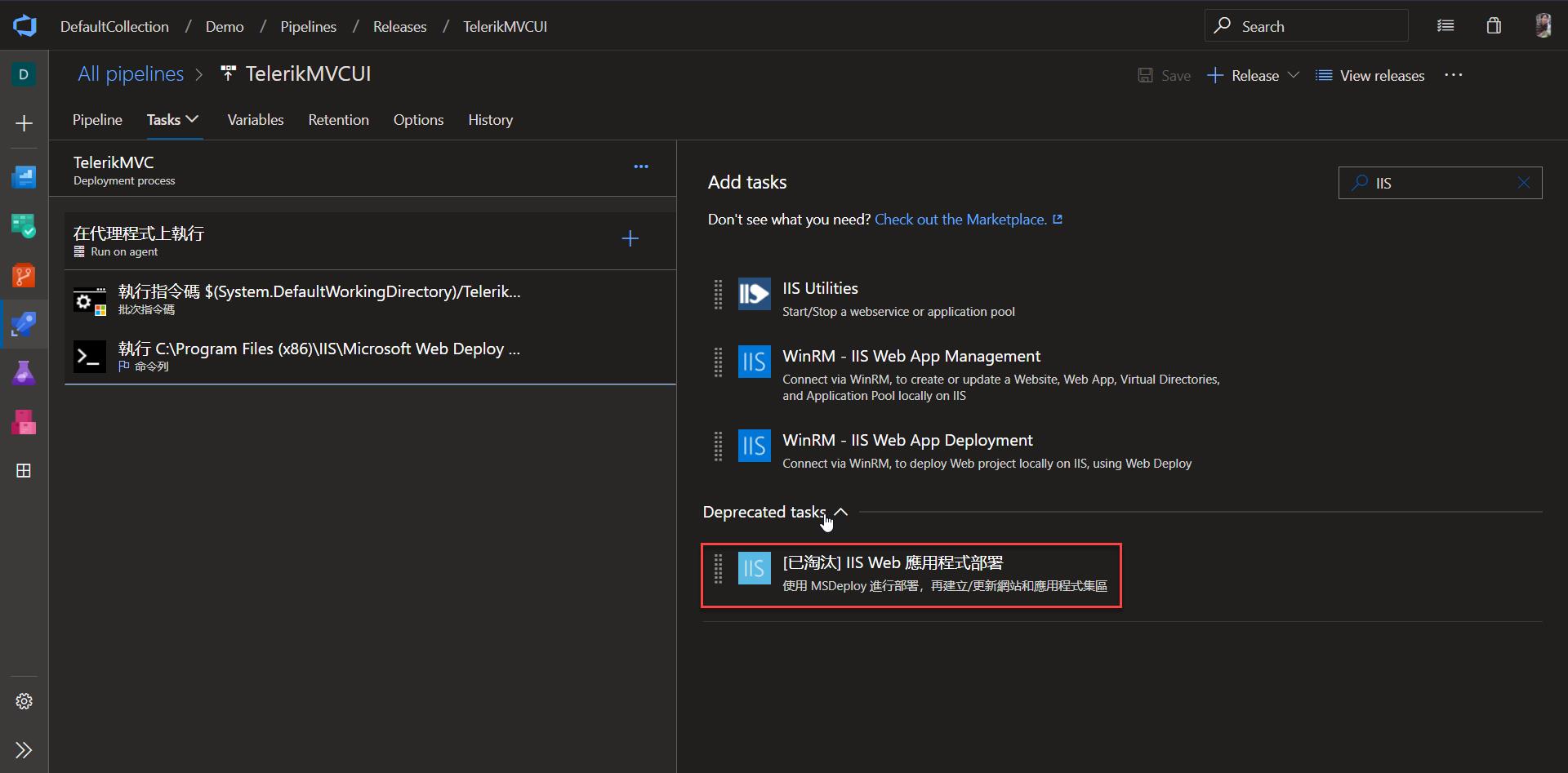
之前有提到使用 IIS WebSite Deployment 來部署 Web 應用程式,不過它不知道在哪個版本就已經列入過時了,取而代之的是 WinRM - IIS Web App Management Task,它不需要依賴 MsDeploy 和 Web Deploy (from Microsoft Web Platform Installer)
以往在 NetFx 在專案的 AssemblyInfo.cs 加上 System.Runtime.CompilerServices.InternalsVisibleToAttribute("TestProject1"),就可以讓 "TestProject1" 存取 NetFx 專案內的 internal 成員;這技巧通常用於測試,既可隱藏,又可測試,真的好棒。
現在,新版的 .NET Project SDKs 已經沒有包含 AssemblyInfo.cs 靜態檔案了,作法就要做一些調整了
組合出好維護的 Http Request 這件事一直困擾著我,最近發現了一枚小工具 Flurl,使用 Flent 語法結構組合出維護性高的 Http Request