目前手上常用來建置與發佈程式的 CI/CD 服務與架構系統,大略可簡化為 "GitLab 的雲端服務 + 地端主機上所運作的 Docker"。
要完全地端也當然不是不行,畢竟可以自行架設 gitlab 的 Server 在地端的環境內運作。
接續上回…
既然已經串接 GitLab Runner 完成了,那就來跑一下 Pipline 吧!
在 GitLab 當中,透過 Build → Pipline,點選 "New pipline":
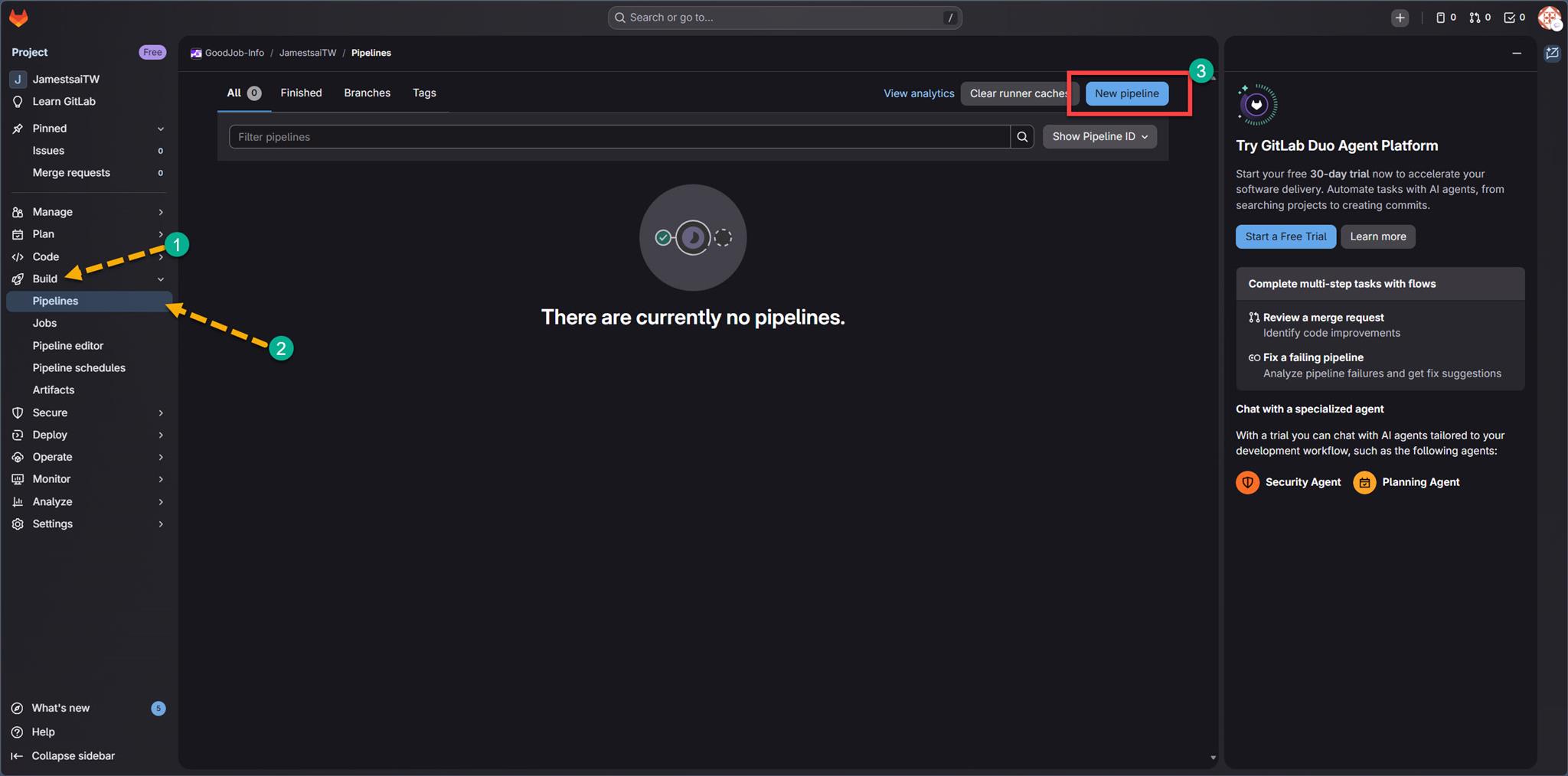
如果遇到還無法開始使用 Pipeline 的問題,請先證明是你是 "人類"。
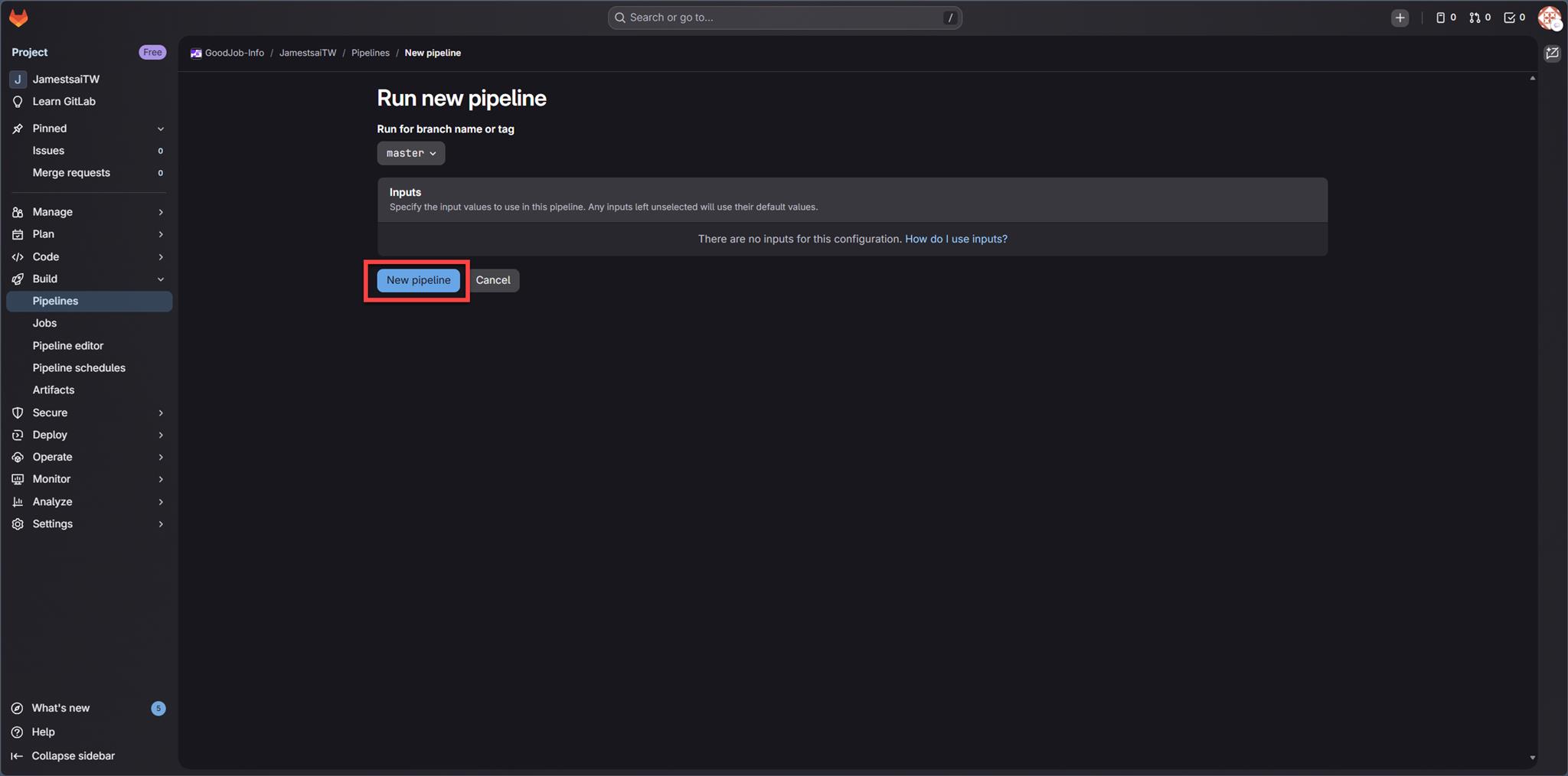
進到 Run new pipline 當中,選取專案的分支,並且確定相關的 Inputs 後,就可以點選執行 New pipline 了:
接著就會看到如果專案的 .gitlab-ci.yml 中所撰寫的設定與邏輯都正確,那這個 Pipline 如上篇所說的 Stages 設定:build (建置)、test (測試)、deploy (部署) 就會依序跑完:
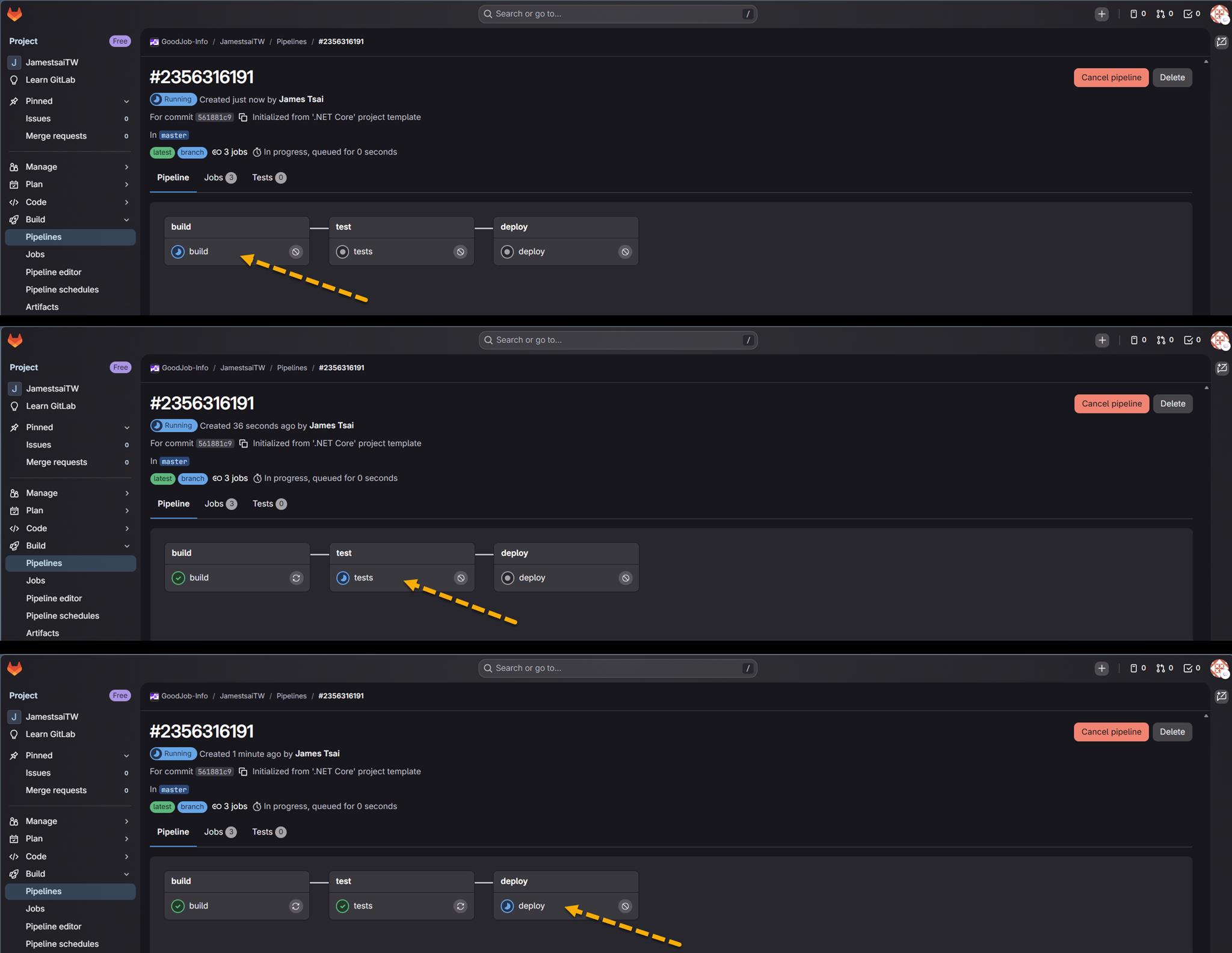
當然也可以直接在 Piplines 當中確認狀態:
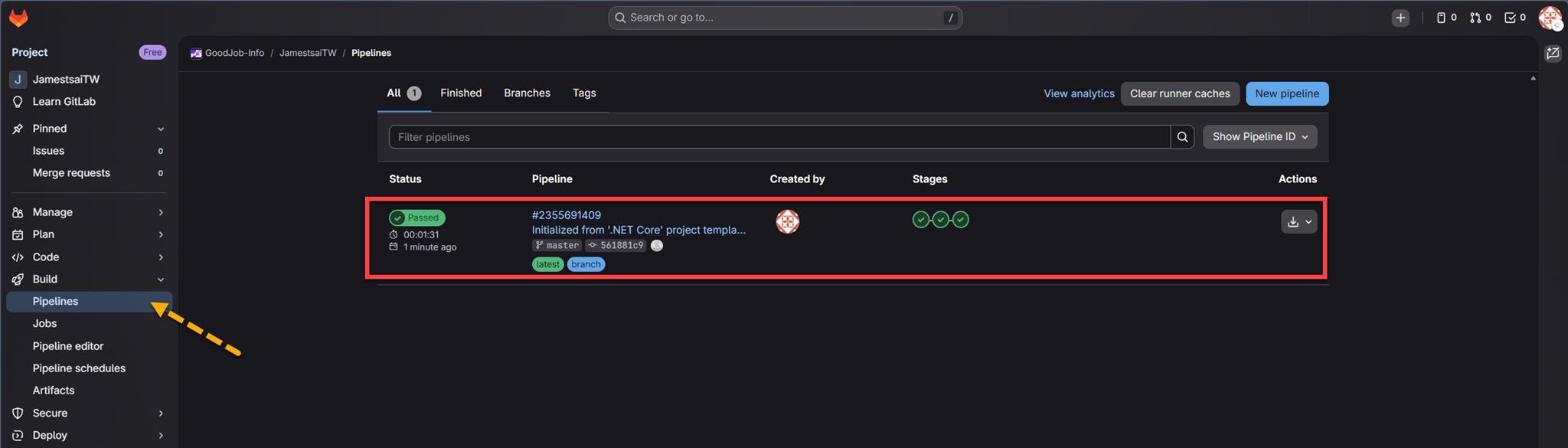
這裡有個大前提,是這個 JamestsaiTW 的專案底下,已經有建立 .gitlab-ci.yml 去進行 Pipline 的執行。
到這邊可以確定,目前 Pipline 可以正確的執行,順利的完成三個 Stages,最終 Pipline 的 Status 為 "Passed"。
所以接下來要惡搞出問題了…
當時是如何搞出此靈異路徑的?
現在已經知道主因是:
在 .gitlab-ci.yml 定義在 job 中要執行 dotnet publish 的 script 撰寫出了錯,產出了 "不正常" 的檔案路徑資料。
所以就算是把 git 的 branch 切換到本來可以正常執行 job 跑 Pipeline 的,也都沒有辦法。
由於 Pipeline 一執行 job 沒多久後就會看到類似如下的錯誤訊息:
Running with 18.10.0~pre.705.ge11dde90 (e11dde90) on green-4.saas-linux-small-amd64.runners-manager.gitlab.com/default ntHFEtyXQ, system ID: s_8990de21c550

Preparing the "docker" executor
Using effective pull policy of [always] for container mcr.microsoft.com/dotnet/sdk:7.0
Pulling docker image mcr.microsoft.com/dotnet/sdk:7.0 ...
Using docker image sha256:ea4f5eec20952a885a89566fc35cf3295b3228375b715a0f1af9e5a3c0c2eebf for mcr.microsoft.com/dotnet/sdk:7.0 with digest mcr.microsoft.com/dotnet/sdk@sha256:d32bd65cf5843f413e81f5d917057c82da99737cb1637e905a1a4bc2e7ec6c8d ...

Preparing environment
Using effective pull policy of [always] for container sha256:03b5fe10a4e181483aa1237e69dca04bd144f499efd41b454efa199ab5799c8c
Running on runner-nthfetyxq-project-79469519-concurrent-0 via runner-nthfetyxq-s-l-s-amd64-1772331062-7df8bcbd...

Getting source from Git repository
Gitaly correlation ID: 736d235194af4952818cad30f082bfb9
Fetching changes with git depth set to 20…
Initialized empty Git repository in /builds/goodjob-info/JamestsaiTW/.git/
Created fresh repository.
Checking out 561881c9 as detached HEAD (ref is master)…
warning: could not open directory 'testing/WTF/MSBuild version 17.3.4+a400405ba for .NET
Skipping Git submodules setup
$ git remote set-url origin "${CI_REPOSITORY_URL}" || echo 'Not a git repository; skipping'

Determining projects to restore…
問題點就在:
warning: could not open directory 'testing/WTF/MSBuild version 17.3.4+a400405ba for .NET
透過 AI 助理的協助,大概指出兩個方面的問題所造成的:
- Git 在 Checkout 時試圖讀取這個路徑,但因為路徑太長或包含特殊字元(如
+或空白),導致 Git 無法處理。 - GitLab Runner 仍留有殘留檔案:上一次 Job 失敗或執行後,在 Runner 的 Build 資料夾 留下了髒資料(Dirty files)。
雖然這還是很讓人費解,那這樣就可以有下列兩種方式可以解決:
- 用 GitLab 的 "Clear runner caches"。

很抱歉,沒有權限。
- 那透過修改 "GitLab Runner" 的所連線的 Docker 的 Container 進行環境修正。
很抱歉,沒有權限。
來回搞了好一段時間後,暫時透過改寫 .gitlab-ci.yml,讓執行 job 時把的 GIT_STRATEGY 的設定覆蓋為 clone ,就可以 正確 的執行完 job ,讓整條 Pipeline 完成跑完。
而 GitLab CI/CD 的 job 在取得程式碼檔案庫時分為三種策略:
- clone
- fetch
- none
稍微搜尋一下,拜讀 GIT_STRATEGY 種類對運行效率的影響。
文章敘述中有清楚交代三種策略的運用與差別,這邊簡單的要點列出對照表:
| 策略 | 行為說明 | 優點 | 缺點 | 適合使用情境 |
|---|---|---|---|---|
| clone | 每次 job 都重新 git clone 一份完整 repository。 | - 最乾淨、最穩定 - 不會受前一次 job 狀態影響 - 適合除錯 | - 速度最慢 - 網路與 I/O 成本最高 | - Repository 不大 - 需要高度穩定與可重現性 - 初期建置或疑難排查 |
| fetch (預設) | 已存在 repo,則 git fetch 更新,沒有才 clone。 | - 速度快 - 節省頻寬 - CI Runner 效率高 | - 可能殘留舊檔案 - 偶爾需手動清理 | - 大型專案 - 頻繁 pipeline - 多數一般 CI/CD 場景 |
| none | 不自動取得程式碼。 | - 速度最快 - 完全自訂流程 | - 需自行處理程式碼來源 - 容易配置錯誤 | - 只跑腳本 / 工具 - 使用 artifacts / cache - Docker image 已含程式碼 |
在當時只是當一個暫時解,讓 Pipeline 可以 "暫時" 正常運作,趕緊找有權限能處理的人幫忙,最終才順利地化解了危機。
I'm a Microsoft MVP - Developer Technologies (From 2015 ~).

I focus on the following topics: Xamarin Technology, Azure, Mobile DevOps, and Microsoft EM+S.
If you want to know more about them, welcome to my website:
https://jamestsai.tw
本部落格文章之圖片相關後製處理皆透過 Techsmith 公司 所贊助其授權使用之 "Snagit" 與 "Snagit Editor" 軟體製作。